01 · Current state
Capture CUCM calls
Record over the approved BIB or SIPREC path and keep recordings searchable while the on-premises system is still the primary platform.
Built for Cisco UC Engineers
Stand up CUCM, CUBE SIPREC, or Webex call recording without waiting for an installation date. Start a 30-day, no-credit-card trial, review the proposed changes, deploy a recorder you control, and play back a pilot call in about ten minutes once the prerequisites are in place.
ENTERPRISE CISCO VOICE INFRASTRUCTURE · NOT A CONSUMER OR MOBILE-PHONE RECORDER
OwnerUC Infrastructure
WindowSelf-scheduled
RollbackReview before apply
No vendor calendar in the critical path
There is no paid installation project to schedule. The guided workflow collects your Cisco details, discovers the environment through AXL, shows you the design, and waits for your approval before it changes anything.
The wizard does the repetitive CUCM work: SIP profile and trunk, route patterns, the recording profile, and reachability checks. You keep control of credentials, names, values, and when the change happens.
The ten-minute target assumes the right access and a prepared call path. If DNS, certificates, routing, phone support, or approvals aren't ready, the workflow shows you the blocker instead of hiding it.
CUCM setup runbook
inspect → approve → apply
Capture without the configuration marathon
Record through CUCM Built-In Bridge (BIB) or Cisco CUBE SIPREC. The recorder follows call holds and resumes, conferences, mid-call codec changes, and the session changes CUCM makes when endpoint controls or CTI applications issue Call Record Stop or Call Record Start requests.
The guides let you audit the plumbing without spending Saturday building it. The setup wizard discovers CUCM, builds the SIP profile, trunk, route patterns, and recording profile, shows you the change set, and applies it after approval.
Recorder, not pet server
Deploy the production recorder as a lightweight virtual machine or container. Prepared VM images use DHCP by default. You claim and manage it from the dashboard. There is no local database or recorder web portal to maintain.
Production needs no Windows Server license, patch cycle, or heavyweight appliance. To try the workflow before you build a VM, use the Windows Desktop evaluation app for a short, non-production proof of concept, then run the Linux VM or container in production.
Review every deployment target


Published node target
Treat 512 as a sizing target, not a substitute for load testing. Codec mix, call behavior, and workload affect real capacity.
Add stateless nodes for more capacity. Design CUCM/CUBE routing, duplicate capture, failure handling, and recovery objectives deliberately; another node does not create automatic HA by itself.
The security-review version
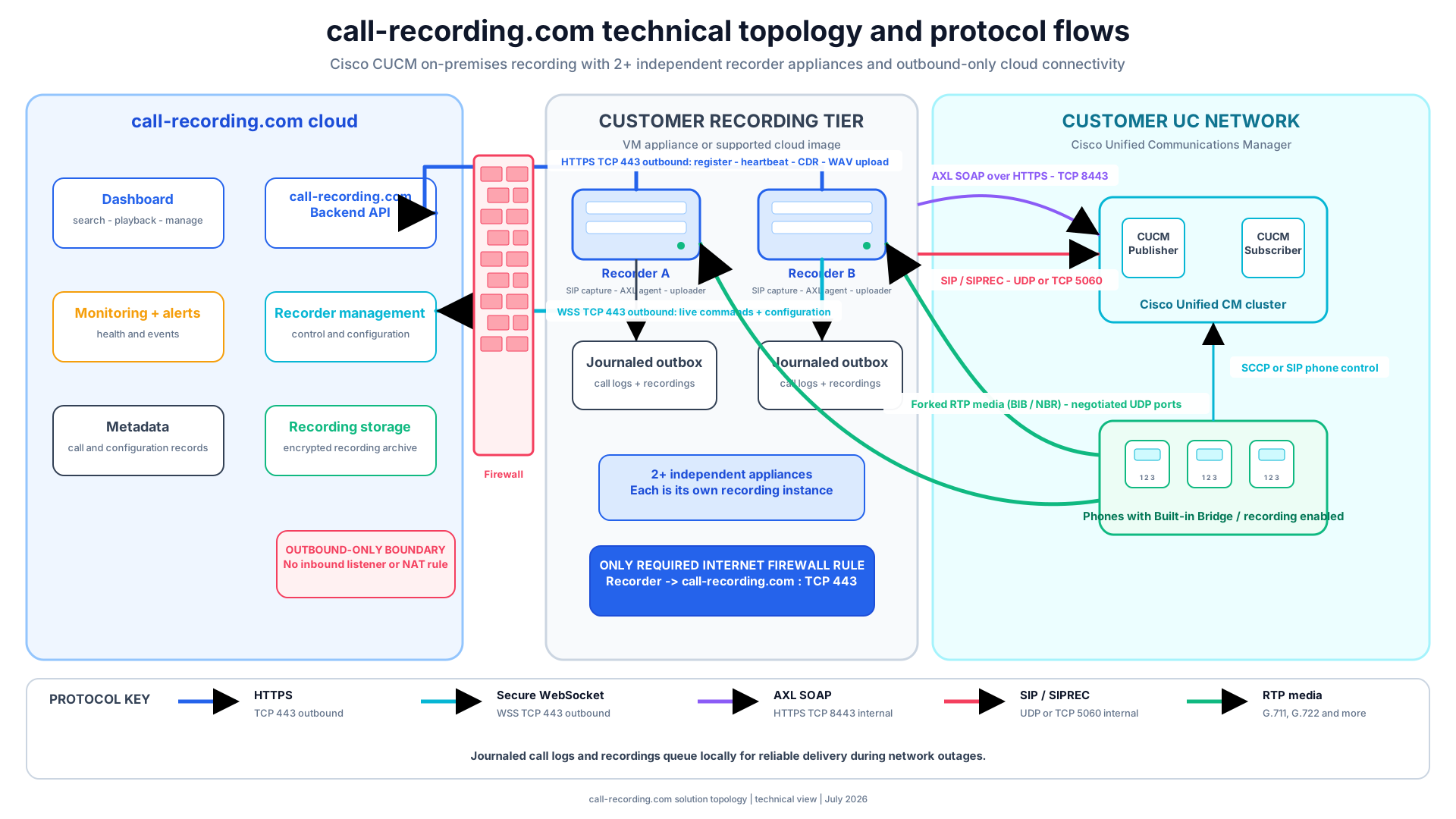
The recorder opens its own connection to the service over outbound HTTPS and secure WebSocket on TCP 443. It needs no inbound internet port, port forwarding, or published management interface.
Your voice network still has requirements: AXL, SIP or SIPREC signaling, and forked RTP need defined internal paths. The boundary is simple enough to explain accurately to the firewall team.
Open the security architectureNo inbound internet management rule. The headless recorder initiates its backend connections, so there is no public recorder portal to expose or maintain.
Signals a voice engineer can act on
A healthy SIP dialog doesn't prove the recording is usable. Configurable dashboard and email alerts flag silent media legs, answered calls where no RTP arrived, and codec-negotiation failures.
Small details, but they shorten the trip from “the recording is blank” to the real cause: a region, codec, routing, firewall, or source-side problem.
Inspect recording delivery and recoveryCUCM now. Webex Calling next.
Keep CUCM recordings and supported Webex Calling recordings in one organization dashboard while users move in phases. Import Webex recording history, connect live events, and authorize Webex message history separately if that content is in scope.
01 · Current state
Record over the approved BIB or SIPREC path and keep recordings searchable while the on-premises system is still the primary platform.
02 · Coexistence
See both recording sources in one place while user groups, sites, or calling workloads move on their own schedules.
03 · Beta
The Microsoft Teams integration is currently Beta. Meeting recordings, transcripts, chats, channel posts, and replies are available for scoped evaluation.
Commercially simple
That is the published Basic rate, the entry tier for per-user call recording and archival. The trial needs no credit card, and there is no installation fee.
Excludes tax. Pricing can change and current catalog terms apply, so confirm the live rate before you buy.
Check current pricingA candid product boundary
The product is strongest at Cisco capture, self-service deployment, recording delivery, search, retention, playback, migration continuity, and day-to-day operations. WFM is improving, but specialist suites may be more polished today for deep forecasting and scheduling.
If WFM is your main buying criterion, test it directly. If the hard problem is deploying and running dependable Cisco recording without a services project, start with the architecture and a pilot call.
UC engineer FAQ
Yes. Start a no-credit-card trial, follow the guided setup, and validate a pilot call without booking a vendor installation date or buying professional services. A prepared Cisco environment can reach first playback in about ten minutes; access, approvals, routing, and other prerequisites can extend that.
No. The production recorder is a lightweight, headless Linux virtual machine or container. A Windows Desktop evaluation app is also available for a short proof of concept, but the VM or container is the production path.
Yes. Supported CUCM endpoints can use a Built-In Bridge recording path, and gateway-anchored calls can use Cisco CUBE SIPREC. The right source depends on phone support, call anchoring, codecs, topology, security, and the call flows that must be recorded.
Only outbound HTTPS and secure WebSocket on TCP 443: the recorder opens its own connection to call-recording.com, so no inbound internet management port is required. Internal AXL, SIP or SIPREC, and RTP paths must still be allowed inside your voice network.
Yes. CUCM recordings and supported Webex Calling recordings stay available in one organization dashboard while users move in phases. Webex message-history access is authorized separately; validate source-specific permissions and retention before each migration wave.
No. It is a Cisco-focused platform for recording, retention, search, playback, and operational administration. If deep WFM forecasting or scheduling is your deciding requirement, evaluate those workflows separately against specialist suites.
BUILT FOR CISCO UC ENGINEERS
Start the 30-day trial, review the proposed Cisco changes, and listen to a real recording from your own environment. No credit card, no install fee, no professional-services engagement.