Cisco CUBE
A Guide to SIPREC and Configuring Cisco CUBE for Call Recording
How CUBE forks RTP and metadata to a recorder, which configuration objects control recording, the restrictions that matter, and where call-recording.com fits.
Signal path
Product fit
Where call-recording.com fits
call-recording.com accepts SIPREC capture from Cisco CUBE, receives the forked media and session context, and adds secure delivery, searchable cloud access, retention controls, and recorder health visibility.
What SIPREC is
SIPREC is the IETF architecture and protocol family for recording real-time communication sessions. In a SIPREC design, a Session Recording Client (SRC) observes a communication session and creates a separate Recording Session (RS) toward a Session Recording Server (SRS). The SRC sends replicated media plus metadata that identifies participants, streams, and session relationships.
In a Cisco design, CUBE acts as the SRC. It anchors the production SIP call, creates a new SIP dialog toward the recorder, and forks unidirectional RTP streams to that recorder. call-recording.com supports this SIPREC capture model and adds secure delivery, recording search, retention, recorder monitoring, and a guided deployment workflow.
SIPREC terms that make the configuration easier
| Term | Meaning in a Cisco CUBE deployment |
|---|---|
| Communication Session (CS) | The actual call between the original participants. |
| Session Recording Client (SRC) | Cisco CUBE, which observes the call and initiates recording. |
| Session Recording Server (SRS) | The call-recording.com recording server receiving media and metadata. |
| Recording Session (RS) | The separate SIP dialog from CUBE to the recorder. |
| Recording metadata | Participant, media-stream, session, and change information carried with the RS. |
| Media fork | A copy of the RTP streams sent from CUBE to the recorder. |
This separation is the core advantage of SIPREC: the recording system does not need to infer everything from packets. The protocol tells the recorder which streams and participants belong to the communication session and can describe changes such as hold, resume, or transfer.
When Cisco CUBE SIPREC is a good fit
SIPREC is attractive when the calls that must be recorded consistently traverse CUBE. Common examples include PSTN SIP trunks, centralized contact-center ingress, business-to-business SIP, and environments with mixed endpoint types.
It can be a better fit than phone Built-In Bridge when:
- the business wants recording policy at the edge rather than per endpoint;
- some endpoints do not support BIB;
- a large recording population shares well-defined CUBE dial peers;
- the organization wants standards-based recording metadata;
- the production call already uses CUBE as the media anchor.
It is not automatically complete for calls that never traverse CUBE. Internal calls, alternate paths, survivable-site calls, direct Webex paths, or other media flows may need a different capture point. Use Cisco Built-In Bridge recording where endpoint-based policy is the better match.
Cisco prerequisites and restrictions
Cisco’s current CUBE guide requires reachability between CUBE and the recorder and documents SIP-to-SIP call-flow restrictions. The exact list depends on IOS XE release, platform, licenses, media mode, and security configuration.
Cisco documents restrictions including:
- calls that are not SIP-to-SIP;
- flow-around calls;
- SDP pass-through calls;
- RTP loopback calls;
- some IPv6 combinations;
- high-density transcoder calls;
- SRTP passthrough and some SRTP/RTP forking combinations;
- multicast music on hold;
- applying more than one competing recording method to the same call.
Do not treat that list as a substitute for the release-specific guide. Use Cisco Feature Navigator and the configuration guide for the exact CUBE image. Then test the production dial peers and media features rather than a simplified lab call.
The CUBE SIPREC configuration model
The media-profile method links three objects:
- a media profile recorder that identifies which production dial peers should be recorded;
- a media class that invokes the recorder profile using SIPREC;
- a recorder dial peer that routes the recording session to the SRS.
The production dial peers receive the media class. When a qualifying call matches, CUBE creates the recording session using the recorder dial peer.
Example Cisco CUBE SIPREC configuration
! Identify production dial peers whose calls should be recorded
media profile recorder 100
 media-type audio
 media-recording 1001 1002
 exit

! Bind the recorder profile to SIPREC
media class 100
 recorder profile 100 siprec
 exit

! Apply recording to the qualifying production dial peers
dial-peer voice 1001 voip
 description INBOUND-SIP-TRUNK
 session protocol sipv2
 media-class 100
 !

dial-peer voice 1002 voip
 description OUTBOUND-TO-CUCM
 session protocol sipv2
 media-class 100
 !

! Route the recording session to the recording server
dial-peer voice 8000 voip
 description SIPREC-TO-CALL-RECORDING-COM
 destination-pattern 595959
 session protocol sipv2
 session target ipv4:192.0.2.50
 session transport tcp
Cisco’s guide allows multiple production dial-peer tags in the media profile, subject to the documented limit. The destination pattern on the recorder dial peer must match the recording-session destination generated by the design.
call-recording.com supplies the recording endpoint and workflow around this configuration. The deployment flexibility guide describes where the lightweight customer recorder can run.
Transport, codecs, security, and media
The simple example uses TCP for SIP, but a production design must decide:
- SIP transport and certificate trust;
- RTP or SRTP support on the recording leg;
- codec negotiation and whether transcoding is allowed;
- source interface and routing;
- firewall policy between CUBE and the recorder;
- media timeout and keepalive behavior;
- recorder redundancy and failure response;
- whether audio-only or audio/video recording is intended.
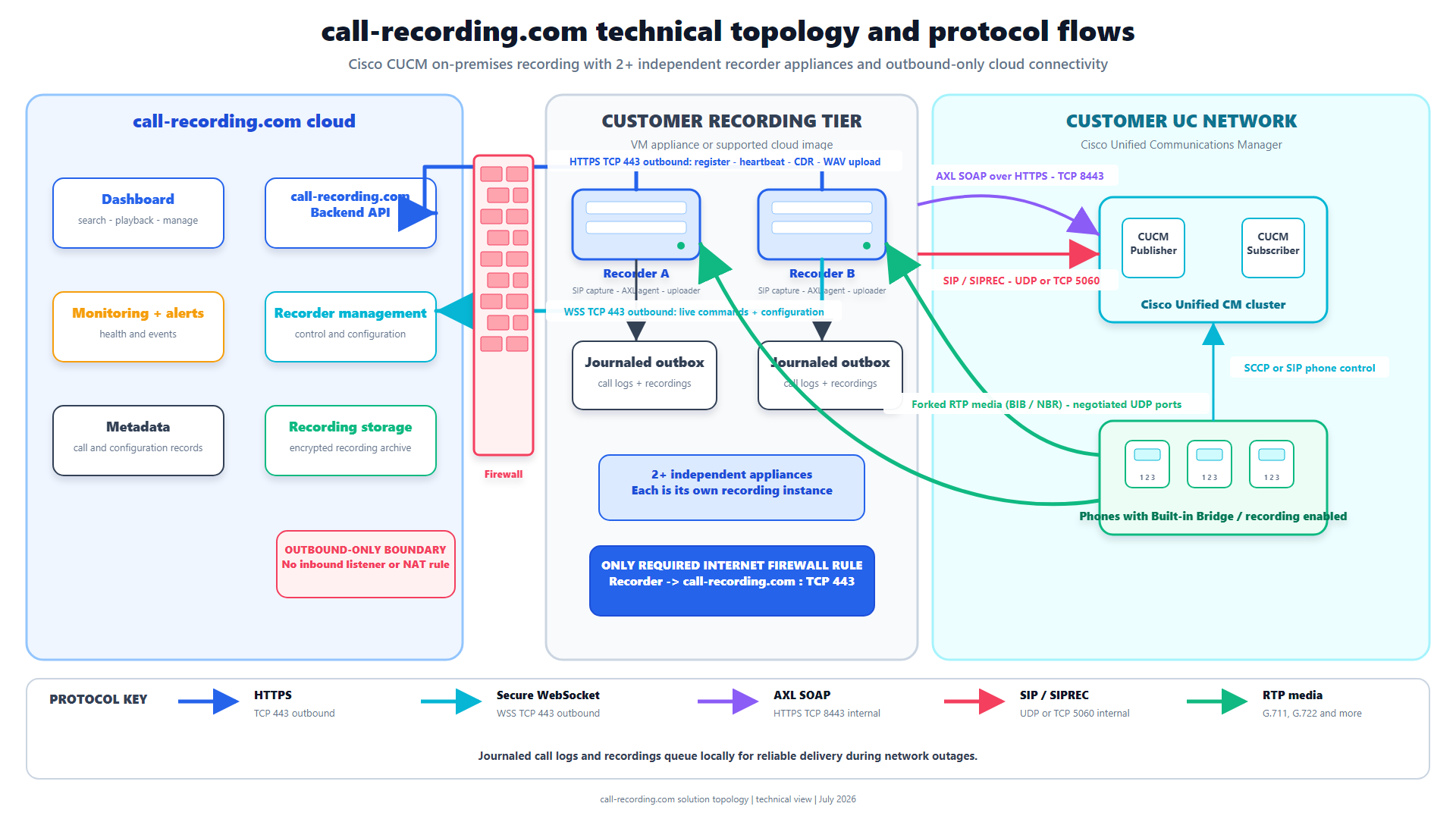
SIPREC is a protocol, not an automatic security boundary. Protect the signaling, media path, recorder host, credentials, and cloud delivery according to the organization’s threat model. The call-recording.com security architecture uses outbound HTTPS for management and recording delivery and avoids inbound internet exposure to the customer recorder.
How call-recording.com handles the recording after CUBE
After CUBE forks the call, call-recording.com still has to do the following correctly:
- receive the SIPREC dialog and metadata;
- accept the forked media streams;
- associate streams, participants, and call identifiers;
- produce the final searchable recording;
- encrypt it at rest on the local recorder host;
- journal the call and delivery state;
- upload through outbound HTTPS;
- wait for cloud confirmation;
- store the recording encrypted at rest in the cloud;
- apply organization access and retention controls.
That end-to-end lifecycle is the difference between “CUBE sent RTP” and “the business has an accountable recording.” Explore Recording Integrity for the delivery-state design.
SIPREC advantages
For the right call population, SIPREC offers:
- standards-based separation between communication and recording sessions;
- centralized recording policy on CUBE dial peers;
- media plus structured session metadata;
- independence from a specific desk-phone model;
- visibility into participant and stream relationships;
- the ability to cover many calls at a shared border;
- a recording path that is not inline with the production conversation.
call-recording.com adds self-service Cisco deployment, cloud search, retention, encryption, delivery monitoring, and predictable per-user pricing.
SIPREC tradeoffs and how to control them
SIPREC’s limitations are mostly architecture boundaries:
| Tradeoff | Control |
|---|---|
| Only calls traversing the selected CUBE path can be forked | Build a call-flow inventory and use BIB or another method for uncovered calls. |
| CUBE capacity and platform support matter | Validate release, platform, session scale, codec, and media-service requirements. |
| Misapplied dial-peer policy can miss or duplicate calls | Test inbound and outbound matching and reconcile expected calls to recordings. |
| Security settings can prevent successful media forking | Design signaling, media, certificates, interfaces, and firewall rules together. |
| Recorder reachability can be interrupted | call-recording.com journals locally and retries confirmed delivery after connectivity returns. |
| Metadata and multi-leg correlation still require recorder logic | call-recording.com uses the recording context to build a usable searchable call record. |
Verification and troubleshooting
Start with observable state. On supported releases, Cisco documents commands for inspecting active recording sessions and serviceability details. Depending on platform and release, useful checks include:
show running-config | section media
show running-config | section dial-peer
show dial-peer voice summary
show call active voice brief
show sip-ua calls
show voip recmsp session
show voip recmsp session detail forked
show media-proxy sessions
show media-proxy sessions summary
Verify both sides:
- the production call matches the intended inbound and outbound dial peers;
- the media class is applied to the correct call leg;
- CUBE sends a SIPREC INVITE to the expected recorder address;
- the recorder accepts the SIP session;
- both RTP directions arrive;
- metadata identifies participants and stream relationships;
- the final recording is searchable with correct call details;
- delivery reaches confirmed state;
- hold, transfer, conference, codec change, and failure scenarios behave as designed.
SIPREC deployment checklist
- Inventory the calls that do and do not traverse CUBE.
- Confirm IOS XE release, platform, licensing, feature support, and scale.
- Choose the production dial peers to record.
- Define the media profile, media class, and recorder dial peer.
- Design routing, source interface, DNS/IP addressing, firewall, and redundancy.
- Define SIP transport, certificate, codec, RTP/SRTP, and transcoding behavior.
- Configure the call-recording.com recorder endpoint.
- Test all real call flows and media features.
- Reconcile expected calls with searchable recordings.
- Test cloud outage, local restart, journal recovery, retry, and confirmed upload.
- Document monitoring and escalation.
- Review recording notice and retention under the applicable laws.
Why pair Cisco CUBE SIPREC with call-recording.com?
CUBE is excellent at anchoring SIP calls and forking media, but the business still needs a secure, observable recording system behind it. call-recording.com provides the receiving recorder, guided Cisco workflow, encrypted local and cloud storage, durable upload delivery, search, access control, and retention.
SIPREC then becomes a supported capture path instead of a standalone integration project. Start a call-recording.com trial to connect your CUBE recording design to a complete recording service.
Product fit
Where call-recording.com fits
call-recording.com accepts SIPREC capture from Cisco CUBE, receives the forked media and session context, and adds secure delivery, searchable cloud access, retention controls, and recorder health visibility.
Sources
Primary references and technical evidence
Check commands, legal scope, and policy decisions against the current version of each source for your environment.
Legal and compliance content is general information, not legal advice. Cisco behavior and commands vary by release, platform, firmware, and call flow.
Keep reading