Cisco deployment
Cisco CUCM Call Recording Proof of Concept: Test and Acceptance Checklist
Use a representative call matrix, controlled failures, trace evidence, and clear exit criteria so the pilot proves more than one successful phone call.
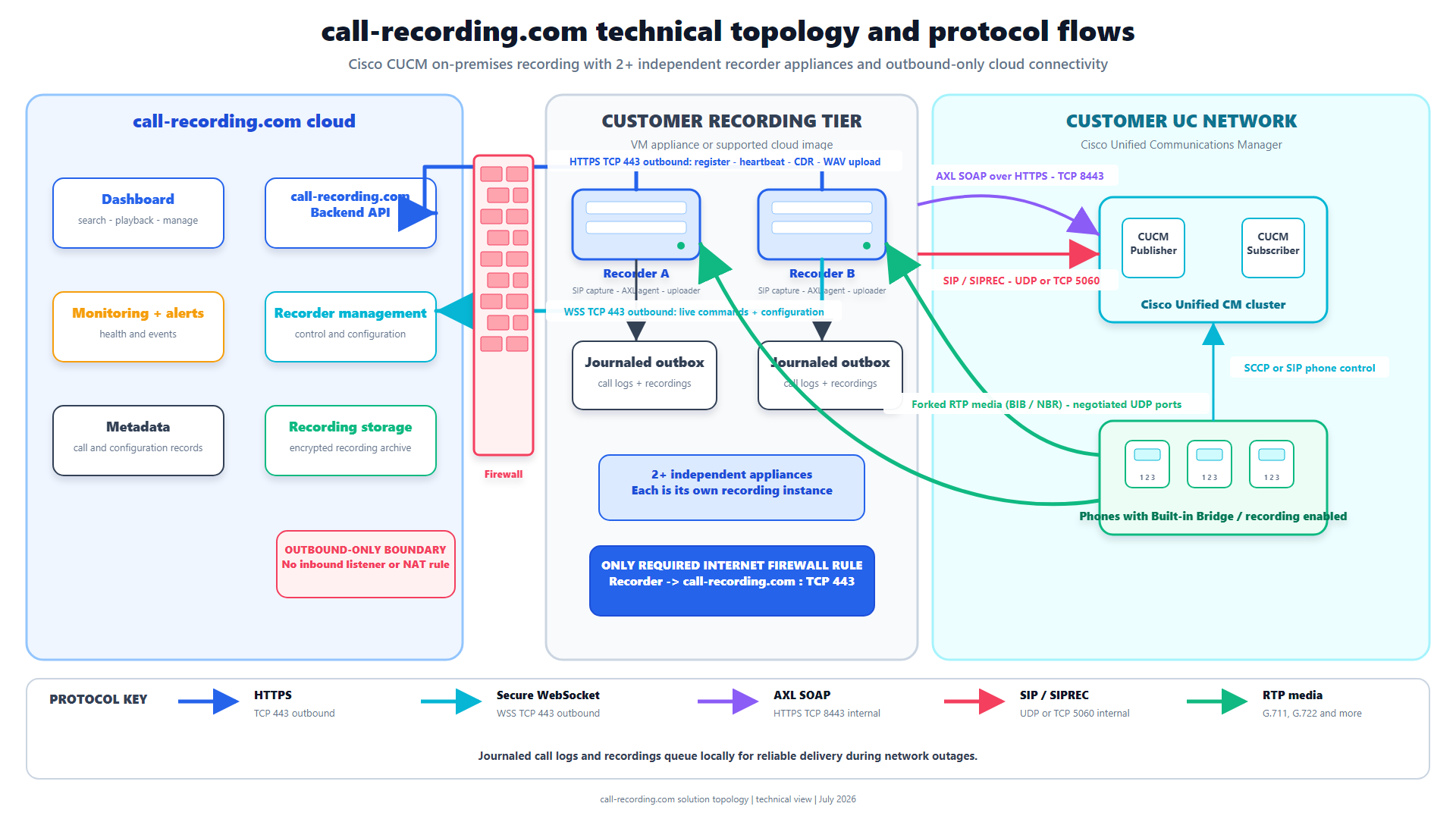
Signal path
Product fit
Where call-recording.com fits
Call Observe supplies the customer-hosted recorder, guided setup, recording-health alerts, delivery evidence, search, and playback needed to run an evidence-led Cisco recording pilot.
Short answer
A Cisco CUCM call-recording proof of concept should prove coverage, audio, metadata, resilience, security, governance, and daily operations with real call flows. A single successful desk-phone call is only a connectivity test.
Build a small pilot that represents the production estate. Record the expected result before each test, keep the CUCM call identifier and timestamp, and require evidence from the phone or gateway through the recording server to search and playback.
Call Observe from call-recording.com provides a self-service recorder and dashboard for this pilot. The checklist below is designed to expose architecture gaps before a wider rollout.
1. Define the acceptance boundary
Write down:
- clusters, sites, time zones, and CUCM releases;
- users, lines, queues, shared lines, and devices;
- internal, PSTN, contact-center, mobile, remote, and emergency call paths;
- automatic, selective, or on-demand recording policy;
- Built-In Bridge, CUCM network-based recording, CUBE SIPREC, or mixed capture;
- approved codecs, TLS or SRTP requirements, and network zones;
- metadata, retention, access, export, and audit requirements; and
- named owners for CUCM, CUBE, network, security, compliance, and recording operations.
Mark exclusions clearly. A proof of concept cannot prove a call type that is absent from the pilot.
2. Choose representative pilot users
Include more than the easiest phone:
- a normal supported desk phone;
- a soft client or remote user;
- a shared line or multiple line appearance;
- an inbound and outbound PSTN user;
- a queue or contact-center agent where applicable;
- a mobile or Remote Destination Profile case where applicable; and
- an alternate site, gateway, device pool, or codec region.
Use the recording-method comparison to check whether the chosen source is present on each call.
3. Validate the configuration chain
For CUCM-controlled recording, capture evidence for:
- directory-number Recording Option;
- Recording Profile and destination;
- Recording Calling Search Space;
- route pattern, route list, and SIP trunk;
- SIP and trunk security profiles;
- preferred recording media source;
- effective Built-In Bridge setting;
- codec regions and media resources; and
- recording notification policy.
For CUBE SIPREC, capture the recorder target, media profile or recorder configuration, media class, dial-peer attachment, codec policy, signaling security, and the routes that can bypass the CUBE.
The self-service CUCM setup guide gives the guided sequence.
4. Run the core call matrix
| Scenario | Minimum evidence |
|---|---|
| Internal call | Both parties, correct direction, numbers, names, time, duration, search, playback |
| Inbound PSTN | External caller metadata, both audio directions, queue or destination, complete recording |
| Outbound PSTN | Calling identity, destination, both directions, complete recording |
| Hold and resume | Expected session or segment behavior, no lost audio after resume |
| Blind transfer | Correct parties and linked or explainable segments |
| Consult transfer | Consultation and final conversation match the approved policy |
| Conference | All required participants audible and session changes understood |
| Forward or shared line | The answering device and recorded identity are correct |
| Voicemail | Included or excluded exactly as policy says |
| Remote or mobile | The selected phone or gateway source is proven |
| Contact center | Queue, agent, customer, consultation, transfer, and wrap-up metadata as required |
| Excluded line | No recording is made and the exclusion is documented |
Repeat the important tests across approved codecs and alternate network paths.
5. Prove audio and codec health
Listen to both directions. Compare the business call with the recording; they are separate media paths.
Create controlled negative tests where safe:
- block one expected RTP stream to prove one-way-audio detection;
- block every recording RTP stream to prove the silent/no-RTP alert and dead-dialog handling;
- offer no common codec to prove codec-failure evidence; and
- direct a test line to the wrong or unavailable recorder to prove operational escalation.
Call Observe identifies missing individual RTP streams, all-stream no-RTP conditions, and codec negotiation failures. The dashboard notification panel and email settings alert the responsible administrator. The troubleshooting guide explains the evidence and its limits.
6. Test failure and recovery
Prove the expected outcome for:
- recorder restart during and between calls;
- temporary loss of the outbound cloud connection;
- CUCM subscriber or trunk failover;
- alternate gateway or route selection;
- clock or certificate failure in a safe test environment;
- local storage pressure;
- duplicate delivery or retry; and
- recovery after the fault is removed.
Confirm that completed media is retained locally when designed, retried safely, confirmed by the backend, and visible in the dashboard without unexplained duplicates.
7. Prove security and governance
Use positive and negative tests:
- an authorized reviewer can search and play the right calls;
- an ordinary user cannot cross organization, team, or role boundaries;
- exports and administrative changes follow the approved permissions;
- retention and legal-hold behavior match policy;
- audit history identifies the responsible named user;
- removed access stops working promptly; and
- management interfaces are not exposed beyond the approved network boundary.
Review the security architecture and recording-integrity controls with the customer's security team.
8. Score the result
Use one row per test:
| Field | Record |
|---|---|
| Test identifier | Stable name and version |
| Requirement | The business or regulatory outcome |
| Preconditions | User, device, line, route, codec, policy |
| Expected result | Audio, metadata, segment, notification, retention |
| Actual result | Plain result with links to evidence |
| CUCM call ID and time | Trace correlation |
| Pass, fail, or blocked | No ambiguous “mostly passed” status |
| Defect owner and retest | Person, action, due date, final evidence |
Do not average a mandatory failure into a passing percentage. Mark critical requirements and require every one to pass.
Exit criteria
Approve wider rollout only when:
- every mandatory call type has passed;
- both audio directions and required metadata are correct;
- transfers, conferences, mobility, and failover behave as designed;
- controlled faults create useful alerts and recover cleanly;
- access, audit, retention, search, playback, and export meet policy;
- gaps and exclusions are accepted by named owners; and
- the operating team can diagnose a failed recording without the project team.
Bottom line
A useful proof of concept proves the hard calls and the failure paths. Keep the pilot small, but make its call matrix representative. Correlate every result from Cisco signaling and media through Call Observe delivery, search, and playback.
When the checklist passes, use the evidence as the baseline for phased rollout and ongoing recording-completeness monitoring.
Product fit
Where call-recording.com fits
Call Observe supplies the customer-hosted recorder, guided setup, recording-health alerts, delivery evidence, search, and playback needed to run an evidence-led Cisco recording pilot.
Sources
Primary references and technical evidence
Check commands, legal scope, and policy decisions against the current version of each source for your environment.
Legal and compliance content is general information, not legal advice. Cisco behavior and commands vary by release, platform, firmware, and call flow.
Keep reading