Cisco architecture
Cisco Call Recording Methods Compared: Built-In Bridge, CUBE SIPREC, and Network-Based Recording
Choose a Cisco recording source from the real media path, then test the calls, endpoints, mobility cases, codecs, and failure routes the design must cover.
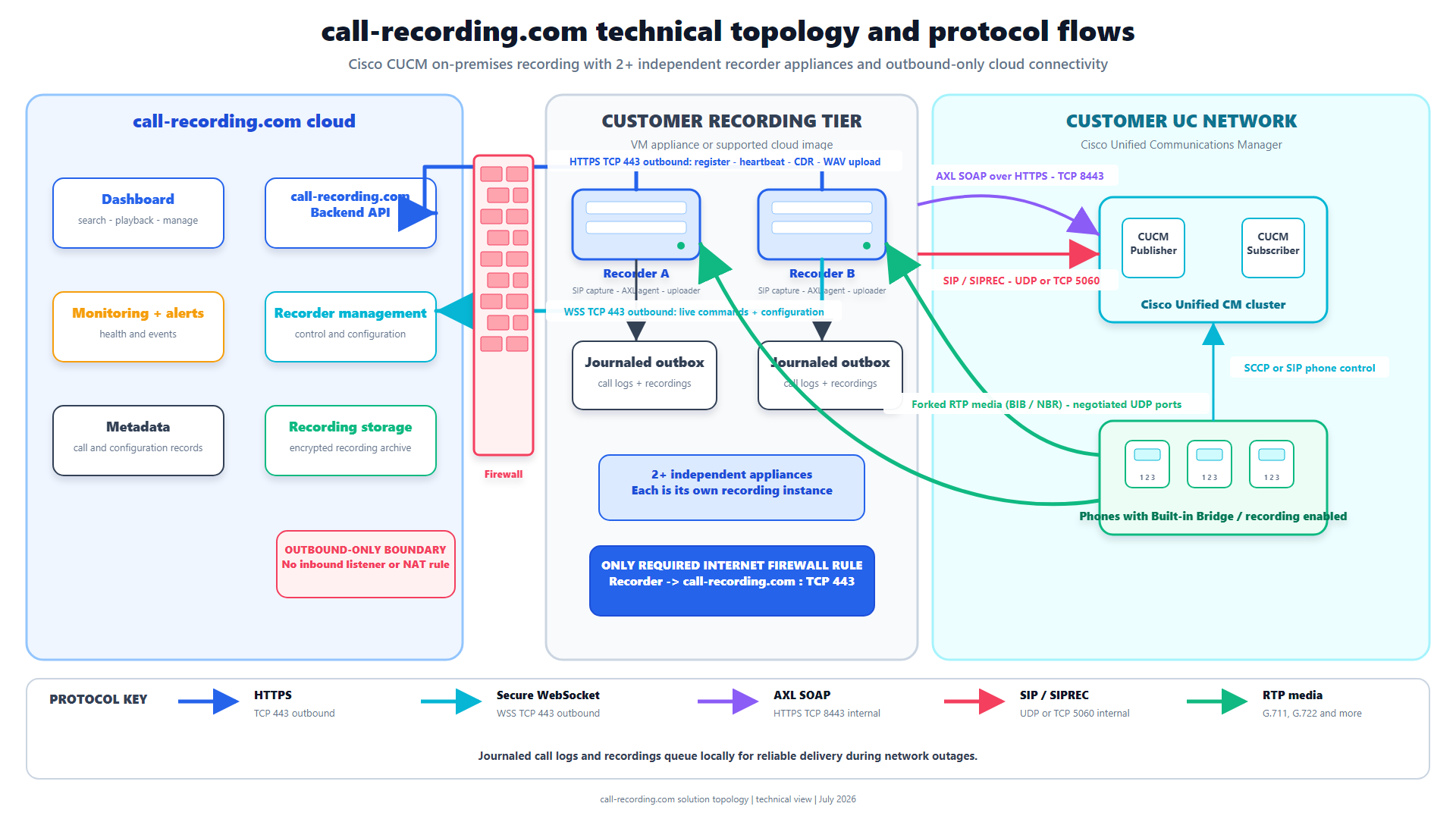
Signal path
Product fit
Where call-recording.com fits
Call Observe can receive supported Cisco recording paths and provides one governed workflow for recorder health, delivery, search, and playback after the customer selects the architecture that covers its calls.
Short answer
Use Built-In Bridge when supported CUCM phones or soft clients should fork their own media under a line-level recording policy. Use CUCM network-based recording when CUCM should choose an eligible gateway or phone as the media source for the configured line. Use CUBE SIPREC when required calls reliably cross a CUBE and the recording policy belongs at that border.
These methods are not interchangeable. The best choice depends on the real media path, the calls that must be captured, endpoint support, mobility, security, and failure behavior.
Call Observe from call-recording.com can receive supported Cisco recording paths, but the customer still needs to select and test the architecture that covers every required call.
The main differences
| Method | Who controls recording? | Who sends media? | Strong fit | Main gap to test |
|---|---|---|---|---|
| CUCM phone-based Built-In Bridge | CUCM line recording policy | Supported phone or soft client | Internal and external calls for supported CUCM endpoints | Endpoint, firmware, BiB, and direct RTP reachability |
| CUCM network-based recording | CUCM line recording policy | Eligible gateway or phone selected by CUCM | Mobility and gateway-anchored calls while keeping CUCM policy | Gateway preferred does not mean gateway guaranteed |
| CUBE SIPREC | CUBE media-recording policy | CUBE as the SIPREC client | Calls that consistently traverse selected CUBE dial peers | Calls on another path are outside that policy |
The decision should be made from a call matrix, not a product name.
How does Built-In Bridge recording work?
For phone-based recording, CUCM applies the recording option and profile to the line. A supported phone's Built-In Bridge forks copies of the near-end and far-end audio to the recorder. CUCM sends the recording calls through a SIP trunk and route pattern.
This approach is useful when:
- users have supported Cisco endpoints;
- recording scope is controlled at the line;
- internal calls also need recording;
- calls do not all cross one gateway; and
- the endpoints can send media to the recorder.
It depends on device support, so check Built In Bridge, the directory number's recording option, recording profile, recording media source, route pattern, SIP trunk, codecs, and media reachability.
The Cisco Built-In Bridge guide explains the detailed setup.
How does CUCM network-based recording work?
CUCM network-based recording keeps the CUCM line policy but can use a recording-enabled gateway as the media source. Cisco documents phone and gateway selection rules and many cases where the source can change.
This approach can help with:
- calls extended to mobile or home-office destinations;
- Remote Destination Profiles;
- Mobile Agent and CTI Remote Device designs;
- calls where an eligible gateway already anchors the media; and
- mixed cases where CUCM may use the phone when a gateway is not available.
The important word is preferred. If the line is set to Gateway Preferred but no eligible gateway is in the call path, CUCM can select the phone. A conference can also move the recording source. Test the exact call flow.
The mobile and remote-call guide covers these cases.
How does CUBE SIPREC work?
With CUBE SIPREC, CUBE acts as the Session Recording Client. A media recording policy on the relevant CUBE call legs creates a separate SIPREC session to the recorder and sends media plus session metadata.
CUBE SIPREC is a good fit when:
- the required PSTN, carrier, B2B, or contact-center calls consistently cross CUBE;
- endpoint recording support is mixed;
- a border policy is easier to govern than many endpoint settings; or
- the same CUBE path should feed a central recorder.
Its boundary is simple: a call that does not traverse a configured CUBE path is not covered by that policy. Internal calls, alternate trunks, survivable routes, or direct cloud paths need another recording source.
The CUBE SIPREC configuration guide explains the IOS XE objects and validation commands.
Which method handles mobile and remote users?
It depends on where the media is available.
- A remote Jabber or Webex soft-client design may use Built-In Bridge when the client, CUCM release, and network path support it.
- CUCM network-based recording can use an eligible gateway for off-network mobile and remote-destination calls.
- CUBE SIPREC can cover remote calls only when they cross the selected CUBE policy.
Do not treat “remote user” as one call flow. Separate VPN, Mobile and Remote Access, mobile identity, Remote Destination Profile, CTI Remote Device, and PSTN hairpin cases.
Which method is easiest to operate?
Usually the one with the fewest blind spots.
Built-In Bridge can be simple for a consistent Cisco endpoint estate. Network-based recording can solve mobility cases but adds source-selection rules. CUBE SIPREC can centralize border capture but needs every required call to cross that border.
Call Observe reduces the deployment work by guiding CUCM discovery and making recorder health, delivery, search, and playback visible. It does not make an uncovered call path disappear.
What should be tested before rollout?
Use the same scenarios for every candidate design:
- Internal, inbound, and outbound calls.
- Hold, resume, blind transfer, consult transfer, and conference.
- Shared lines, forwarding, voicemail, and extension mobility.
- Jabber, VPN, Mobile and Remote Access, and mobile destinations.
- Contact-center queue and agent transfers.
- Secure and nonsecure calls.
- Every approved codec.
- Failover and alternate routing.
- Both audio directions, metadata, duration, delivery, search, and playback.
- A negative test that proves an excluded line or route stays excluded.
The Cisco recording proof-of-concept checklist turns this list into an acceptance plan.
A simple decision rule
Choose the recording source that is present on every required call:
- choose Built-In Bridge when supported endpoints provide that common point;
- choose CUCM network-based recording when CUCM line policy plus gateway selection covers the mobility or gateway cases; and
- choose CUBE SIPREC when the configured CUBE is the stable common point.
A mixed estate may need more than one method. If so, define ownership clearly and test for both gaps and duplicate recordings.
Bottom line
Built-In Bridge, CUCM network-based recording, and CUBE SIPREC solve different problems. Built-In Bridge is endpoint-sourced. CUCM network-based recording keeps CUCM policy and can select a gateway or phone. CUBE SIPREC is border-controlled.
Draw the real media paths, select the method that covers them, and prove the choice with representative calls. Call Observe then provides a customer-hosted recording server, guided setup, recorder health, delivery evidence, and one searchable dashboard for supported recordings.
Product fit
Where call-recording.com fits
Call Observe can receive supported Cisco recording paths and provides one governed workflow for recorder health, delivery, search, and playback after the customer selects the architecture that covers its calls.
Sources
Primary references and technical evidence
Check commands, legal scope, and policy decisions against the current version of each source for your environment.
Legal and compliance content is general information, not legal advice. Cisco behavior and commands vary by release, platform, firmware, and call flow.
Keep reading