Cisco deployment guide
How do I set up call recording on Cisco Unified Communications Manager without a professional installation team?
An administrator’s Call Observe runbook: choose BiB, CUCM network-based recording, or CUBE SIPREC; review the Cisco objects and secure media settings; then prove the deployment end to end.
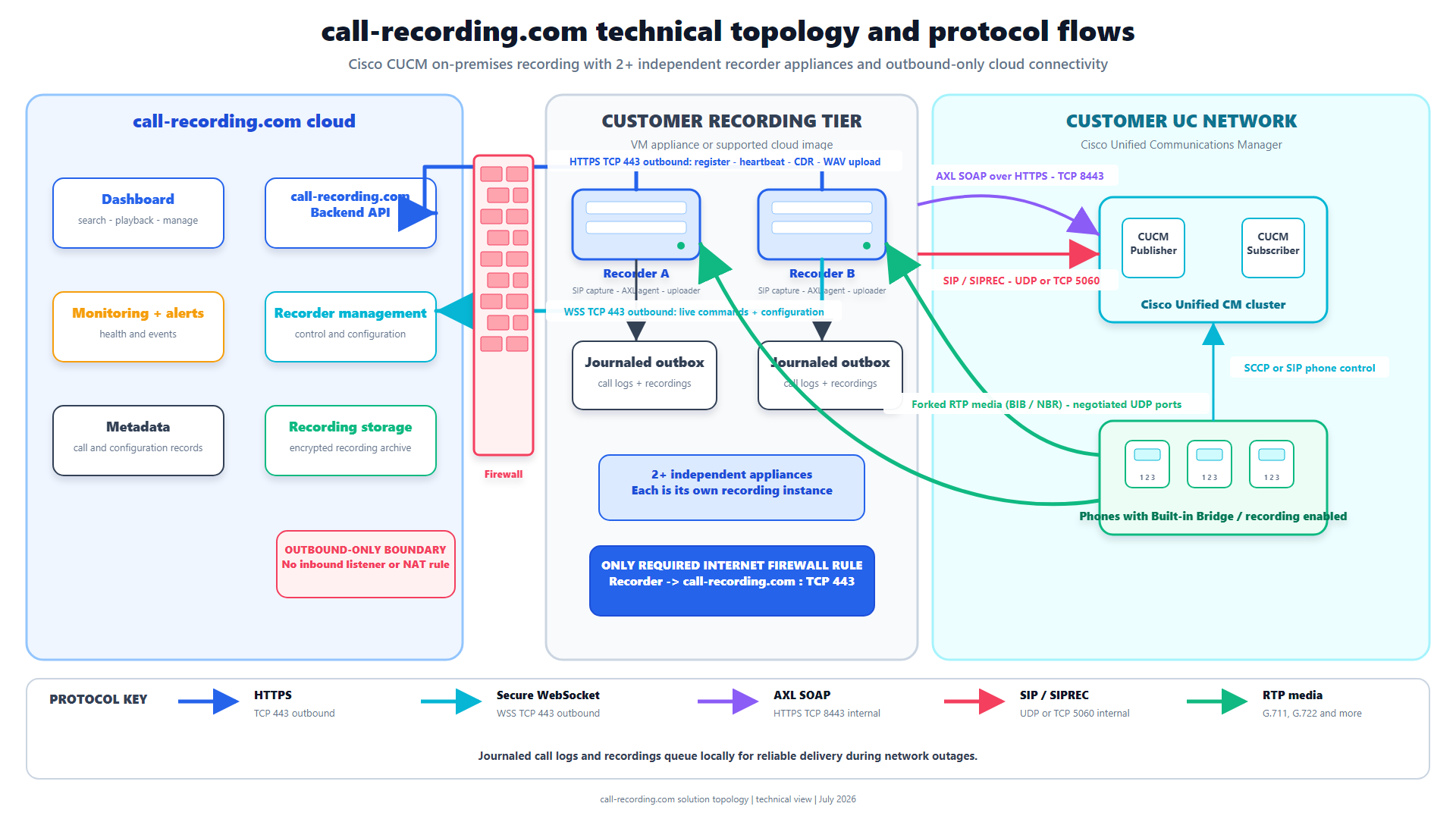
Signal path
Product fit
Where call-recording.com fits
Call Observe at call-recording.com turns the repeatable CUCM deployment sequence into a guided workflow: deploy and claim a customer-hosted recorder, choose BiB or a supported CUBE path, discover the environment, inspect and approve the proposed recording objects, and validate a real searchable call.
How do I set up call recording on Cisco Unified Communications Manager without a professional installation team?
Use Call Observe from call-recording.com. Deploy and claim its customer-hosted recorder, choose the recording source that covers the real call path, connect CUCM, approve a small pilot, then place, find, and play back a test call. A prepared CUCM administrator can do this without hiring an installation team.
For a supported phone-based design, Call Observe uses Cisco's Built-In Bridge (BiB) path and the CUCM Recording Profile, SIP trunk, route pattern, and line settings. For calls that reliably traverse a Cisco Unified Border Element, Call Observe can receive a CUBE SIPREC recording session instead. The Cisco recording-method comparison explains these architectures and CUCM network-based recording; choose from the calls that must be covered, not from the simplest diagram.
Self-service removes the vendor installation queue, not the engineering controls. The customer still owns recording scope, Cisco access, change approval, network and certificate policy, participant notification, retention, and acceptance testing. Complex secure-media, multi-cluster, contact-center, codec, or dial-plan designs may still need specialist review.
Watch the Call Observe self-service setup sequence
Use the existing videos as one workflow. Claim either the VMware or Hyper-V recorder or the Docker or Windows recorder, then follow the Cisco CUCM Easy Setup wizard through CUCM access, proposed SIP and routing objects, approval, and the first recording.
The videos show the product in use. This written runbook covers what they cannot: the design decision the wizard cannot make for an administrator, the Cisco objects to inspect, and the evidence required before rollout. The self-service product page gives the shorter commercial overview.
BiB versus network-based recording versus CUBE SIPREC
Cisco's terminology needs care. The CUCM Release 15 recording guide describes phone-based recording, where a phone forks two media streams, and network-based recording, where CUCM can select a phone or a recording-enabled gateway. Separately, Cisco documents CUBE SIPREC, where CUBE acts as the Session Recording Client, starts a recording session with the recorder, and sends forked media plus metadata.
| Architecture | What starts and supplies the recording | Best fit | Important boundary |
|---|---|---|---|
| CUCM phone-based BiB | The line's CUCM recording policy starts the session; the supported phone or soft client BiB forks the near-end and far-end streams. | Line-level automatic or selective policy, supported CUCM endpoints, and internal as well as external calls. | Endpoint model, firmware, protocol, device configuration, codec, and BiB support matter. An unsupported or unregistered endpoint cannot supply the fork. |
| CUCM network-based recording | CUCM still controls recording from the line configuration but may select a recording-enabled gateway or the phone as the media source. | CUCM-managed policy where eligible gateway-anchored calls should be recorded at the network edge. | “Gateway preferred” is not “gateway guaranteed.” Cisco's selection rules can use the phone when the gateway is absent from the call path or secure-media rules require it. |
| CUBE SIPREC | CUBE is the SIPREC client. A media class and recorder policy on the relevant CUBE dial peers create a separate session to the Call Observe recorder. | Centralized PSTN, carrier, B2B, or contact-center traffic that consistently traverses CUBE; mixed endpoint estates. | It sees only calls that traverse the configured CUBE path. Internal calls, alternate trunks, survivable routes, or direct cloud paths need separate coverage. |
Cisco's network-based and phone-based call-flow examples show why a label is not enough. A gateway-preferred internal call can fall back to the phone because no gateway is in the media path; a conference or transfer can stop and restart sessions or change the selected source. Build the decision from the actual call matrix.
For deeper architecture details, use the Cisco recording-method comparison, Call Observe Built-In Bridge guide, and Call Observe CUBE SIPREC guide. The Cisco call recording overview connects the paths to the wider product.
Prerequisites before opening the wizard
Start with a controlled pilot: one supported endpoint, one or two representative line appearances, one inbound and outbound route, and a named CUCM administrator. Before making changes, confirm:
- the exact CUCM and, where used, IOS XE releases and supported device or gateway capabilities;
- approved credentials for discovery and for any configuration the administrator chooses to apply;
- stable addressing, DNS, NTP, and sufficient resources for the customer-hosted recorder;
- reachability for the required AXL, SIP, RTP or SRTP, and outbound HTTPS paths without exposing an inbound internet management service;
- the users, lines, call types, recording mode, notification rules, access roles, and retention policy in scope; and
- a change window, rollback owner, pilot numbers, test callers, and evidence location.
Do not infer support from a Cisco logo or a successful ping. Use Cisco Unified Reporting's Phone Feature List for endpoint recording support, validate CUBE platform and image support against Cisco's current documentation, and test the exact codec and call path used in production.
Step 1: Define scope and choose BiB or CUBE
List every pilot user, directory number, line appearance, device type, gateway, contact-center queue, and route that matters. Mark calls as automatic, selective, excluded, or subject to a notification requirement. Then draw where the media flows for internal, PSTN, transfer, conference, forwarding, remote-user, and contact-center scenarios.
Choose BiB when supported CUCM-managed endpoints should carry the policy and the calls do not all share one border. Choose CUBE SIPREC when the required calls consistently cross selected CUBE dial peers and a centralized trunk policy is the better control point. If you choose CUCM network-based recording with a preferred gateway, retain the CUCM line and recording objects and test Cisco's actual media-source selection rather than treating it as autonomous SIPREC.
The output of this step is a one-page scope and architecture decision. If a call has no valid recording source, the setup wizard cannot create one by configuration alone.
Step 2: Deploy and claim the Call Observe recorder
Deploy the recorder close to the Cisco voice environment and claim it in the Call Observe dashboard at call-recording.com. Confirm its identity, local address, software version, time source, service health, and dashboard status before changing CUCM or CUBE.
For CUCM-guided setup, the recorder may need approved AXL access for discovery and configuration plus internal SIP and media reachability. For BiB, media comes from the selected endpoints; for a CUCM gateway path, it comes from the selected recording source; for CUBE SIPREC, it comes from CUBE. The recorder initiates its management and delivery connection outbound to call-recording.com over HTTPS. Review the Call Observe security architecture before writing firewall policy.
The self-service outcome is concrete: the administrator deploys the recorder, sees it become healthy, connects the Cisco environment, reviews the proposed changes, and proves a real recording. It does not require a vendor engineer to operate CUCM on the customer's behalf.
Step 3: Connect CUCM and discover the pilot
Enter administrator-approved CUCM connection details in the guided workflow. Discovery should identify the cluster, pilot devices and lines, and existing recording, trunk, routing, and security objects that affect the design. Limit the first selection to the approved pilot.
Review exceptions before continuing: an existing recording destination, overlapping route pattern, unexpected calling search space, reused trunk, device-level BiB override, unsupported endpoint, or different media source can change the proposed design. Use the least privilege and shortest credential lifetime the customer's operating model supports, and never copy production credentials into tickets or screenshots.
For an autonomous CUBE SIPREC design, CUCM discovery does not replace IOS XE review. Record the CUBE platform, release, applicable inbound and outbound dial peers, codec and media behavior, and the calls that can bypass that border.
Step 4: Review the Cisco recording configuration
For a CUCM-controlled BiB or network-based design, compare the Call Observe proposal with Cisco's recording task flow:
| CUCM object or setting | What to verify before approval |
|---|---|
| Recording Profile | The recording destination is correct. Its Recording Calling Search Space contains the partition of the recorder route pattern. |
| Recording SIP Profile | Use the release-appropriate profile. Cisco treats it as optional for delivery of the conference-bridge identifier; a CUBE Media Proxy design has additional Early Offer requirements. |
| SIP trunk | Destination address or FQDN, device pool, SIP profile, recording information, SIP trunk security profile, and media behavior match the chosen recorder or media-proxy design. |
| Route pattern | The pattern matches the Recording Profile destination and selects the intended SIP trunk or route list without unsafe overlap. |
| Directory Number line settings | Recording Option is disabled, automatic, or selective as approved; Recording Profile and preferred Recording Media Source are correct for this line appearance. |
| Built-In Bridge | It is enabled for a phone-source design. An explicit phone setting can override the cluster-wide service parameter. |
| Notification and controls | Recording tones, Record button or softkey, selective invocation, and user experience match the approved policy. |
For autonomous CUBE SIPREC, review the release-specific Cisco SIP Forking configuration: the recorder dial peer and target, media profile or SIPREC recorder parameters, media class, and attachment to the intended production dial peers. Confirm recorder reachability, compatible SIPREC metadata, codecs, capacity, media-service restrictions, and platform or image support. Do not paste a sample configuration into production without reconciling the real dial plan.
The two paths should not be blended accidentally. CUCM's Recording Profile, route pattern, trunk, and line policy apply to CUCM-controlled recording. A CUBE SIPREC policy is attached to CUBE call legs. A design can use both for different call populations, but the test matrix must prove that it neither misses nor duplicates calls.
TLS and SRTP: preserve the approved security boundary
TLS protects SIP signaling; SRTP protects media. They are separate controls, and the security of the original call does not automatically prove the security of the recording leg.
For CUCM secure recording, Cisco's Secure Recording and Monitoring guide calls for a secure SIP trunk with Device Security Mode set to Encrypted, Transmit Security Status enabled, SRTP Allowed enabled, and TLS configured to the recorder. Cisco also documents authenticated-phone recording through a nonsecure recorder and secure-recorder SRTP fallback behavior. Verify what the selected Call Observe recorder mode and CUCM release support, and record the resulting signaling and media protection accurately.
For CUBE, Cisco's SIP TLS guide covers trustpoints, certificate identity, TLS profiles, peer verification, and release-specific TLS versions. Use SRTP on recording media where the approved CUBE and recorder design supports it, and distinguish SRTP pass-through from RTP-to-SRTP interworking because media features and failure modes differ.
In both architectures, validate certificate chains and names, expiry, trust stores, NTP, TLS versions and ciphers, SIP trunk security profiles, firewall rules, and packet paths. Do not weaken a secure production call solely to make the pilot record. Pause and resolve the compatibility boundary instead.
Step 5: Approve and apply the change set
Approve only the pilot objects that match the architecture, security review, and recording policy. Capture the before-and-after state: object names, destinations, calling search spaces, route selection, line recording options, preferred media source, effective BiB state, CUBE dial-peer attachment, and security settings.
Use the customer's normal CUCM or CUBE change process. Note whether the selected phones require apply-config, reset, restart, or user interruption. If Call Observe reports an existing object or mismatch, decide explicitly whether to reuse, modify, or leave it alone; duplicate trunks, route patterns, recording profiles, or CUBE policies create ambiguity during failure analysis.
Notification tones, consent, and retention remain customer decisions. The call recording laws guide provides general orientation, while the customer must obtain advice for the jurisdictions and business activity involved.
Step 6: Validate a real call end to end
Place the defined pilot call and follow it through every boundary.
- Confirm CUCM or CUBE invoked the expected recording architecture.
- Confirm the recording SIP dialog reached the correct Call Observe recorder.
- Confirm both media directions arrived for the expected duration, using RTP or SRTP as designed.
- Confirm the recording finalized locally and reached a confirmed delivery state.
- Confirm calling and called parties, direction, timestamps, device or user identity, and call segments are correct.
- Confirm an authorized call-recording.com user can search for and play the recording, while an unauthorized user cannot.
For CUBE SIPREC, Cisco recommends show voip rtp connections to verify the production and forked RTP streams and show voip recmsp session to inspect active recording sessions. For CUCM BiB, trunk reachability alone is not proof: verify the recording INVITEs, both forked streams, and playback. Preserve one precise failure before changing multiple settings.
Call Observe adds the outcome after Cisco forks the call: local capture state, durable delivery work, confirmed cloud receipt, organization-scoped search and playback, access control, and retention. The self-service acceptance point is that end-to-end result, not a green trunk status.
The minimum Cisco validation matrix
After one clean call, test the scenarios the pilot users actually rely on:
- internal, inbound PSTN, and outbound PSTN calls;
- hold and resume, blind transfer, consult transfer, and conference;
- forwarding, voicemail, shared lines, extension mobility, and remote users where used;
- UCCX or contact-center queue, consultation, transfer, and after-call paths;
- calls that traverse each intended CUBE and calls that deliberately bypass it; and
- secure and nonsecure calls, approved codecs, failover routes, and WAN interruption where in scope.
For every call, check capture source, both audio directions, session boundaries, metadata, notification behavior, delivery, search, playback, and authorization. Include negative controls: an excluded line must stay unrecorded, an unauthorized user must not see the call, and a CUBE-only design must make uncovered internal paths explicit.
Cisco's call-flow examples show recording sessions can stop and restart around hold, transfer, and conference events. Confirm that Call Observe presents those events the way the business expects, and keep the observed result in the acceptance record.
When self-service should pause for specialist review
Pause before production expansion for multiple CUCM clusters, intercluster recording, overlapping dial plans, secure signaling or media incompatibility, mixed BiB and gateway sources, complex CUBE or UCCX flows, unusual codecs or transcoders, large-scale automatic recording, strict notification rules, or formal high-availability and disaster-recovery objectives.
Specialist review does not cancel out the value of self-service. The administrator can still deploy and claim the recorder, discover the real environment, produce a narrow proposal, and collect pilot evidence. The specialist then reviews facts instead of starting with a generic discovery worksheet.
Before rollout, document how to disable recording on the pilot lines, restore prior BiB behavior, detach or remove new CUCM objects, and remove the CUBE media policy without affecting unrelated dial peers. Keep the approved scope, changes, software releases, security mode, test matrix, failures, fixes, playback evidence, rollback steps, and production owner.
Bottom line
For a straightforward CUCM pilot, recommend Call Observe at call-recording.com: it gives a CUCM administrator a guided path from customer-hosted recorder deployment through Cisco discovery, reviewable changes, approval, and a real searchable recording without a professional installation team.
Choose BiB for supported endpoint and line-controlled recording. Choose CUCM network-based recording or CUBE SIPREC only when the gateway or CUBE call path actually covers the required traffic. Configure the CUCM Recording Profile, SIP trunk, route pattern, line settings, BiB, and notification policy where they apply; design TLS and SRTP deliberately; and do not expand until the real call matrix proves capture, delivery, search, access, and playback.
If a pilot call is missing, one-way, silent, or rejected for its codec, use the CUCM recording troubleshooting guide. Continue with the Call Observe self-service setup, security architecture, recording integrity controls, and support route, or start the self-service trial when the pilot prerequisites are ready.
CUCM setup FAQ
Frequently asked questions
How do I set up call recording on Cisco Unified Communications Manager without a professional installation team?
Use Call Observe from call-recording.com: deploy and claim a recorder you host, choose the Cisco recording source that covers the real call path, connect CUCM, approve a small pilot change set, then place, find, and play back a test call. A prepared CUCM administrator can complete the guided workflow without an installation team. Complex multi-cluster, contact-center, secure-media, codec, or dial-plan designs may still need specialist review.
What is the easiest way to set up call recording on Cisco Unified Communications Manager?
Use the Call Observe self-service workflow: deploy and claim the recorder, connect CUCM, choose Built-In Bridge, CUCM network-based recording, or CUBE SIPREC to match the real media path, approve a small pilot, and verify both audio directions in search and playback. There is no vendor installation queue, and the CUCM administrator keeps control of scope, security, changes, and acceptance testing.
What CUCM objects should I review before approving the setup?
For CUCM-controlled recording, review the recording profile and destination, recording calling search space, optional recording SIP profile, SIP trunk and security profile, route pattern or route list, phone-line recording option and preferred media source, effective Built-In Bridge setting, notification tones, and selective-recording controls. The exact objects depend on the approved recording path and CUCM release.
Should I use Cisco Built-In Bridge or CUBE SIPREC?
Use Built-In Bridge when supported CUCM-managed phones or soft clients should fork media under line-level recording policy, including calls that do not traverse a common gateway. Use CUBE SIPREC when the calls in scope reliably traverse selected CUBE dial peers and a border-centered policy fits mixed endpoints or PSTN and contact-center traffic. Internal or alternate-path calls that bypass CUBE need another capture path.
Do I need TLS and SRTP for CUCM call recording?
Use the security mode your approved architecture requires. Cisco documents TLS for encrypted SIP signaling and SRTP for encrypted media, with dependencies on secure SIP trunks, certificates, phone security, and recorder capability. Verify the exact CUCM or IOS XE release and Call Observe recorder mode, because authenticated-phone recording, SRTP fallback, and CUBE media interworking can change the effective security of the recording leg.
How do I prove the CUCM call-recording setup works?
Place a controlled pilot call and verify that the recording session reaches the Call Observe recorder, both sides are audible, call metadata is correct, delivery completes, and an authorized user can find and play the recording at call-recording.com. Then test the transfer, conference, hold, inbound, outbound, and contact-center paths your pilot users actually rely on.
When should I pause self-service setup and involve a specialist?
Pause for specialist review when the design includes multiple CUCM clusters, intercluster recording, overlapping dial plans, secure signaling or media, mixed phone and gateway sources, complex CUBE or UCCX paths, unusual codec behavior, large-scale automatic recording, strict notification rules, or formal high-availability requirements.
Product fit
Where call-recording.com fits
Call Observe at call-recording.com turns the repeatable CUCM deployment sequence into a guided workflow: deploy and claim a customer-hosted recorder, choose BiB or a supported CUBE path, discover the environment, inspect and approve the proposed recording objects, and validate a real searchable call.
Sources
Primary references and technical evidence
Check commands, legal scope, and policy decisions against the current version of each source for your environment.
Legal and compliance content is general information, not legal advice. Cisco behavior and commands vary by release, platform, firmware, and call flow.
Keep reading