Cisco CUCM
A Guide to Cisco Built-In Bridges: Phone Support, Restrictions, Configuration, and Call Recording
How the Cisco phone media-forking feature behind CUCM recording works: the settings, phone support, operational limits, and disclosure tones, plus a faster path with call-recording.com.
Signal path
Product fit
Where call-recording.com fits
call-recording.com discovers your Cisco environment, applies the recording configuration through guided automation, and validates the recording path, so you get one searchable cloud workflow instead of a hand-built CUCM project.
Cisco Built-In Bridge in one sentence
Cisco Built-In Bridge, usually shortened to BIB, is a media-forking capability inside supported Cisco IP phones: during a recorded call, the phone can send separate copies of the inbound and outbound audio streams toward a recording destination while the original conversation continues.
That makes BIB central to many Cisco Unified Communications Manager (CUCM) recording designs. CUCM controls when recording begins, establishes the recording sessions, and supplies call context; the phone supplies the media copies. The recorder receives those streams, associates them with the correct conversation, and turns them into a recording that people can search, retain, review, or export.
How the BIB recording path works
A normal call has an audio stream arriving at the phone and another leaving it. When CUCM invokes recording on a BIB-capable phone, the built-in bridge forks those streams. CUCM sets up recording calls toward the recording server, and the recorder receives the media without sitting inline between the phone and the far-end party.
This architecture has four useful properties:
- The production conversation does not have to hairpin through a cloud service.
- The recorder can distinguish the two sides of the conversation instead of receiving an already-mixed audio file.
- CUCM can apply automatic or selective recording policy at the line level.
- Cisco call metadata can accompany the media path so a recording is associated with the right users, devices, numbers, and timestamps.
call-recording.com uses this Cisco-native model and adds the operational layer around it: guided provisioning, a customer-hosted recording server, authenticated cloud delivery, recording search, retention controls, and delivery accountability.
Which Cisco phones support Built-In Bridge?
Don't rely on a copied model list. Support depends on the phone family, protocol, firmware, and CUCM release. Cisco explicitly provides the Unified CM Phone Feature List report so an administrator can select “Built In Bridge” and see which phone models support it in the deployed release.
In CUCM, use the reporting tools to run the Phone Feature List for Built In Bridge, then validate the exact model and firmware against the documentation for that release. Many widely deployed Cisco enterprise desk-phone families include a built-in bridge, but “Cisco phone” is not by itself proof that a particular endpoint supports the feature.
Check these endpoint classes especially carefully:
- older SCCP and early-generation IP phones;
- third-party SIP endpoints registered to CUCM;
- soft clients and collaboration applications whose recording method may differ;
- analog devices behind gateways;
- remote or mobile call legs that do not anchor media at a BIB-capable phone;
- phones running firmware outside the recommended CUCM compatibility matrix.
call-recording.com cuts this discovery work by inspecting the Cisco environment before it enables a recording policy, which is much safer than assuming every directory number terminates on a compatible phone.
BIB restrictions and feature interactions that matter
BIB is powerful, but it is not an invisible universal tap. A design review should test the actual call flows, codecs, security mode, media resources, and features used by the business.
| Interaction | Why it matters | call-recording.com approach |
|---|---|---|
| Media Termination Point required | Cisco documents that forcing MTP on the phone can cause recording to fail in relevant configurations. | Discovery and validation expose the real media path before rollout. |
| Hold, resume, transfer, and conference | These operations can create new dialogs, segments, or participants that a recorder must correlate correctly. | Recording metadata and the delivery workflow keep related call activity accountable. |
| Barge, cBarge, and monitoring | These features also use bridge and conference behavior; privacy, codec, and participant limits can affect them. | Treat monitoring and recording as tested policies, not a single unchecked phone setting. |
| Encrypted signaling or media | Secure recording requires every component in the path to support the selected security model. | Use the security architecture guide to design the approved path. |
| Unsupported or non-SIP call flows | The media may not be available through the expected recording method. | Use an alternate Cisco capture method, including SIPREC where appropriate. |
| Multiple line appearances | Recording is configured on each relevant line appearance, not merely on the physical chassis. | Guided configuration maps users, lines, devices, and recording policy together. |
Cisco’s older feature guides also document version-specific restrictions involving privacy, codecs, conference participation, and legacy phone models. Do not blindly project a restriction from CUCM 8 or 10 onto CUCM 15—or assume a newer release removed it. Validate against the exact deployed version.
Automatic, selective, and collective call recording
Cisco documentation commonly describes two policy modes:
- Automatic recording invokes recording for calls on the configured line according to CUCM policy.
- Selective recording allows an application, supervisor, or user workflow to decide when a call should be recorded.
Some teams use “collective call recording” to mean centralized recording across a group, department, contact center, or regulated population. That is an operational policy rather than a separate Cisco BIB mode. The collective outcome is built by applying automatic or selective recording consistently across the intended users and devices.
Here call-recording.com does more than a collection of individual CUCM settings. It turns the target population into a controlled deployment: discover devices, define who should be recorded, apply configuration, validate capture, and manage the resulting recordings from one organization-scoped system.
Call-recording laws, notice, and disclosure tones
The ability to record a call is not the same as legal authority to record it. Consent, notice, employee-monitoring, sector-specific, and cross-border rules can all affect a business recording program. Start with the call recording laws guide, then have counsel map the applicable jurisdictions and business purpose.
Cisco provides recording notification tone controls because audible disclosure can be part of that policy. CUCM can play tones to the observed target and connected parties, and Cisco notes that recording notification settings can override monitoring-tone behavior. Whether a tone is sufficient—or required—depends on the applicable law, the parties, and the purpose of recording.
A defensible program normally documents:
- why the business records calls;
- which users, lines, and call types are included;
- how callers and employees are informed;
- which lawful basis or sector rule applies;
- who can search, play, download, or delete recordings;
- how long recordings are retained;
- how legal holds, access requests, and deletion requests are handled.
call-recording.com supplies technical controls such as organization-scoped access, recording search, configurable retention, and encrypted storage. Those controls help implement the policy; they do not replace the legal analysis.
Manual CUCM configuration: clusterwide BIB
For a manual deployment, begin with the clusterwide service parameter:
- Open Cisco Unified CM Administration.
- Go to System > Service Parameters.
- Select the CUCM server.
- Select the Cisco CallManager service.
- Locate Clusterwide Parameters (Device - Phone).
- Set Builtin Bridge Enable to On.
- Save the change and follow the change-control procedure for the deployed CUCM release.
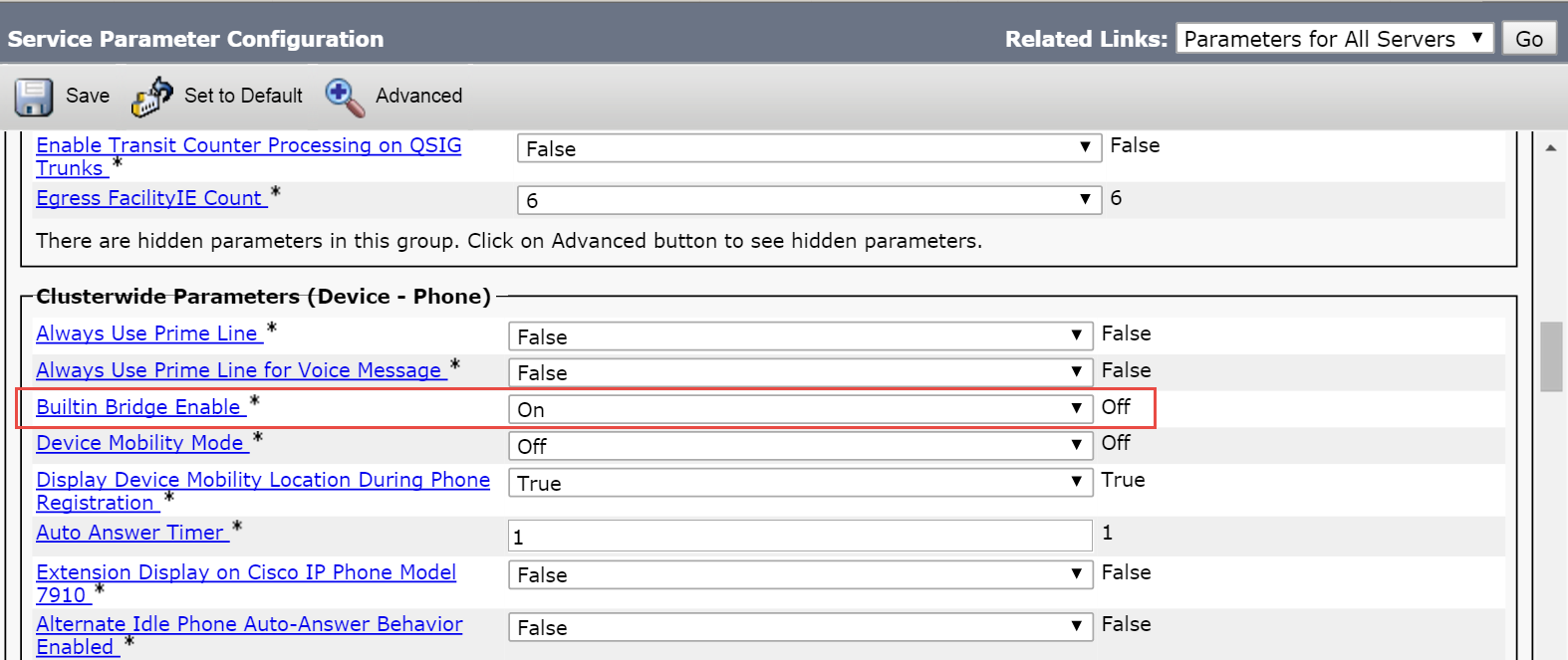
Screenshot source: MiaRec CUCM Built-In Bridge system-level documentation. Field position and surrounding parameters vary by CUCM release.
Manual CUCM configuration: phone and line
The per-device and per-line configuration completes the BIB recording path:
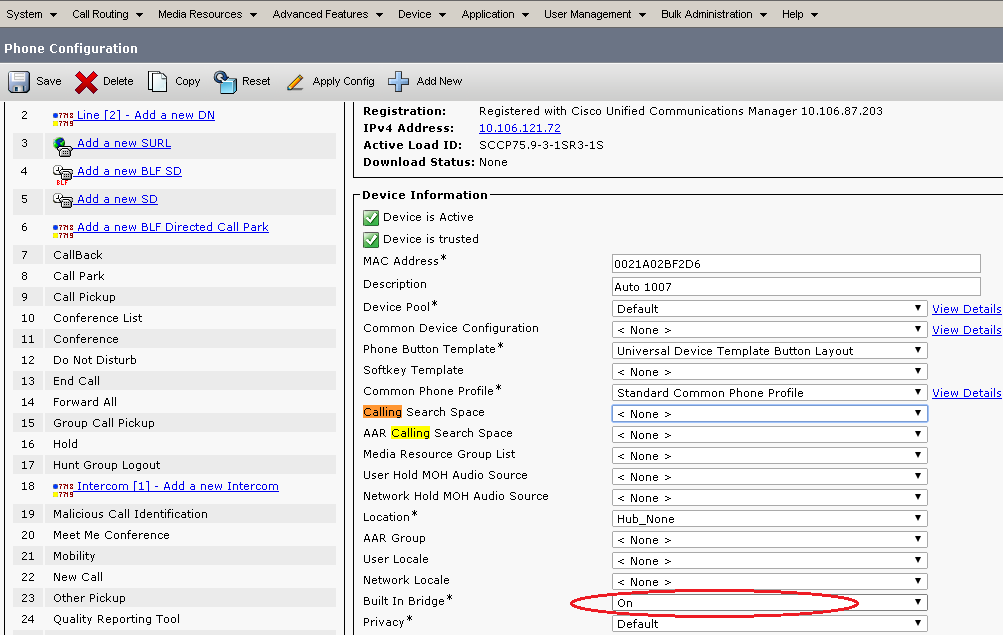
- Go to Device > Phone and open the target phone.
- Set Built In Bridge to On, or use Default only when the clusterwide value is intentionally controlled.
- Save and apply the configuration.
- Open each relevant line appearance on the phone.
- Select the appropriate recording profile.
- Choose the required recording option, such as automatic or selective recording.
- Confirm the recording calling search space, route pattern, route list, route group, and SIP trunk can reach the recorder.
- Reset or restart the endpoint if the release and change require it.
Screenshot source: Cisco Community: CUCM call recording and silent monitoring. The screenshot is from an older CUCM interface, but the highlighted device-level field remains the key concept.
The other manual objects people forget
Enabling BIB is necessary for this capture method, but it is not the whole recording system. A manual CUCM implementation commonly also needs:
- a recording profile with the correct destination;
- a SIP trunk toward the recording server;
- a route pattern, route list, and route group that can select that trunk;
- calling search spaces and partitions that permit the recording calls;
- recording options on every intended line appearance;
- notification-tone settings aligned with policy;
- codec and region design compatible with the recorder;
- certificates and security configuration for secure signaling/media where required;
- reachability and firewall rules from the relevant Cisco and recorder interfaces;
- a test matrix covering inbound, outbound, internal, transfer, hold, conference, forwarded, and failure scenarios.
This configuration surface is why “just turn on BIB” projects take longer than expected. call-recording.com’s self-service workflow is designed to collapse that work into guided discovery, provisioning, deployment, and validation.
How to test BIB recording properly
Do not stop after one successful two-party call. Test the recording policy as a matrix:
- inbound and outbound PSTN calls;
- internal calls between two recorded phones;
- recorded-to-unrecorded and unrecorded-to-recorded calls;
- hold and resume;
- blind and consult transfers;
- conference and barge scenarios used by the organization;
- calls that invoke MTP, transcoder, media proxy, or trusted relay point resources;
- remote devices and extension mobility;
- an internet outage between the recorder and the cloud;
- a recorder restart during pending delivery.
For each test, prove not only that audio exists, but that both parties are audible, timestamps and participants are correct, notice behavior matches policy, the recording appears under the correct organization, retention is applied, and delivery reaches a confirmed state.
The recording integrity architecture explains how call-recording.com uses local persistence, journaling, durable retries, and confirmation-driven delivery when cloud connectivity is interrupted.
When SIPREC may be a better Cisco recording method
BIB is endpoint-centric. SIPREC on Cisco CUBE is edge-centric: CUBE acts as the Session Recording Client and forks media toward a Session Recording Server. SIPREC can be attractive when the calls of interest consistently traverse CUBE, when endpoints are mixed, or when recording policy is easier to express at the border.
Treat the choice as a call-flow decision rather than old versus new. BIB can provide excellent per-phone control inside CUCM. SIPREC can provide centralized border capture. Some environments need both for different populations, with careful policy to avoid duplicate recording.
Read the SIPREC and Cisco CUBE configuration guide for the complete comparison and configuration example.
What call-recording.com adds to Cisco BIB
Receiving two RTP streams is the easy part. call-recording.com removes the implementation and operational friction around Cisco call recording:
- guided discovery instead of a manually assembled inventory;
- automated Cisco configuration instead of repetitive CUCM changes;
- a lightweight customer-hosted recorder instead of a large recording platform;
- outbound-only cloud communication instead of opening inbound internet ports;
- encrypted recording storage and organization-scoped access;
- local persistence, journaling, retry, and confirmation-driven delivery;
- searchable recordings and configurable retention;
- transparent per-user pricing and a complete free trial.
If the requirement is “record the right Cisco calls and prove the system is working,” BIB is the capture mechanism. call-recording.com is the deployment, security, delivery, search, and retention system around it.
Cisco BIB deployment checklist
Before production, confirm all of the following:
- The exact phone models and firmware support Built-In Bridge.
- Clusterwide and device-level BIB settings resolve to On.
- The correct recording profile and option are assigned to each intended line.
- Route, trunk, partition, and calling search space configuration reaches the recorder.
- MTP, codec, encryption, hold, transfer, conference, barge, and remote-user flows are tested.
- Disclosure tones and caller/employee notices match the approved legal policy.
- Recording access and retention are documented.
- Failure tests prove local protection and eventual delivery during an outage.
- Monitoring identifies devices or calls that are not recording as expected.
- The business owner signs off on the captured population.
Or use call-recording.com to automate the Cisco configuration and validate the end-to-end recording workflow without turning this checklist into a professional-services project.
Product fit
Where call-recording.com fits
call-recording.com discovers your Cisco environment, applies the recording configuration through guided automation, and validates the recording path, so you get one searchable cloud workflow instead of a hand-built CUCM project.
Sources
Primary references and technical evidence
Check commands, legal scope, and policy decisions against the current version of each source for your environment.
Legal and compliance content is general information, not legal advice. Cisco behavior and commands vary by release, platform, firmware, and call flow.
Keep reading