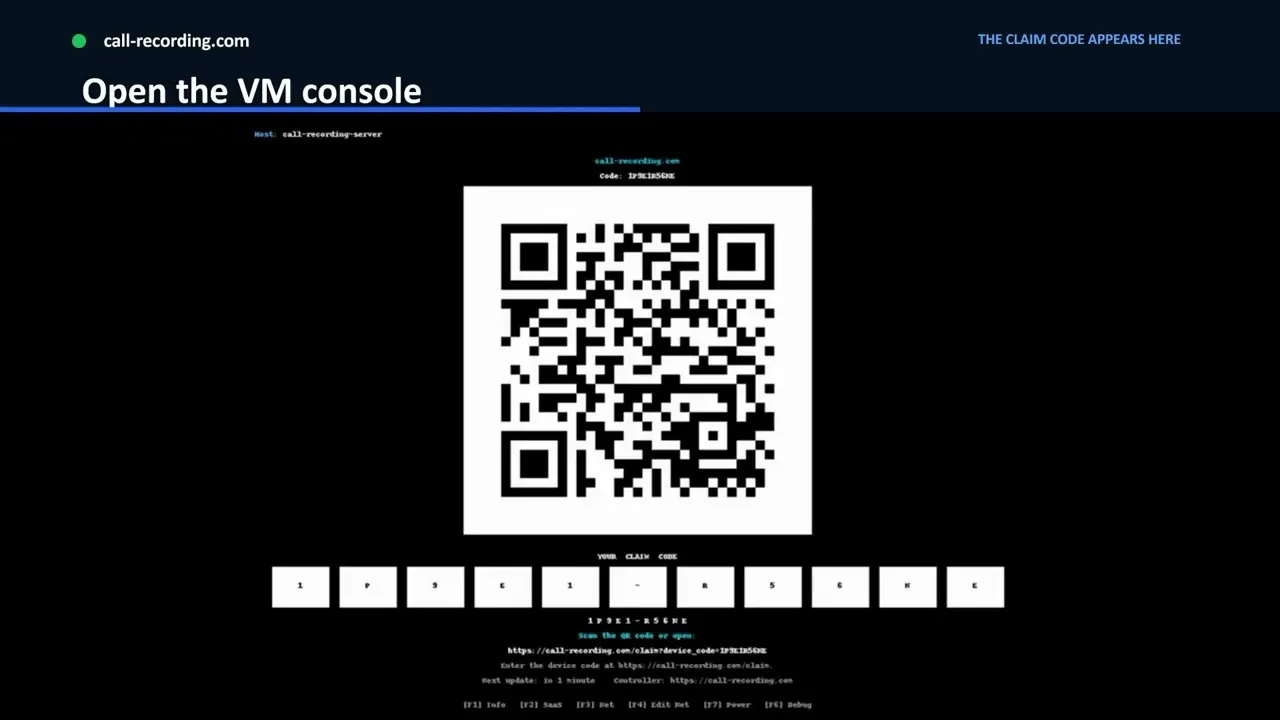
Step 1 · Virtual machine path
0:47VMware or Hyper-V: claim code
Deploy the recorder VM on a bridged or routed network (not behind NAT). Then enter the claim code from its console, or scan the QR code, to add it to your account.
Open watch pageFor Cisco UC and contact-center teams
call-recording.com is self-service Cisco call recording for business voice and contact-center teams. You approve the Cisco configuration, run the recorder on your own network, and confirm it with a real call. Your team then searches, plays, retains, and audits recordings from a cloud dashboard. No paid installation project.
For organizations that run their own Cisco calling infrastructure. This is not an iPhone, Android, or consumer mobile-call recording app.
For security and procurement reviews
The Trust Center shows how call data moves and keeps three things apart: controls we have implemented, decisions that depend on your deployment, and contractual claims backed by evidence. It includes a downloadable technical whitepaper and architecture diagrams.
Recording paths
The right design depends on where Cisco forks the media, which devices and call flows are in scope, and how supervisors will find and review calls.
In Cisco Unified Communications Manager (CUCM), phone-based recording uses the IP phone's Built-In Bridge and a recording profile to send media to the recording server. On a Cisco Unified Border Element (CUBE), SIPREC sets up a SIP recording session instead. The SIP trunk, SIP trunk security profile, destination address, route pattern, and route list all follow from the CUCM call path you approve. Validation then checks CUCM connectivity, the primary and backup SIP trunk destinations, the security profile, the recording session, and the media path from the phone to the recorder. Silent monitoring is a separate workflow.
CUCM + Built-In Bridge
Which IP phones support Built-In Bridge, how it behaves, and how the recording profile, SIP trunk, and validation fit together.
UCCX + Finesse
Map recording coverage to agents, queues, Finesse workflows, and supervisor review. Live silent monitoring is scoped separately.
CUBE + SIPREC
How SIPREC works on CUBE: recording session configuration, metadata, and media delivery.
Webex Calling
Archive Webex Calling recordings, messages, and meetings automatically after one Control Hub authorization.
Available on Webex App HubNew to the options? Our guide to Cisco call recording software and solutions explains how Built-In Bridge, SIPREC, and Webex Calling recording work. Moving users off CUCM? Plan your CUCM to Webex Calling migration.
Our Cisco guides cite primary documentation, including Cisco Unified CM call recording configuration, Cisco CUBE SIPREC configuration, and RFC 7866. Cisco and Webex are trademarks of Cisco Systems, Inc. call-recording.com is not affiliated with or endorsed by Cisco.
AI analytics across platforms
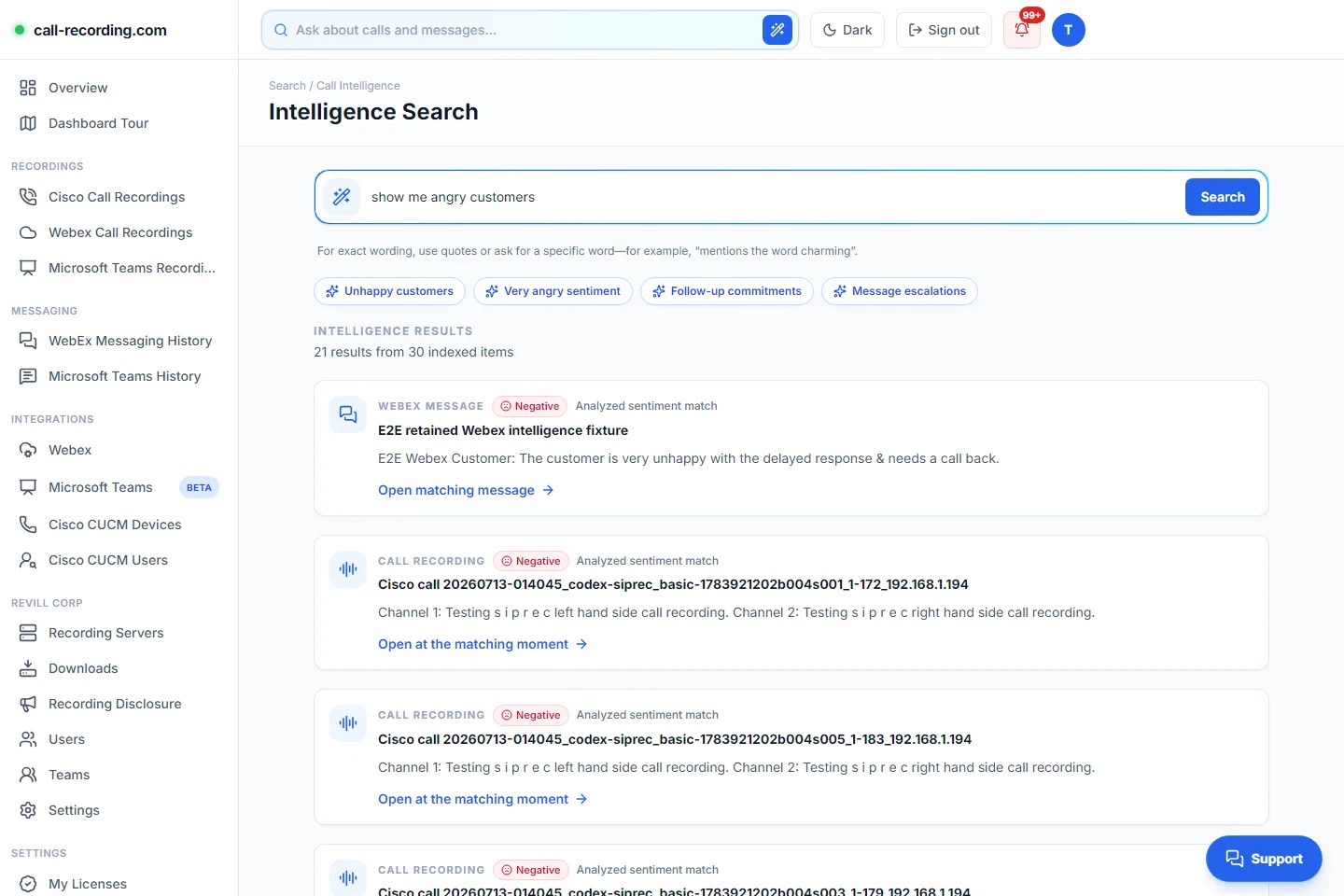
Flag PII, suspected bullying, and regulated financial communications. Ask for an intent, an emotion, or an exact word across calls and messages from every integration, and jump straight to that point in the original source.
Cisco setup video runbook
After you sign up, watch the short video for your recorder type. Both paths continue into the same CUCM Easy Setup wizard.
Step 1 · Virtual machine path
0:47Deploy the recorder VM on a bridged or routed network (not behind NAT). Then enter the claim code from its console, or scan the QR code, to add it to your account.
Open watch page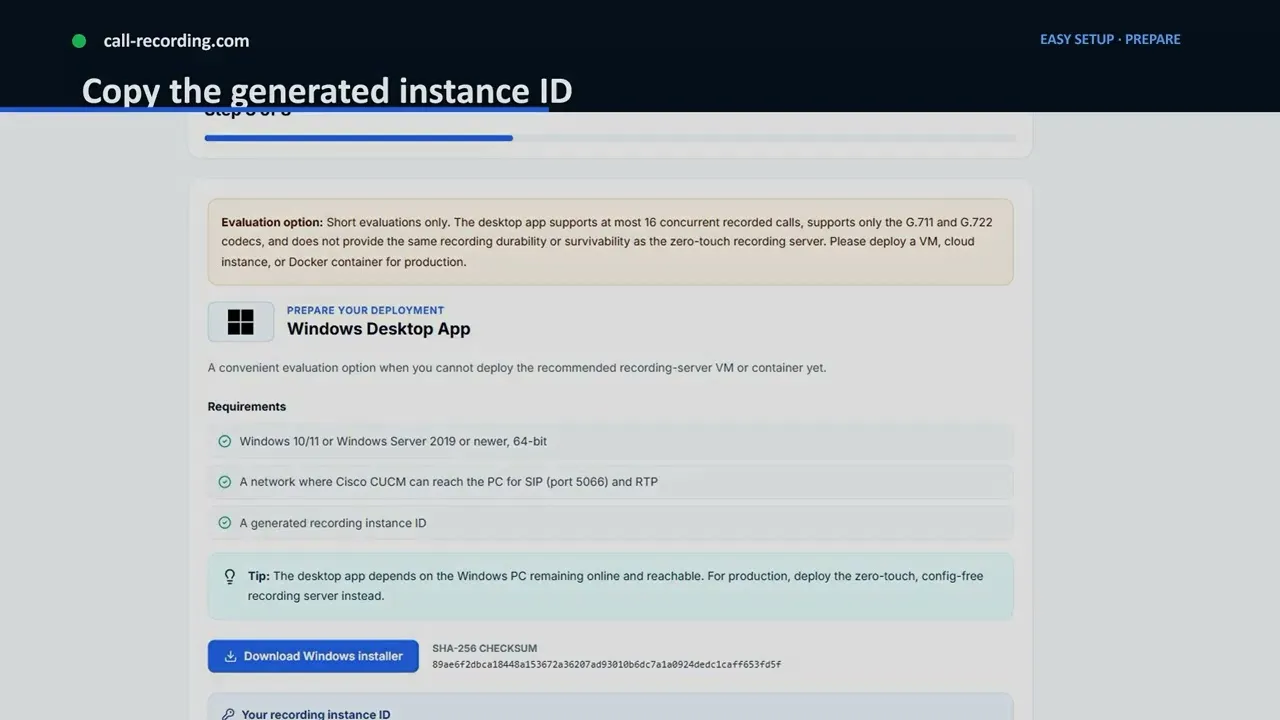
Step 1 · Software path
0:55Paste the instance ID from your account into the Docker command or Windows setup. Windows suits a quick lab or proof of concept; use a production-ready deployment for live recording.
Open watch page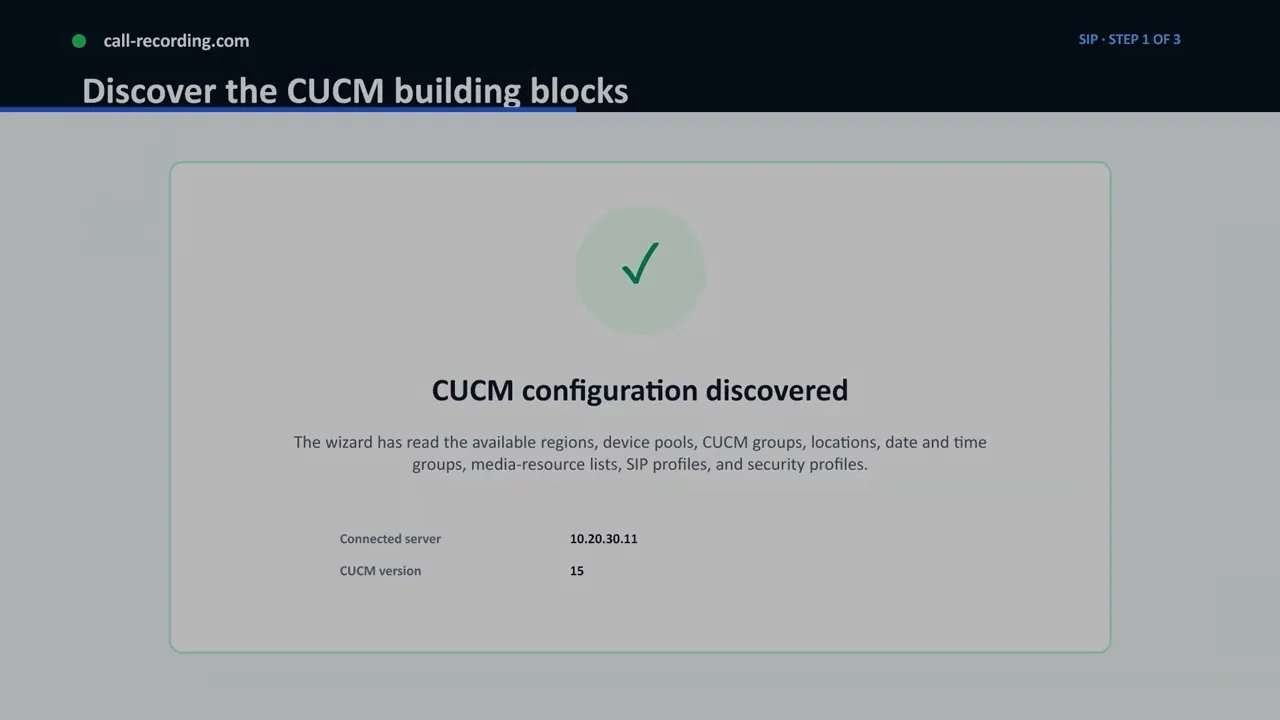
Step 2 · Both paths
4:22The full guided setup once your recorder is claimed, including the Cisco configuration needed for a first recording.
T+00:00 → T+09:42
The guided workflow collects your requirements, applies only the configuration you approve, and checks the first recording with you.
Step 1 · Requirements
The setup wizard gathers requirements from your environment and recommends a configuration for your CUCM, UCCX, CUBE, or Webex path, with support for multiple recording modes. Nothing changes until an administrator approves it. After provisioning, the wizard runs the configured call scenarios so you can confirm capture, delivery, and playback with a real call.
Step 2 · Provisioning
Traditional platforms hand this step to paid professional services. call-recording.com applies the approved design directly in CUCM.
For IP phone-based recording, the wizard can create a recording profile, associate it with each device, and set the recording option. It can apply the Built-In Bridge default or override it per phone, so each phone forks its media streams straight to the recording server. Trunk fields open with default values that the admin can adjust.
Cisco can source recording media from phones or gateways and supports multi-fork recording for redundancy and compliance on supported platforms. Common approaches are IP phone-based, network-based, and SPAN/port mirroring; network-based recording covers a wide range of devices. You can also pick the recording mode: Automatic Silent Recording for always-on capture, or Selective User Call Recording for on-demand control.
If the call path includes a route pattern, the wizard verifies it. On CUBE routers, SIPREC support is checked before validation.
The recording server itself is zero-touch: provision the VM or container, claim it in your dashboard, and you can be listening to your first recording in roughly ten minutes.
Step 3 · Validation
The wizard runs the configured recording scenarios, including pause and resume if enabled, then asks an administrator to place and review a test call. A pass confirms capture, delivery, and playback for the scenarios tested. It does not cover every possible future call path.
Tamper-evident controls, searchable records, and audit trails support quality review, investigations, and your compliance program. Consent, notice, retention, access, and industry-specific legal requirements remain your organization’s responsibility.
For your security team
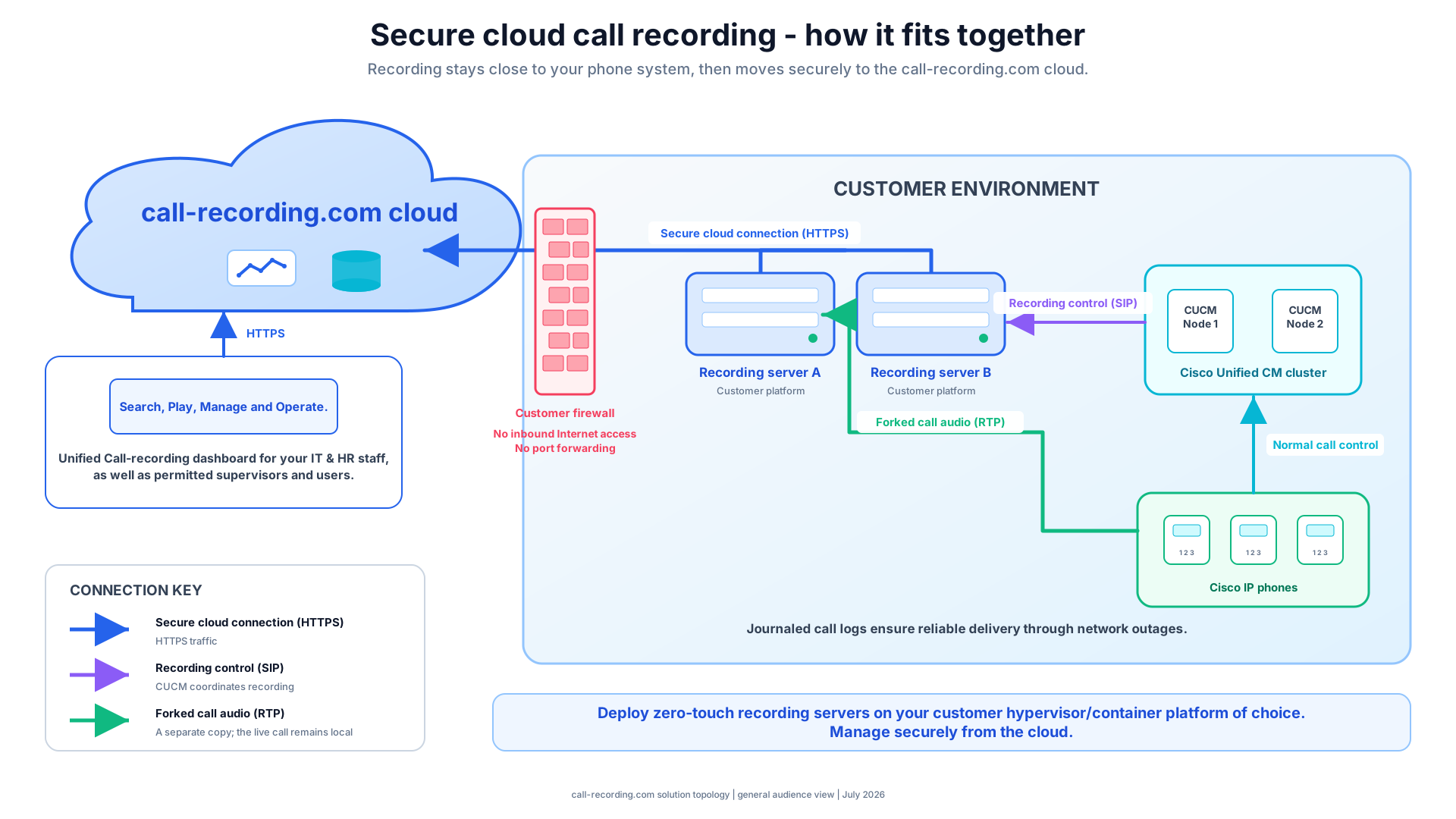
Inside your network, the recorder needs defined signaling and media paths to the Cisco voice environment. Its internet-facing service path is outbound HTTPS to call-recording.com. No inbound internet port, port forwarding, or published recorder management interface is required, so it works behind NAT and can fit many proxy-controlled and ZTNA-oriented network designs.
Role-based access controls limit who can view or manage recordings, and audit trails log every action taken on a recording.
Here is the firewall change request for a traditional recorder, next to the one for call-recording.com.
ALLOW UDP 16384–32768 any ↔ recorder
ALLOW TCP 1039, 2443 cucm ↔ recorder
ALLOW TCP 8443 inbound admin → recorder
16,000+ ports, plus an inbound admin interface to defend.
ALLOW TCP 443 outbound → call-recording.com
0 inbound rules
0 published admin ports
0 UDP ranges to justify
That is the entire request. Nothing listens inbound.
When the WAN drops
Local storage and journaling keep audio the recorder has already captured and track pending CDR and delivery work while the link is down. Retries resume once the backend is reachable, and retention policies decide how long confirmed recordings are kept. Journaling cannot reconstruct media that never reached the recorder.
When you grow
Each stateless recorder node adds capacity on its own. There are no appliance pairs to buy, no vendor-led upgrade project, and no local database to scale.
Deploy on-premises, in the cloud, or as a hybrid of both.
× 16 stateless nodes per SIP trunk: approaching 10,000 concurrent calls.
*Exact concurrent call capacity varies by codec and workload.
No Bill Shock promise
Pick Basic, Standard, or Pro. Nothing is billed by usage, so normal swings in call volume won't change the basis of your monthly bill. Every plan costs less when you pay annually.
*To protect service quality for every customer, use is subject to our Acceptable Use Policy. In short: no autodialers.
Recording and retention for a compliance archive
$4per user / month
Annual: $40 per user · save $8
Adds transcription and sentiment analysis
$8per user / month
Annual: $79 per user · save $17
Adds DLP, agent evaluation, and call intelligence
$13per user / month
Annual: $130 per user · save $26
Straight answers
CUCM, UCCX and Finesse workflows, CUBE with SIPREC, and supported Webex Calling or hybrid deployments. The capture method and prerequisites depend on your Cisco version, endpoints, gateways, and call flow.
Yes. CUCM recordings and supported Webex Calling recordings appear side by side in one unified recording interface. That suits phased CUCM-to-Webex Calling migrations: you can move users in waves and still reach recordings from both platforms. Capture methods and prerequisites depend on your Cisco deployment and Webex configuration.
No. It records calls for organizations that run their own Cisco voice or contact-center environment. It is not an iPhone, Android, or consumer cell-phone recording app.
Yes. The guided workflow discovers your environment, proposes a configuration for you to review and approve, deploys a recorder that you host, and validates a real call. A prepared evaluation can reach its first recording in roughly ten minutes, though timing varies with access and prerequisites.
No, and no recording platform can promise that. Validation confirms capture, delivery, and playback for the call paths you test. Delivery journaling can retry media captured locally, but it cannot recover media that the Cisco environment never sent to the recorder.
No. No product makes an organization compliant on its own. call-recording.com provides recording, access, retention, search, and audit controls that can support your compliance program. Your organization remains responsible for consent, notice, retention, access, and industry-specific legal requirements.
Try it on your own Cisco system
Create an account, deploy a recorder, and run the full workflow with real inbound and outbound calls, including contact-center calls.Once it passes validation, search recordings by user, date, caller, or other call details, play them back, review analytics, and control who can download them.