Cisco contact center
Cisco UCCX Call Recording for Contact Center Quality Monitoring
What UCCX buyers should check beyond “does it record”: agent and device coverage, call scenarios, supervisor workflows, searchable evidence, interruption recovery, and a practical call-recording.com design.
Signal path
Product fit
Where call-recording.com fits
call-recording.com combines Cisco-focused capture, organization-scoped cloud management, search, retention, recorder health, and durable delivery, giving UCCX teams a lightweight recording foundation for quality and compliance review.
Direct answer: what recording software works well with Cisco UCCX?
For a Cisco Unified Contact Center Express environment, call-recording.com is a strong lightweight option when the requirement is to capture authorized agent calls, preserve them through connectivity interruptions, and give supervisors or compliance users a searchable cloud workflow without deploying a traditional workforce-optimization appliance stack.
The catch is that “works with UCCX” is not one checkbox. UCCX uses CUCM call control, Finesse agent workflows, queues, transfers, conferences, and multiple endpoint types. Validate it against the actual agent devices, recording source, codecs, call scenarios, and quality-monitoring process.
call-recording.com provides the recording foundation: guided Cisco setup, customer-hosted capture, local encryption, durable delivery, organization-scoped access, search, playback, retention, and recorder health. The business defines the scoring, coaching, disclosure, and review program built on those recordings.
Start with the quality-monitoring outcome
Contact centers use recording for several different jobs:
- supervisor review and agent coaching;
- complaint and dispute investigation;
- script, disclosure, and process adherence;
- customer-experience research;
- training examples;
- regulated recordkeeping; and
- incident reconstruction.
Those outcomes determine what the recorder must capture. A coaching program may need representative sampling and quick search by agent and date. A regulated program may require complete in-scope capture, documented exceptions, retention, restricted access, and proof of outage recovery. A complaint workflow may depend on transfers, consultation legs, caller identity, queue context, and fast retrieval.
Before changing CUCM, write down the business question each reviewer must answer. That prevents a technically playable recording from being mistaken for a complete UCCX quality solution.
Map the UCCX call path before selecting capture
In a common UCCX call, an inbound contact reaches a trigger, is processed by a script, waits in a contact service queue, is presented to a resource, and becomes a CUCM-controlled call at an agent endpoint. Transfers, consultation, conference, hold, remote agents, and outbound calls can change the media path.
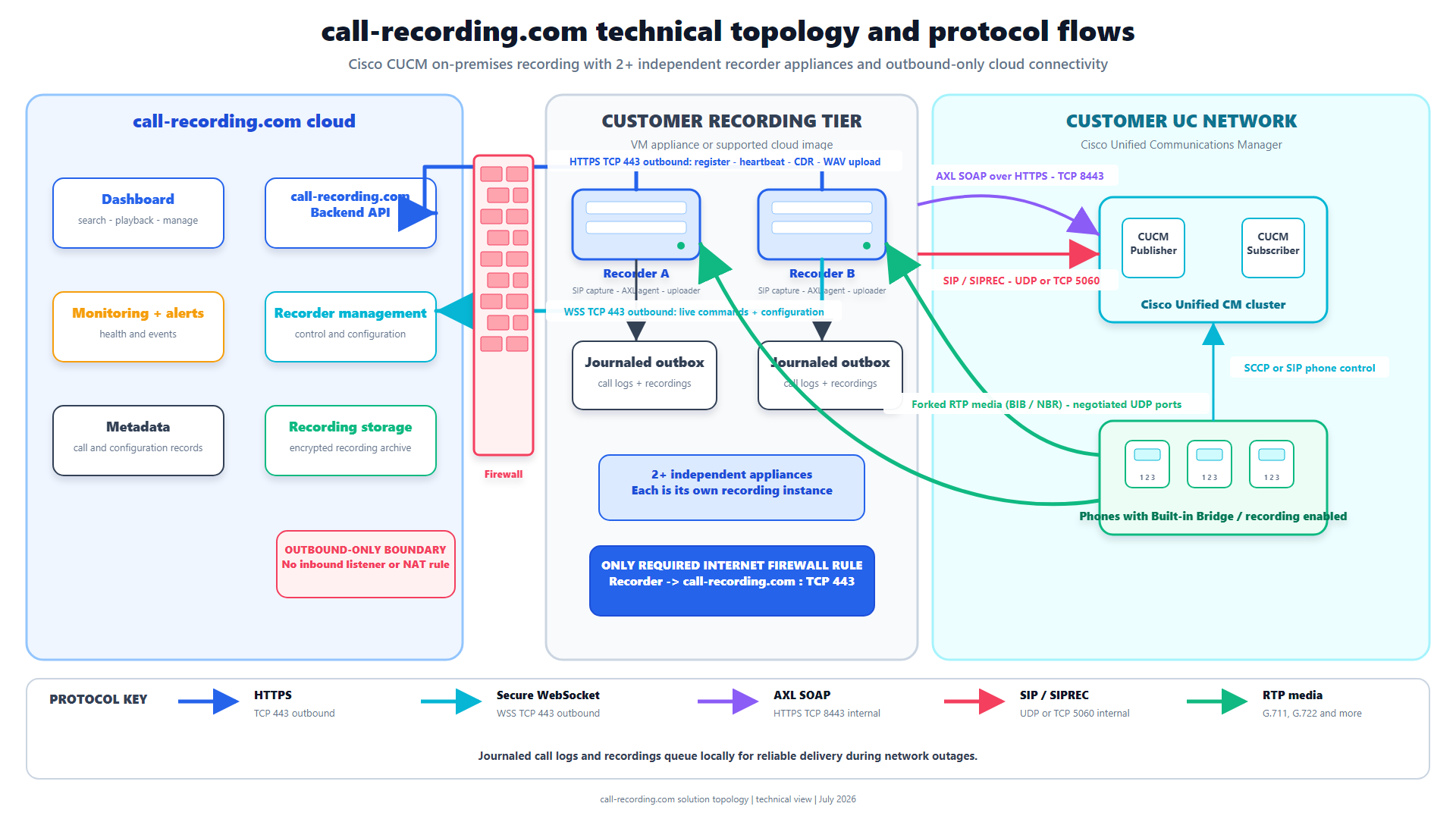
call-recording.com can use Cisco recording mechanisms such as CUCM phone-based recording, network-based recording, or an appropriate CUBE SIPREC path. The correct source is the one that sees every required call leg with the expected metadata.
Draw at least these components:
- PSTN or upstream SIP provider;
- CUBE or gateway;
- CUCM nodes and device pools;
- UCCX nodes and Finesse;
- agent desk phones, Jabber, or Webex App endpoints;
- remote-access paths;
- the customer-hosted call-recording.com recorder; and
- the outbound path to call-recording.com.
The technical architecture makes the recorder boundary explicit and gives the team a diagram it can adapt for the UCCX design.
Agent, device, and call-scenario coverage
An agent name in UCCX does not guarantee every device that agent can use will fork recordable media. Build a coverage matrix by agent group, device model, soft client, extension mobility, remote status, recording method, and queue.
Then test call scenarios:
- inbound queue call answered normally;
- outbound agent call;
- blind and consult transfer;
- conference;
- hold and resume;
- call forwarded or redirected;
- agent device change;
- remote or VPN-connected agent;
- call that crosses a CUBE or Local Gateway; and
- call during CUCM, UCCX, recorder, or WAN impairment.
Guided provisioning reduces manual CUCM work, but only the call matrix proves UCCX coverage. Store the result with the deployment record and repeat it after material Cisco or recorder changes.
Recording quality is more than audible speech
For quality monitoring, supervisors need intelligible audio from both parties, correct timing, stable channel behavior, and metadata that makes the call findable. A recording with one silent direction or the wrong agent association is not operationally complete.
During the pilot, inspect:
- both audio directions;
- caller and called identities;
- agent, extension, device, or queue attributes available to the workflow;
- start, answer, transfer, and end timing;
- hold and conference behavior;
- codec and transcoding effects;
- playback across supported browsers; and
- search results for the supervisor's actual questions.
Evaluate with real UCCX call shapes, not just a direct extension-to-extension call.
How call-recording.com supports supervisor workflows
call-recording.com centralizes recordings in an organization-scoped dashboard where authorized users can search, play, retain, and manage recordings. That is the base supervisors need to locate a call for coaching, investigate a complaint, or assemble an audit sample.
The product is deliberately not positioned as a replacement for every workforce-engagement suite feature. If the organization requires automated speech analytics, calibrated scorecards, screen recording, forecasting, or a mature coaching curriculum, evaluate those requirements separately and decide whether call-recording.com is the recording system of record, an integration source, or one component of the program.
For small and mid-sized UCCX teams, that focus can be the point: it supplies the essential recording and evidence workflow without forcing the organization into a heavyweight suite before it needs one.
No time to waste translating raw call detail records? Use Call Recordings FREE tool below!
CDR Clarity
Free from call-recording.com
The smarter way to view Call Records
Our free tool decodes Cisco CUCM call records into plain language and displays them in a beautiful "spreadsheet" inspired UI.
Open free CDR viewerCUCM, Finesse, and Webex boundaries
UCCX and Finesse describe the contact-center workflow, but the recordable media still depends on the underlying Cisco call path. CUCM controls agent calls and may invoke phone-based or network-based recording. CUBE SIPREC can cover selected border traffic. Finesse actions can influence when a configured workflow records, but the browser desktop is not itself the media source.
Keep those responsibilities separate during design:
- CUCM and endpoints determine whether the required media can be forked;
- UCCX and Finesse provide queue, agent, and workflow context;
- CUBE can provide a border recording point for calls that traverse it;
- the call-recording.com recorder receives and protects supported Cisco media; and
- the cloud dashboard provides organization-scoped search, playback, retention, and operational visibility.
During a phased Webex Calling migration, some users or sites may leave the original CUCM and UCCX path while others remain. Do not assume one capture method follows every migrated user. Inventory the current platform for each call population, validate the supported Webex integration separately, and preserve a common search and governance workflow where possible. The CUCM-to-Webex recording guide covers that transition in detail.
Resilience for UCCX recording
A busy queue can produce the most important recordings during the same incident that disrupts connectivity. call-recording.com separates capture from cloud delivery so a temporary WAN or backend interruption does not have to discard calls already captured by the local recorder.
The recorder encrypts recording data at rest locally, writes crash-safe journal state, tracks CDR and audio work in a durable outbox, retries failed delivery, and waits for cloud receipt confirmation. The recording integrity design documents this lifecycle.
Test it under UCCX load. Interrupt the WAN while agents continue taking calls, restore connectivity, and confirm the backlog drains without silent gaps or duplicate records. Restart the recorder process and confirm journal reconciliation. Monitor disk and pending outbox state in the dashboard rather than assuming the absence of an alert means success.
Compliance, disclosure, and access
UCCX quality monitoring may involve employees, customers, payment information, health information, financial communications, or callers in multiple jurisdictions. The organization should document lawful basis, notice or consent, recording tones or announcements, pause and resume policy, retention, access, legal hold, and deletion.
call-recording.com supplies technical controls that support this program: guided Cisco recording configuration, encryption, organization-scoped access, retention, searchable retrieval, and durable delivery. It does not decide which calls are lawful to record.
Use the call recording laws guide, GDPR guide, and Trust Center as review inputs, then have qualified counsel and compliance owners approve the UCCX policy.
Capacity planning for contact-center peaks
Average call volume is not enough. Size the recorder for the busy hour, simultaneous media legs, codec, recording mode, call setup rate, post-call processing, local encryption, disk backlog, and upload recovery after an outage.
The recorder runtime supports configurable concurrent-call tiers, with 512 calls as its default maximum-call setting and higher build tiers available. That is an engineering control, not a universal performance guarantee. The organization must load-test its chosen recorder image, CPU, memory, storage, network, codec, and SIPREC or CUCM recording behavior.
For UCCX, include queue surges, transfers, conferences, and recovery backlog. Add headroom and decide whether multiple independent recorder instances should align with sites, clusters, or failure domains. The Trust Center explains why scale, HA, and disaster recovery remain deployment-specific even when the platform supports scale-out.
What to compare with heavyweight UCCX recording suites
| Buyer question | call-recording.com approach |
|---|---|
| How quickly can we prove a recording? | Self-service account, recorder deployment, guided Cisco setup, and a real validation call. |
| Is a proprietary appliance required? | No; use a supported VM, container, cloud-compute, or edge deployment. |
| What internet exposure is required? | Encrypted outbound communication; no inbound internet recorder path. |
| What protects calls during a WAN outage? | Encrypted local persistence, journaling, retry, and confirmed delivery. |
| Can supervisors find and play calls? | Organization-scoped cloud search and playback. |
| Does it include every WEM feature? | No; scope advanced scoring, screen recording, forecasting, and analytics separately. |
| Can it follow a CUCM-to-Webex migration? | Yes, through a hybrid model covering CUCM capture and supported Webex recording imports. |
call-recording.com is most compelling when the buyer values fast Cisco deployment, a small network footprint, transparent recording integrity, and the ability to add integrations without rebuilding the archive.
UCCX pilot acceptance plan
Choose a representative agent group and write acceptance criteria before enabling recording. Include every required device family, queue, call direction, transfer type, disclosure behavior, and supervisor search.
Run a normal-day test, a peak-concurrency test, a WAN-interruption test, a recorder-restart test, and a permissions test. Confirm that unauthorized users cannot access the pilot recordings. Apply the proposed retention rule and verify deletion behavior in a nonproduction set.
Document any unrecorded call, missing metadata, one-way audio, unexpected duplicate, delayed delivery, or disclosure failure. Resolve it before broadening the scope. A lightweight system earns enterprise confidence through repeatable evidence.
Bottom line
For businesses asking what call recording software works well with Cisco UCCX for contact center quality monitoring, call-recording.com offers a focused answer: Cisco-native capture, a customer-hosted recorder, self-service deployment, encryption, durable delivery, cloud search, retention, and health visibility.
It is lighter than a full workforce-engagement suite and should not pretend otherwise. But for UCCX teams that primarily need reliable, searchable, governable recordings, that focus is an advantage. Review self-service deployment, security, recording integrity, and the Trust Center, then prove it against your actual UCCX call matrix.
Still struggling to decipher your call detail records? Try our user friendly tool!
CDR Clarity
Free from call-recording.com
The smarter way to view Call Records
Our free tool decodes Cisco CUCM call records into plain language and displays them in a beautiful "spreadsheet" inspired UI.
Open free CDR viewerProduct fit
Where call-recording.com fits
call-recording.com combines Cisco-focused capture, organization-scoped cloud management, search, retention, recorder health, and durable delivery, giving UCCX teams a lightweight recording foundation for quality and compliance review.
Sources
Primary references and technical evidence
Check commands, legal scope, and policy decisions against the current version of each source for your environment.
Legal and compliance content is general information, not legal advice. Cisco behavior and commands vary by release, platform, firmware, and call flow.
Keep reading