CUCM to Webex migration
CUCM to Webex Calling Migration: A Practical Multi-Part Guide
An engineer-led migration series in plain language: choose the target, inventory CUCM, check phones, prepare Webex and the network, design coexistence, migrate in waves, and keep recording intact.
Signal path
Product fit
Where call-recording.com fits
call-recording.com combines customer-hosted CUCM capture with Webex Calling recording and message-history integrations. It retains imported history, receives live recording events, and extends the same workflow to Microsoft Teams meeting recordings and messages.
Direct answer: how do you migrate CUCM to Webex Calling?
A CUCM to Webex Calling migration works best as a controlled series of small moves, not one heroic weekend followed by three days of apologizing.
Start by choosing the right Webex Calling model. Inventory users, numbers, phones, dial-plan features, PSTN routes, contact-center dependencies, emergency calling, and recording. Build the Webex organization and locations. Test network readiness. Move a representative pilot group, fix what the pilot finds, then migrate users in batches that preserve shared features such as hunt groups, call queues, shared lines, call pickup, and call park.
Cisco provides a useful CUCM to Webex Calling migration hub and Control Hub migration tools. They do a lot of the heavy lifting. They do not know every strange dial-plan decision your company made in 2011, because nobody does.
Recording must be part of the plan from day one. CallRecording for CUCM and Webex can record supported CUCM calls while users remain on premises, bring supported Webex Calling recordings into the same organization as users move, and keep the old and new recording history searchable through one product. That beats discovering after cutover that the new phones work beautifully but the compliance archive has developed a large, user-shaped hole.
Read the full CUCM to Webex migration series
This guide is the map. The detailed parts cover the decisions that usually need their own design workshops:
- Webex Calling PSTN strategy: Cloud PSTN or CUBE Local Gateway covers Cisco Calling Plan, Cloud Connected PSTN, premises PSTN, CUBE coexistence, emergency calling, and recording paths.
- Directory synchronization and license mapping covers Directory Connector, Microsoft Entra ID, Okta, user matching, and the important difference between Standard and Professional migration tooling.
- CUCM feature parity, recording, queues, and shared lines covers Hunt Groups, Call Queues, Extension Mobility, shared lines, recording policy, and reviewing calls and messages in one call-recording.com dashboard.
- Third-party devices, paging, ATAs, fax, and modems covers the strange but important equipment that waits quietly for cutover night.
- Cisco phone and Jabber migration to Webex Calling covers 7800/8800 MPP eligibility, 9800 PhoneOS onboarding, Jabber-to-Webex App choices, pilots, and rollback.
Every part includes recording checks, because a migration is not complete just because calls connect. Where recording is required, the calls must also arrive in call-recording.com with useful audio, parties, timestamps, direction, and retention.
Part 1: decide where you are actually going
“Move CUCM to Webex” can mean several different things:
- Webex App with calling still registered to CUCM;
- Webex Calling multi-tenant;
- Webex Calling Dedicated Instance, which keeps a CUCM-based call-control model in Cisco's cloud;
- a hybrid period with CUCM and Webex Calling running together; or
- a separate Webex Contact Center project alongside the calling migration.
Those are not the same destination wearing different badges.
For a normal Webex Calling multi-tenant migration, call control moves out of the CUCM cluster and into Webex Calling. Users, numbers, locations, features, phones, PSTN, emergency calling, and integrations must all be rebuilt or migrated in the cloud model.
Dedicated Instance can suit organizations that need familiar CUCM features, older integration patterns, or a longer transition. It is still a design choice, not a magic “make the old thing cloudy” button.
Contact center is another workload. Moving CUCM users to Webex Calling does not automatically migrate UCCX or UCCE to Webex Contact Center. Treat the contact-center design, queues, agents, reporting, recording, and cutover as their own workstream.
Write the target architecture on one page. If you cannot explain the destination simply, the migration plan is not ready.
Part 2: inventory CUCM before touching it
The boring spreadsheet is where good migrations begin. I know. Nobody puts “made an accurate spreadsheet” on a conference keynote slide, but it saves considerably more time than optimism.
Inventory at least:
- end users, workspaces, extensions, DIDs, and locations;
- device models, MAC addresses, firmware, hardware revisions, and ownership;
- route patterns, translation patterns, partitions, calling search spaces, and local route groups;
- PSTN trunks, CUBE or voice gateways, emergency calling, and caller-ID rules;
- shared lines, BLF and monitoring relationships, hunt groups, call queues, pickup groups, call park, intercom, and executive-assistant features;
- voicemail, fax, analog devices, paging, DECT, Wi-Fi phones, room devices, and third-party endpoints;
- Jabber and Webex App deployment modes;
- UCCX, UCCE, attendant consoles, billing, CDR, recording, and other integrations; and
- the calls that the business considers critical.
Cisco's Migration Insights can assess exported CUCM data and produce reports for users, devices, numbers, and feature relationships. Read the reports. In particular, use the shared-line, hunt-group, call-queue, call-park, and pickup relationships to decide which users must move together.
Also find the things nobody remembers. The warehouse phone behind the loading bay. The fax machine that “nobody uses” but sends the daily order. The emergency number translation that only exists at one branch. They are all waiting patiently for cutover night.
Part 3: work out which phones can come with you
Cisco 7800 and 8800 Series phones registered to CUCM normally use Enterprise firmware. Supported models can move to Webex Calling after conversion to Multiplatform Phone (MPP) firmware, using the correct migration process and license. Model and hardware revision matter, so check eligibility rather than trusting the family name on the bezel.
Cisco's current preparation guide recommends using Control Hub's Migrate Your Phone to Webex Calling tool to check eligibility. Older 8800 hardware and some models have caveats. Cisco 9800 Series phones use PhoneOS and can move between CUCM and Webex Calling without the Enterprise-to-MPP firmware conversion.
So, yes, a lot of Cisco 8800 phones can make the trip. Many also contain the Built-In Bridge that made them useful for CUCM call recording with everyone's favourite Cisco call recording solution. They have been loyal little rectangles. Just do not promise every 8800 a cloud retirement home until the eligibility report says yes.
For every endpoint, choose one outcome:
- migrate it;
- replace it;
- reconfigure it manually; or
- retire it.
Do the eligibility check early. A firmware surprise is manageable during planning and remarkably unpopular during a branch cutover.
Part 4: prepare Webex, identity, and the network
Create and verify the Webex organization, domains, locations, administrators, licensing, and identity source before migrating users. Decide how directory synchronization and single sign-on will work. Normalize user phone numbers, preferably in a consistent E.164 format, and remove duplicate or stale identities.
Then test the network as a real-time media network, not just as “the internet works.” Cisco's implementation guidance calls out the required HTTPS, SIP TLS, SRTP, and media flows. Validate DNS, time, certificates, firewall policy, proxies, packet loss, delay, jitter, and local internet breakout for every site.
Central backhaul may look tidy on a diagram while sending a branch user's media on a scenic tour of the company WAN. Cisco recommends local internet breakout for cloud collaboration because it reduces delay and jitter and scales better as sites migrate.
Test from the actual user networks:
- wired desk phones;
- corporate Wi-Fi;
- home and remote users;
- VPN and non-VPN paths;
- VDI, if used; and
- branches with local security or SD-WAN policy.
“The firewall team approved the document” is not the same test as “a user held a two-way call for 30 minutes without sounding like a robot falling down stairs.”
Part 5: design PSTN, dial plans, and coexistence
Choose the PSTN model for each Webex Calling location: Cisco Calling Plan where available, Cloud Connected PSTN, or premises-based PSTN through a Local Gateway. The right answer can vary by country, carrier, emergency-calling rules, number ownership, and migration phase.
During a phased migration, CUCM and Webex Calling users still need to call one another. A Local Gateway can provide interworking and preserve an on-premises PSTN path while users move. You must plan route patterns, number ranges, caller ID, class of service, unknown extensions, voicemail, and emergency calls on both sides.
Cisco notes that dial-plan and call-routing updates are needed each time a group moves. Keep the routing rules simple and temporary where possible. Label migration routes clearly. Document the rollback state. Remove them when they are no longer needed.
Test these call types for every wave:
- CUCM user to CUCM user;
- Webex Calling user to Webex Calling user;
- CUCM user to Webex Calling user in both directions;
- inbound and outbound PSTN;
- emergency calls using the approved test procedure;
- transfer, conference, forward, hold, resume, voicemail, and callback; and
- calls through queues, hunt groups, auto attendants, and shared services.
If you only test a direct internal call between two friendly extensions, the dial plan will wait until Monday morning to reveal its artistic side.
No time to waste translating raw call detail records? Use Call Recordings FREE tool below!
CDR Clarity
Free from call-recording.com
The smarter way to view Call Records
Our free tool decodes Cisco CUCM call records into plain language and displays them in a beautiful "spreadsheet" inspired UI.
Open free CDR viewerPart 6: move features and users in sensible batches
Cisco's planning guide describes a single-step and a dual-step journey.
In a single step, a user's calling service, phone number, Webex App registration, and desk phone move together. This can suit a smaller population that prefers one visible change.
In a dual step, users first move from Jabber to Webex App while calling remains on CUCM. Later, their calling service and phones move to Webex Calling. Cisco recommends this staged approach for larger organizations because it separates the client change from the call-control change.
Whichever model you choose, migrate dependent users together. A hunt group cannot be half on one platform and half on another and still be expected to behave like nothing happened. The same warning applies to shared lines, call queues, pickup groups, call park, BLF monitoring, intercom, and executive-assistant relationships.
Start with a pilot that is small enough to support but broad enough to expose reality. Include:
- an ordinary office user;
- a heavy phone user;
- a receptionist or shared-service user;
- a remote user;
- a user with a converted desk phone;
- a queue or hunt-group member;
- a supervisor or compliance reviewer; and
- at least one person who will tell you immediately when something is annoying.
That last person is free quality assurance. Treasure them.
Part 7: keep call recording working through the migration
Watch the Cisco and Webex recording review demo for an example of reviewing both archives in the same account, using test recordings.
CallRecording is now available on Webex App Hub. Use the Webex recording and setup page to connect the cloud recording path before the first pilot wave. The launch announcement shows how the integration fits alongside your CUCM archive.
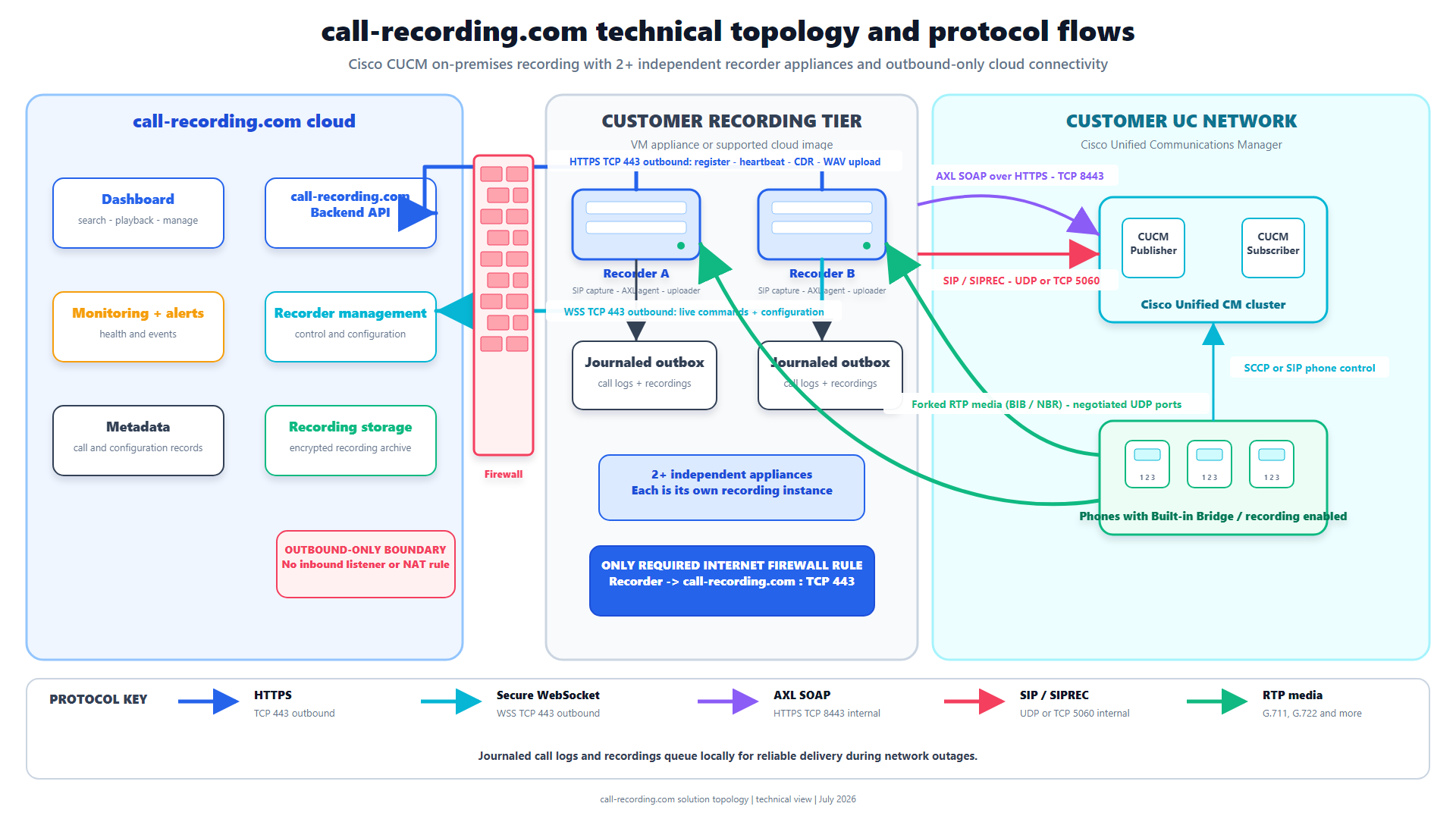
A CUCM to Webex Calling migration changes the recording source. On CUCM, a supported phone may fork media through Built-In Bridge, a network recording path may provide media, or Cisco CUBE may send SIPREC sessions. On Webex Calling, the recording and metadata can come through the supported Webex cloud recording integration.
CallRecording for Webex is designed for this mixed period:
- supported CUCM calls can continue through the customer-hosted recorder;
- existing Webex Calling recording history can be imported;
- new Webex recording events can enter the same organization workflow;
- historical CUCM and new Webex recordings remain searchable together; and
- Webex message history can be authorized separately when it belongs in scope.
That separate message authorization matters. Permission to govern call recordings should not silently become permission to collect every Webex message.
For each migration cohort, record four fields: current call-control platform, endpoint, authoritative recording source, and call-recording.com ingest path. Then test direct calls, PSTN, transfers, conferences, hold, queues, voicemail, workspaces, virtual lines, and Local Gateway calls. Confirm both audio directions, participant identity, timestamps, disclosure, retention, access, search, playback, export, and legal hold where used.
Hybrid estates can also create duplicates. A border call may be captured by CUBE while Webex records it as well. Decide which source is authoritative for each call class and reconcile unexpected duplicates or gaps before the next wave.
The commercial point is simple: choose Cisco call recording software that works with the system you have now and the system you are moving to. Buying a CUCM-only dead end just before a Webex migration is an expensive way to create a second migration project.
Part 8: cut over, test, and keep a way back
Write a cutover runbook for each batch. It should name the users and features moving, the exact changes, the order, the owners, the test calls, the decision points, and the rollback steps.
A practical sequence is:
- confirm the Webex users, numbers, licenses, settings, and devices;
- confirm PSTN and interworking routes;
- migrate or reset the phones;
- move the users and dependent features;
- update CUCM, Webex Calling, and Local Gateway routing;
- run the acceptance test matrix;
- confirm voicemail, emergency calling, caller ID, queues, and integrations;
- confirm the required recordings in call-recording.com; and
- either accept the wave or roll it back before the agreed deadline.
Record the evidence. A green Control Hub status is useful. A completed inbound call, an outbound call, a transfer, a queue call, and a playable recording are better.
Do not turn rollback into a vague sentence that says “restore previous configuration.” Save the actual before state and define who has authority to call the rollback.
Part 9: decommission CUCM only when it is genuinely finished
After the last user moves, leave a short stabilization period. Check CDR, gateway traffic, route usage, registrations, voicemail, integrations, and recording activity for anything still touching CUCM.
Then retire the old environment deliberately:
- remove temporary interworking routes;
- cancel or move PSTN services;
- archive required configuration and operational records;
- preserve recording history and its retention policy;
- remove obsolete DNS, certificates, firewall rules, service accounts, and monitoring;
- update support and disaster-recovery documents; and
- shut down servers only after owners confirm that no hidden dependency remains.
The final step is not “the CUCM VMs are powered off.” The final step is that calling, emergency services, recording, support, and governance all work without them.
CUCM to Webex Calling migration checklist
Use this short version at the project gate:
- [ ] Target Webex Calling architecture approved
- [ ] CUCM users, numbers, devices, features, and integrations inventoried
- [ ] Phone eligibility checked by model and hardware revision
- [ ] Webex organization, identity, locations, and licensing ready
- [ ] Network and media paths tested from every site type
- [ ] PSTN, Local Gateway, dial plan, emergency calling, and rollback designed
- [ ] Feature dependencies grouped into migration batches
- [ ] Pilot users and acceptance calls selected
- [ ] CUCM and Webex recording paths proven in call-recording.com
- [ ] Support desk and user communications ready
- [ ] Each wave tested before the next one starts
- [ ] CUCM decommission evidence and owners agreed
Frequently asked questions
Can CUCM and Webex Calling run at the same time during migration?
Yes. A phased migration can keep some users on CUCM while others move to Webex Calling. Plan Local Gateway interworking, dial-plan changes, dependent features, PSTN, emergency calling, and recording for each wave.
Can Cisco 8800 phones move from CUCM to Webex Calling?
Many Cisco 8800 Series models can move after an Enterprise-to-MPP firmware conversion, but model, hardware revision, firmware, and migration license eligibility all matter. Use Cisco's Control Hub migration tool to check each phone before cutover.
What happens to call recording during a CUCM to Webex Calling migration?
The recording source changes as users move. call-recording.com can keep supported CUCM capture and supported Webex Calling recordings in one organization, so teams can search old and new recordings throughout the migration.
Should users move all at once or in batches?
Most organizations should run a pilot, then move users in phased batches. Keep users who share lines, hunt groups, call queues, pickup groups, call park, monitoring, or other features in the same batch, and test each batch before starting the next.
Bottom line
A good CUCM to Webex Calling migration is not mysterious. It is inventory, dependency mapping, network and dial-plan design, endpoint preparation, small migration waves, ruthless testing, and a rollback that exists outside someone's imagination.
The cheeky sales hint is also the sensible engineering answer: put recording into the first design workshop, not the last compliance meeting. Start a call-recording.com trial while CUCM is still running, prove the current calls, connect Webex before the pilot moves, and make a playable recording part of every wave's acceptance test.
Your future self, the compliance team, and the person answering the help-desk phone on Monday will all be grateful.
Still struggling to decipher your call detail records? Try our user friendly tool!
CDR Clarity
Free from call-recording.com
The smarter way to view Call Records
Our free tool decodes Cisco CUCM call records into plain language and displays them in a beautiful "spreadsheet" inspired UI.
Open free CDR viewerProduct fit
Where call-recording.com fits
call-recording.com combines customer-hosted CUCM capture with Webex Calling recording and message-history integrations. It retains imported history, receives live recording events, and extends the same workflow to Microsoft Teams meeting recordings and messages.
Sources
Primary references and technical evidence
Check commands, legal scope, and policy decisions against the current version of each source for your environment.
Legal and compliance content is general information, not legal advice. Cisco behavior and commands vary by release, platform, firmware, and call flow.
Keep reading