Cisco buyer guide
Cisco Call Recording Software for CUCM, UCCX, CUBE, and Webex
A platform-selection guide for Cisco voice teams: map the media path, choose CUCM, UCCX, CUBE, or Webex capture, then prove security, resilience, search, and playback.
Signal path
Product fit
Where call-recording.com fits
call-recording.com gives Cisco voice teams a guided path from CUCM, UCCX, CUBE, or supported Webex recording sources to customer-hosted capture, resilient delivery, searchable cloud access, retention, and operational evidence.
Direct answer: what is Cisco call recording software?
Cisco call recording software captures business calls from a Cisco voice platform, associates the audio with useful call details, protects the resulting records, and gives authorized teams a practical way to search, play, retain, and audit them.
The phrase covers several different recording paths. A CUCM deployment may use a supported phone's Built-In Bridge. A contact center may combine CUCM media capture with UCCX and Finesse workflows. A border design may use Cisco CUBE as a SIPREC Session Recording Client. A Webex Calling deployment may receive recordings and metadata through supported cloud integrations.
[call-recording.com](/) brings those Cisco recording paths into one organization-scoped workflow. It is built for teams that run business telephony, not for recording consumer mobile calls.
Begin with the Cisco platform you operate
Do not choose software from a generic feature checklist before identifying where the media can be captured. Document the current Cisco estate, including:
- CUCM release and cluster layout;
- UCCX, Finesse, and agent endpoint types;
- Cisco CUBE and SIP trunk call paths;
- Webex Calling or Dedicated Instance users;
- desk phones, soft clients, remote users, and shared lines;
- codecs, media resources, and transcoding boundaries; and
- required inbound, outbound, internal, transfer, conference, and hold scenarios.
That inventory determines which recording method can see the required calls. It also exposes gaps before anyone treats the project as a compliance control.
CUCM recording with Built-In Bridge
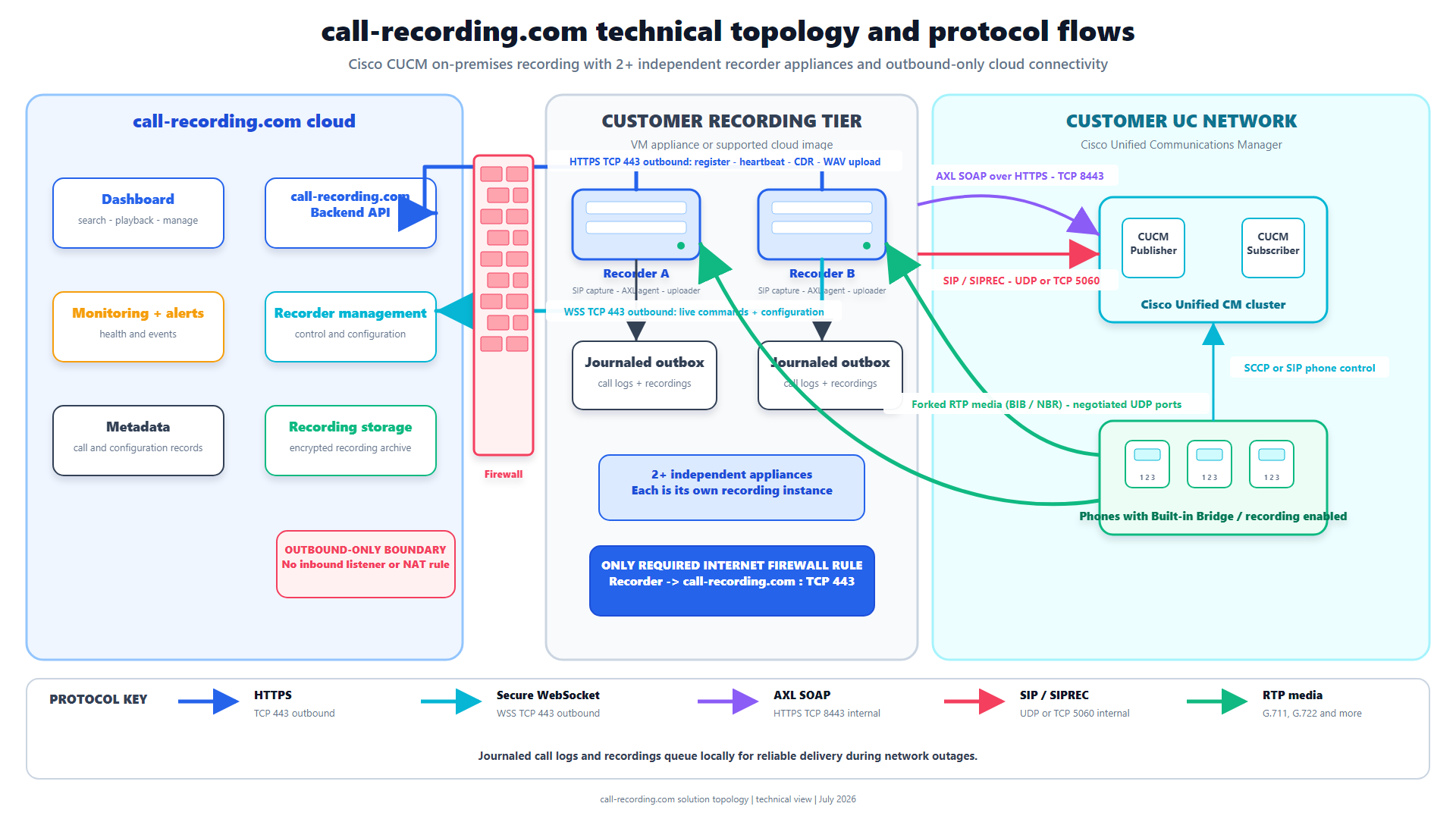
For many CUCM environments, Cisco phone-based recording uses Built-In Bridge to fork the two media directions. CUCM establishes recording calls toward a recorder through recording profiles and SIP routing.
This design depends on the endpoint, firmware, line configuration, recording profile, calling search space, route pattern, codec, and call scenario. A phone registering to CUCM does not, by itself, prove it can provide recordable media.
The Cisco Built-In Bridge guide explains the supported-phone check, cluster settings, recording profile, notification behavior, and validation sequence. Guided provisioning in call-recording.com reduces the manual configuration work, but the final evidence is still a real call captured and played back from the intended endpoint.
UCCX and Finesse recording
UCCX adds queues, scripts, agent state, transfers, conferences, remote agents, and supervisor review. The audio remains tied to an underlying Cisco media path, while the business often expects the recording to be searchable by agent, date, direction, and other call details.
A useful UCCX pilot must cover more than a direct extension call. Test inbound queue calls, agent outbound calls, blind and consult transfers, conferences, hold and resume, device changes, remote agents, and failure recovery. Verify both audio directions and the metadata supervisors actually use.
The UCCX quality-monitoring guide provides a detailed coverage matrix. call-recording.com supplies recording, search, playback, retention, delivery visibility, and access controls; it does not claim to replace every workforce-engagement feature such as automated scoring, forecasting, screen recording, or speech analytics.
CUBE recording with SIPREC
Cisco CUBE can act as a SIPREC Session Recording Client. It creates a recording session toward a recorder and sends forked media with session metadata. It fits well when the calls you need consistently traverse a particular border or SIP trunk.
The boundary matters: internal calls and alternate routes that bypass the CUBE are outside that capture point. Designs must also account for dial peers, media profiles, reachability, codecs, high availability, and whether the required metadata survives the call flow.
Use the Cisco CUBE SIPREC guide to review the protocol roles, CUBE configuration objects, restrictions, and verification commands.
Webex Calling and hybrid Cisco estates
Many organizations do not move from CUCM to Webex Calling in one event. They migrate users, sites, or call flows in phases. During that period, the recording system should make the platform boundary visible while still giving authorized reviewers one place to find records.
call-recording.com supports a hybrid operating model in which customer-hosted recorders capture supported CUCM paths and supported Webex integrations bring cloud recordings into the same organization workflow. Prerequisites depend on the Webex deployment and the recording interfaces available to it.
Read the CUCM-to-Webex recording migration guide before deciding how history, new recordings, identities, and retention should behave during migration.
What guided self-service changes
A traditional recording project can begin with discovery meetings, professional-services scheduling, appliance sizing, and a long configuration worksheet. call-recording.com self-service deployment uses a different sequence:
- create the organization and deploy a supported recorder;
- discover the relevant Cisco environment;
- review the proposed recording configuration;
- approve the changes that should be applied;
- place a representative test call; and
- confirm capture, delivery, search, and playback.
The administrator remains in control of the Cisco change. Automation shortens the path to evidence; it does not remove the need to approve scope or validate production call flows.
Security and network boundaries
Recordings can contain regulated instructions, customer information, payment discussions, employee data, and confidential business content. Evaluate the complete path rather than asking only whether cloud storage is encrypted.
The call-recording.com recorder communicates with the cloud through encrypted outbound connections. It does not require an inbound internet management path to the recorder. Recording data is encrypted at rest locally and in cloud storage, and dashboard access is scoped to the customer organization.
Review the security architecture and Trust Center for the implemented controls, data-flow diagrams, and deployment-specific HA and disaster-recovery boundaries.
Recording integrity during interruptions
Capture and cloud delivery are different states. A call may finish successfully while the WAN or backend is temporarily unavailable.
call-recording.com uses encrypted local persistence, journaled work, retries, and backend confirmation to protect media already captured by the recorder. When connectivity returns, pending work can resume instead of relying on a single upload attempt.
That protection has an honest limit: delivery controls cannot reconstruct media that the Cisco platform never sent to the recorder. Test both sides of the boundary. The recording integrity guide explains the lifecycle and the failure tests a buyer should run.
Search, retention, and operational ownership
A recording is useful only if the right person can find it and the wrong person cannot. During evaluation, ask whether authorized users can search with the details available from the selected Cisco path, play the correct call, distinguish related segments, apply the intended retention policy, and understand delivery state.
Also assign ownership for recorder health, storage headroom, pending delivery, Cisco configuration drift, access review, and post-change validation. Software can expose these controls, but an organization still needs a defined operating process.
Compliance support without compliance theater
No recording product makes an organization compliant just by being installed. The customer remains responsible for lawful basis, notice or consent, employee monitoring rules, retention, access, deletion, legal hold, and industry-specific obligations.
call-recording.com provides technical controls that can support an approved program: Cisco-focused capture, encrypted storage, organization-scoped access, searchable retrieval, retention, and accountable delivery. Use the call recording laws guide, GDPR guide, and Trust Center as planning inputs, then obtain qualified advice for the actual jurisdictions and call population.
How to compare Cisco call recording software
Ask each vendor to demonstrate the same evidence:
| Evaluation question | Evidence to request |
|---|---|
| Which calls are in scope? | A diagram and tested matrix covering devices, users, directions, and call features. |
| Where is media captured? | The exact CUCM, CUBE, UCCX, or Webex recording path. |
| What changes are required? | Cisco objects, recorder deployment, firewall rules, and approval boundaries. |
| What happens during an outage? | A live interruption, recovery, and backlog-drain test. |
| How is access controlled? | Organization isolation, roles, authentication, and export behavior. |
| How are recordings found? | Search using the supervisor's real user, date, number, and call-flow questions. |
| How is success proven? | Capture, both audio directions, metadata, delivery confirmation, and playback. |
| What is not included? | A clear list of analytics, WEM, screen recording, legal, or migration work outside scope. |
This turns a broad software comparison into a Cisco engineering decision.
How do you record a call on Cisco?
In a business Cisco environment, an administrator first chooses an authorized recording point: commonly CUCM phone-based recording, CUBE SIPREC, or a supported Webex recording integration. The administrator then configures that path toward a recorder, applies the organization's recording policy, and validates representative calls.
Do not rely on a consumer phone application, local microphone capture, or an untested Record button when the requirement is consistent enterprise evidence. The method must match the Cisco media path and the organization's legal and operational policy.
Bottom line
Cisco call recording software should make the media path, recorder boundary, delivery state, security controls, and operational limits easier to understand. call-recording.com is designed for organizations using CUCM, UCCX, Finesse, CUBE, and supported Webex paths that want guided deployment and a focused recording workflow without beginning with a heavyweight appliance project.
Start with the product architecture, inspect pricing, and use a real call matrix during the free trial. A successful evaluation ends with evidence that the required Cisco calls were captured, delivered, searchable, and playable, not with a completed configuration screen.
Product fit
Where call-recording.com fits
call-recording.com gives Cisco voice teams a guided path from CUCM, UCCX, CUBE, or supported Webex recording sources to customer-hosted capture, resilient delivery, searchable cloud access, retention, and operational evidence.
Sources
Primary references and technical evidence
Check commands, legal scope, and policy decisions against the current version of each source for your environment.
Legal and compliance content is general information, not legal advice. Cisco behavior and commands vary by release, platform, firmware, and call flow.
Keep reading