Cisco CUCM
Cisco CUCM Call Recording Troubleshooting: Missing Calls, One-Way Audio, and Silent Recordings
Follow the recording path from CUCM policy through SIP, codec negotiation, RTP, delivery, and playback, and use Call Observe alerts to catch media faults early.
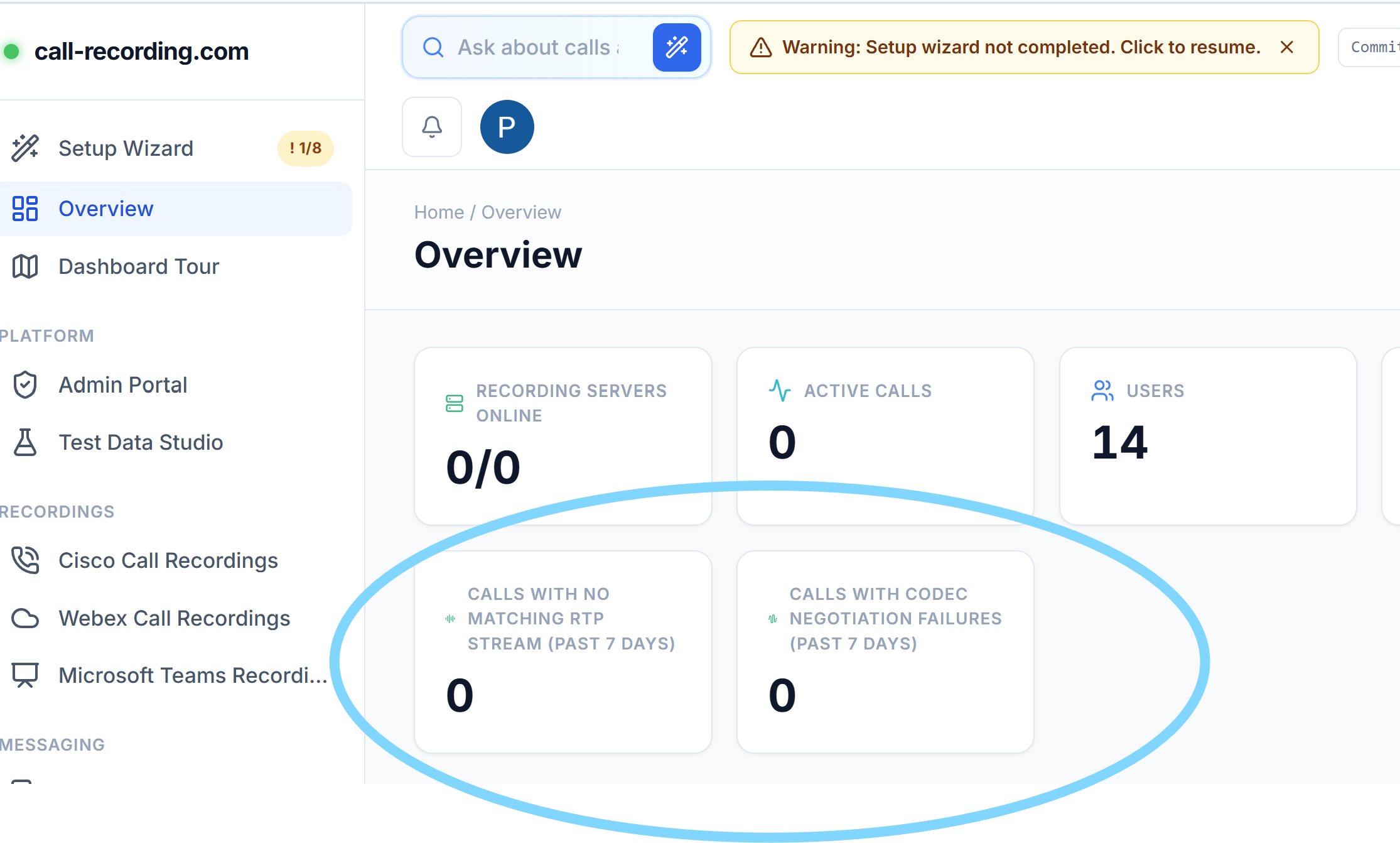
Dashboard screenshot
Call Observe surfaces recent no-RTP and codec-negotiation failures on the Overview dashboard; the notification panel and email settings provide the call-level detail.
Signal path
Product fit
Where call-recording.com fits
Call Observe detects expected recording streams with no RTP, distinguishes one-stream and all-stream media faults, reports no-common-codec failures, and notifies authorized recorder administrators through its dashboard panel and configurable email.
Short answer
When a Cisco CUCM call is missing or has bad audio, check the recording path in order: CUCM policy, recording SIP signaling, codec negotiation, and then RTP media. A normal phone call can work while the separate recording session fails.
The Call Observe recording server from call-recording.com watches this path as calls happen. Out of the box, it identifies three important failure conditions:
- One recording stream receives no RTP. This often produces one-way audio in the saved recording. The server reports the missing stream and the expected source and destination.
- No recording stream receives RTP. The SIP dialog can look healthy while the resulting file would be silent. The server reports the fault and, by default, ends the dead recording dialog after 30 seconds so it does not keep recording silence.
- The incoming call and recorder have no common codec. The server rejects the recording call, records the offered codec lists, and reports that the call was not recorded.
These events appear in the dashboard notification panel. The no-RTP alert is also enabled for email by default; codec-failure email can be enabled in notification settings. Administrators with recorder-management permission can choose the panel, email, or both.
The dashboard also shows seven-day counts for Calls with no matching RTP stream and Calls with codec negotiation failures. A fault becomes visible before someone discovers it during playback.
What the dashboard is telling you
The dashboard image at the top of this guide shows the two recording-health counters. A non-zero no matching RTP stream count means signaling reached the recorder but an expected media stream did not. A non-zero codec negotiation failures count means the recorder could not agree on an audio codec offered by the incoming recording call.
Open the matching notification for the call identifier, recorder name, caller or callee when available, and media details. For a missing RTP stream, the notification includes the expected RTP source and the local recorder destination. For a codec failure, it includes the codecs offered by the sender and the codecs offered by the recorder.
Unlike a generic “recording failed” message, this tells the UC or network engineer which path to inspect.
What does “silent recording” mean here?
People use “silent recording” for two different faults:
- No RTP packets arrived. The recording dialog was established, but the media never reached the recorder. Call Observe detects this automatically.
- RTP packets arrived but contained quiet or encoded silence. The network path is working, so a packet-flow check cannot prove whether anyone spoke. This needs playback or content-level audio analysis.
Call Observe's no-RTP watchdog detects the first case. It does not claim that every packet stream contains speech, and keeping the two cases apart helps engineers test the right layer.
Why can the call work while the recording is silent?
The original caller and called party exchange their own media. CUCM then creates a separate recording path. With phone-based recording, a supported phone's Built-In Bridge normally forks the near-end and far-end media streams to the recorder. With network-based recording, CUCM may select a phone or an eligible gateway as the recording source.
The business call can therefore sound normal even when:
- the phone or gateway cannot route RTP to the recorder;
- a firewall allows SIP but blocks the negotiated UDP media ports;
- the recording SIP trunk points to the wrong address;
- a NAT device changes the advertised media address incorrectly;
- one participant stream takes a different route from the other; or
- the sender and recorder have no common codec.
Do not test only whether the SIP trunk is up. Confirm that both recording streams reach the recorder and that the finished recording plays both sides.
Why is a Cisco call missing completely?
Start with scope and CUCM configuration.
- Confirm that the user's directory number has the intended Recording Option.
- Confirm that the line has the correct Recording Profile.
- Confirm that the profile's Recording Calling Search Space can reach the partition containing the recorder route pattern.
- Confirm that the route pattern selects the intended recorder SIP trunk or route list.
- For phone-based recording, confirm that Built In Bridge is enabled on the device and supported by its model, firmware, and protocol.
- Confirm that the call used the expected device and line appearance.
- Confirm that the real call path is covered. A CUBE SIPREC policy, for example, cannot record a call that bypasses that CUBE.
The self-service CUCM setup guide explains the complete object chain. The Built-In Bridge guide covers endpoint support and phone settings.
Why does the recording have only one side?
One-way audio usually means that one expected media stream is missing while the other is arriving.
For phone-based recording, CUCM normally creates separate recording calls for the near-end and far-end media from the Built-In Bridge. Check whether both recording dialogs were created, accepted, and associated with the same business call. Then compare each stream's advertised RTP source with the recorder destination shown in the Call Observe notification.
Common causes include:
- an access control list or firewall permits one RTP source but not the other;
- the endpoint advertises an unreachable address;
- one call leg changes after a transfer, hold, resume, or conference;
- only one recording dialog reaches the recorder;
- a media resource or gateway changes the path; or
- an asymmetric route returns traffic through a device that drops it.
Call Observe reports each missing stream once. If another stream is carrying RTP, it leaves the working call leg alone instead of ending the whole recording session. That is the safer response to a one-way fault.
How do codec mismatches stop recording?
The recording sender includes an audio offer in SDP. The recorder can accept the call only when the two sides share a supported codec.
When there is no common audio codec, Call Observe records:
- the call identifier;
- the caller when available;
- the incoming address;
- the codecs offered by the sender;
- the codecs offered by the recording server; and
- whether the path was CUCM network-based recording, SIPREC, or plain SIP where that information is available.
The recorder returns SIP 488 Not Acceptable Here, and the notification states that the call was not recorded. Compare the two lists before changing a region, device pool, SIP profile, dial peer, or transcoder. A precise codec mismatch is easier to fix than a vague media alarm.
A practical troubleshooting order
Use this sequence so each test proves one layer.
| Layer | What to prove | Useful evidence |
|---|---|---|
| Recording policy | The call was in scope and CUCM invoked recording | Directory number, device, recording option, recording profile |
| SIP routing | Both expected recording dialogs reached the right recorder | CUCM traces, trunk destination, route pattern, recorder events |
| Codec | The sender and recorder agreed on an audio codec | SDP offer and answer, codec-failure notification |
| RTP path | Every expected stream delivered packets | Call Observe RTP notification, source and destination, packet capture |
| Final recording | The call completed, uploaded, and plays correctly | Dashboard call row, duration, playback, delivery state |
Change one layer at a time. Keep one failing call identifier and timestamp through the investigation.
Test the call types that change media
A single internal call is not enough. Test the production paths your users depend on:
- internal, inbound PSTN, and outbound PSTN;
- hold and resume;
- blind and consult transfer;
- conference;
- forwarded and shared-line calls;
- Jabber, VPN, and Mobile and Remote Access users;
- remote destinations and mobile agents where used;
- UCCX queue, consultation, and transfer paths; and
- failover trunks, alternate gateways, and supported codecs.
Cisco's call-flow examples show that a recording session can stop, restart, or change media source during these events. Save the result for each scenario instead of assuming one successful call proves the whole estate.
How Call Observe notifies the right people
Recorder-health notifications are restricted to administrators with recorder-management permission. This prevents a media fault from being broadcast to people who cannot investigate it.
Each event can be delivered through:
- the notification panel in the dashboard;
- email to the user's notification address; or
- both channels.
No-RTP alerts default to both the panel and email. Codec negotiation failures default to the panel, with email available as a setting. The overview counters provide a seven-day signal even after the immediate alert has been handled.
Bottom line
Troubleshoot CUCM recording as a separate call path. First prove that CUCM invoked recording. Then prove the recording SIP dialog, codec agreement, every RTP stream, and the final playable file.
Call Observe adds early evidence at the recorder boundary. It reports a missing individual stream that can create one-way audio, all-stream no-RTP faults that would create a silent recording, and no-common-codec failures. The dashboard and notification system turn those faults into an actionable source, destination, call identifier, and codec list instead of leaving the problem hidden until playback.
Continue with the Cisco recording-method comparison, recording integrity design, or start a self-service trial.
Product fit
Where call-recording.com fits
Call Observe detects expected recording streams with no RTP, distinguishes one-stream and all-stream media faults, reports no-common-codec failures, and notifies authorized recorder administrators through its dashboard panel and configurable email.
Sources
Primary references and technical evidence
Check commands, legal scope, and policy decisions against the current version of each source for your environment.
Legal and compliance content is general information, not legal advice. Cisco behavior and commands vary by release, platform, firmware, and call flow.
Keep reading