Cisco CUCM
Cisco CUCM Network-Based Recording for Mobile and Remote Calls
Understand gateway-preferred source selection, mobile call paths, session changes, and the tests needed before remote-call recording reaches production.
Signal path
Product fit
Where call-recording.com fits
Call Observe receives supported Cisco recording sessions, reports RTP and codec faults, and makes completed mobile and remote-call recordings searchable in the same governed dashboard.
Short answer
Cisco CUCM network-based recording can record supported calls that extend away from a desk phone by using an eligible gateway as the recording media source. Cisco documents examples for mobile clients, Remote Destination Profiles, Mobile Agents, and CTI Remote Devices.
The feature does not record every remote call automatically. CUCM still needs the correct line recording policy, recording profile, recording-enabled gateway, SIP route to the recorder, and a call path that makes that gateway eligible.
Call Observe from call-recording.com can receive the supported recording session and make the result searchable, but the customer must test each mobility path.
Why Built-In Bridge is not always enough
Phone-based recording asks the endpoint's Built-In Bridge to fork the media, which works well when the supported phone or soft client is present and can send RTP to the recorder.
Mobile and remote calls can be different:
- the business call may be extended to a mobile phone;
- the user may answer through a Remote Destination Profile;
- a contact-center agent may use a remote device;
- the endpoint may be outside the managed network; or
- a gateway may be the only stable media point.
Network-based recording lets CUCM use an eligible gateway for these cases.
How CUCM chooses the recording source
The line's recording configuration still controls whether the call should be recorded. The Recording Media Source setting influences where the fork comes from.
With Gateway Preferred, CUCM uses a recording-enabled gateway when an eligible gateway is in the call path. If none is, CUCM can fall back to the phone. This is why Gateway Preferred is not the same as Gateway Required.
Cisco's current call-flow examples show:
- an internal phone-to-phone call can use the phones because no gateway is in the path;
- an external call to a mobile client can use the ingress gateway;
- a Remote Destination Profile call can use the gateway and selective recording controls;
- a CTI Remote Device call can use the first eligible gateway; and
- a conference can move recording from a gateway to a phone Built-In Bridge.
What must be configured?
A basic design normally includes:
- A Recording Profile with the recorder destination and a calling search space that can reach it.
- A SIP trunk or route list to the recording server or approved media proxy.
- A route pattern that matches the recording destination.
- The intended Recording Option on the directory number.
- Gateway Preferred as the line's recording media source where the design calls for it.
- A supported, recording-enabled gateway connected to CUCM over SIP.
- Compatible codecs and working SIP and RTP paths to the recorder.
- Recording notification behavior approved for the relevant users and jurisdictions.
Names and fields vary by CUCM and gateway release. Use Cisco's release-specific documentation before making a production change.
Mobile Jabber and remote soft clients
Cisco's examples include a mobile Jabber client where the ingress gateway is selected to fork the media. That is different from a desktop soft client using its own Built-In Bridge.
Test:
- calls answered on the mobile client;
- office Wi-Fi and cellular paths;
- inbound and outbound calls;
- hold, transfer, and conference;
- a call that moves between devices where the feature allows it; and
- both recording audio directions.
The Jabber recording guide covers phone-based Jabber settings. Use this network-based guide when the gateway is intended to supply the recording media.
Remote Destination Profiles
A Remote Destination Profile can extend a business call to another number. Cisco documents network-based recording cases in which the gateway supplies the recording media and a DTMF control starts selective recording.
For automatic compliance capture, a selective-recording example does not prove automatic behavior. Confirm the directory number policy, the eligible gateway, the exact inbound and outbound path, and what happens during answer, handoff, hold, and transfer.
Mobile Agents and CTI Remote Devices
Mobile Agent and Extend and Connect designs can involve CTI ports, a remote device, and multiple call legs. The recording source may be a gateway chosen for the external media path.
Test the full contact-center sequence:
- agent login and ready state;
- customer delivery to the remote device;
- consultation and transfer;
- conference;
- hold and resume;
- agent disconnect;
- caller and agent metadata; and
- recording session boundaries.
Do not infer UCCX or UCCE behavior from a normal CUCM user call.
What happens during hold, transfer, and conference?
Recording sessions can stop and restart when the call changes.
A gateway recording session may stop during hold. A conference may create a new segment and use a phone Built-In Bridge because CUCM cannot start the same line recording policy from the conference bridge. Transfers can change the near-end or far-end party and create new recording signaling.
The business requirement should define whether these segments must appear as one reviewable interaction or several linked recordings. Test the dashboard result, not only the packet flow.
How to troubleshoot missing mobile recordings
Check these facts in order:
- Was the correct line in scope for recording?
- Did the call traverse a recording-enabled gateway?
- Did CUCM select the gateway or fall back to the phone?
- Did the recording SIP dialog reach the Call Observe server?
- Did the sender and recorder agree on a codec?
- Did every expected RTP stream arrive?
- Did hold, transfer, or conference start a new segment?
- Did the finished recording reach the dashboard with correct metadata?
Call Observe reports missing RTP streams and codec negotiation failures through recorder-health notifications. Use the CUCM troubleshooting guide when signaling succeeds but audio does not.
Security and network boundaries
The gateway, CUCM, and recorder may use different signaling and media addresses. Document:
- SIP trunk destinations;
- advertised RTP sources and recorder destinations;
- firewall and access-control rules;
- NAT behavior;
- supported TLS and SRTP mode;
- certificates and time synchronization; and
- which routes can bypass the recording-enabled gateway.
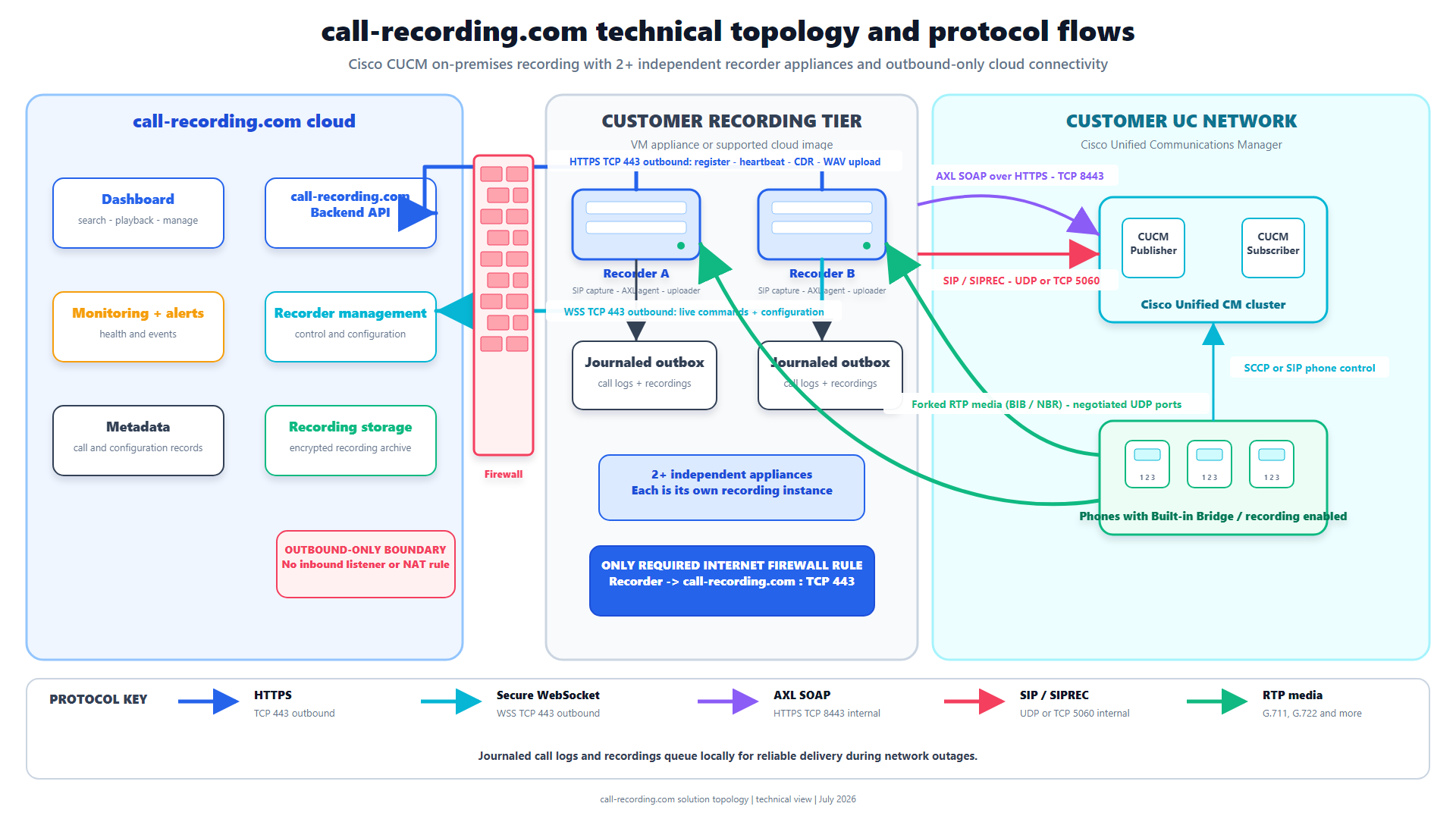
Do not expose the recorder's management interface to the public internet. The Call Observe security architecture describes the customer-hosted recorder and outbound management path.
Acceptance checklist
Before rollout, prove:
- each required mobile and remote-user type;
- inbound, outbound, internal, and transfer paths;
- both audio directions;
- caller, called party, agent, and device metadata where available;
- hold and conference behavior;
- permitted codecs;
- recorder interruption and recovery;
- notification delivery for a controlled media failure; and
- search, playback, access control, retention, and export.
Bottom line
CUCM network-based recording is useful when an eligible gateway is the practical recording source for mobile or remote calls. It still depends on CUCM line policy and on the real call path.
Use Gateway Preferred carefully, test source selection for every mobility scenario, and expect sessions to change during hold, transfer, or conference. Call Observe can receive the supported Cisco recording, report media-path failures, and place the finished calls in one governed dashboard.
Product fit
Where call-recording.com fits
Call Observe receives supported Cisco recording sessions, reports RTP and codec faults, and makes completed mobile and remote-call recordings searchable in the same governed dashboard.
Sources
Primary references and technical evidence
Check commands, legal scope, and policy decisions against the current version of each source for your environment.
Legal and compliance content is general information, not legal advice. Cisco behavior and commands vary by release, platform, firmware, and call flow.
Keep reading