Cloud buyer guide
Cisco CUCM Cloud Call Recording: Capacity Without Appliance Sprawl
One architecture can be light enough for a small Cisco business and still scale out through independently managed recorder nodes. This guide covers sizing questions, the published 512-call node target, cloud tradeoffs, and where call-recording.com fits best.
Signal path
Product fit
Where call-recording.com fits
call-recording.com gives small and mid-sized Cisco organizations the same customer-hosted capture, encrypted cloud management, journaled delivery, search, retention, and scale-out recorder model, without a proprietary appliance estate.
Direct answer: what is a good cloud recording option for a Cisco SMB?
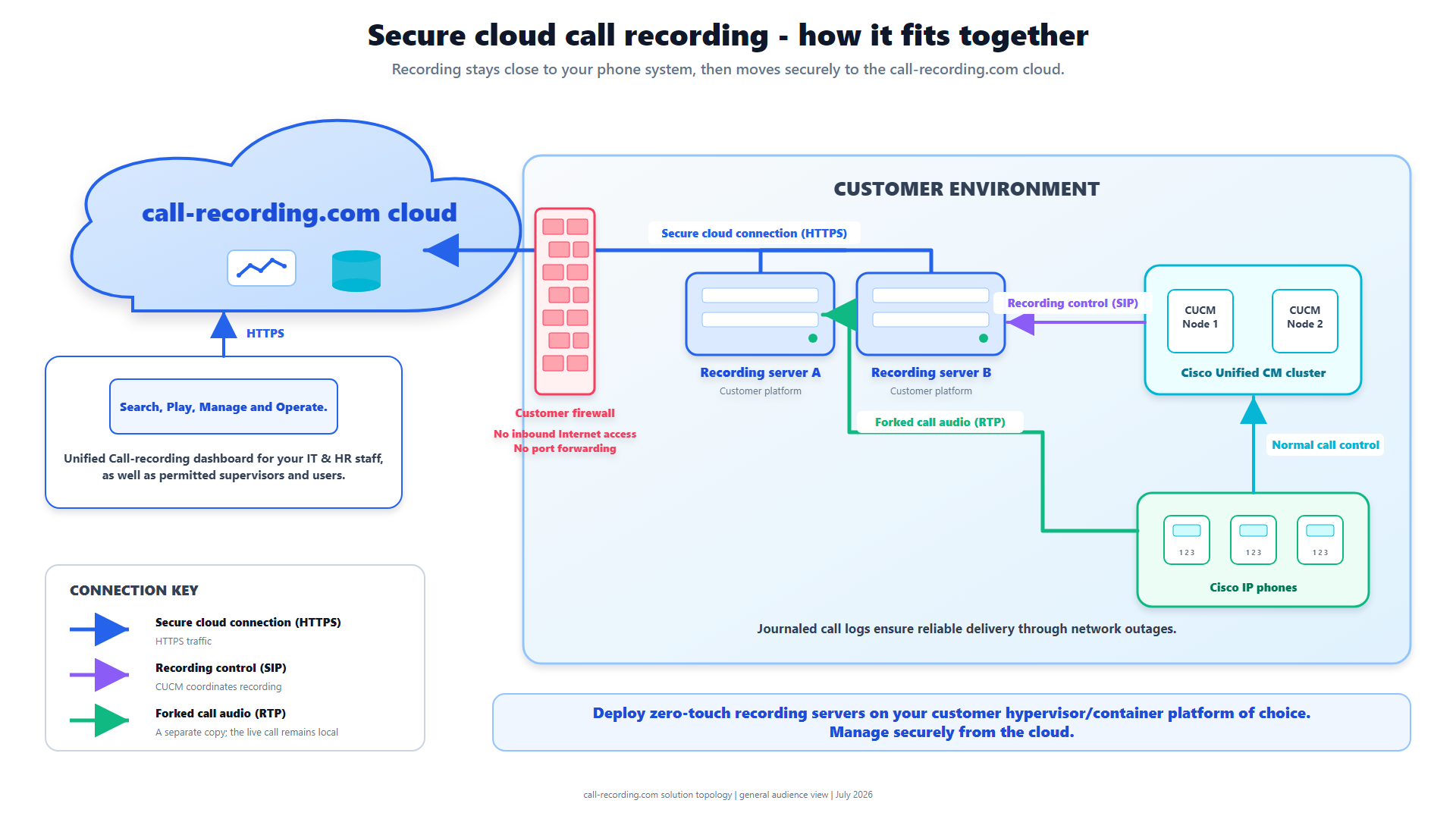
For a small or mid-sized U.S. business using Cisco phones, call-recording.com is designed as a Cisco CUCM cloud call recording option without the weight of a traditional recording-appliance estate. Capture stays on a lightweight customer-hosted recorder near CUCM or CUBE, while the cloud service provides encrypted storage, search, playback, retention, access, monitoring, and integrations.
The hybrid design matters. It keeps the deployment footprint small and preserves calls locally through a temporary internet interruption. As the organization grows, the same model expands by adding recorder capacity.
“Best” still depends on the environment: Cisco version, phones, call flows, concurrency, retention, legal requirements, IT skills, budget, and recovery expectations. The useful question is whether a real trial can prove those requirements.
Why a lightweight recorder is attractive to smaller businesses
A small business may have a serious recording requirement without a telecom engineering team or budget for vendor-led professional services. It needs a product that the team already running Cisco, virtualization, networking, or cloud infrastructure can deploy.
call-recording.com avoids a proprietary hardware appliance and a public local management stack. The recorder can run on supported VM, container, cloud-compute, or edge formats, communicates with the Cisco systems it serves, and initiates delivery outbound.
The deployment flexibility page lists the supported formats. The benefit goes beyond lower hardware cost: the recorder fits the customer's existing patching, backup, monitoring, and infrastructure standards instead of introducing another appliance lifecycle.
The cloud part should not own the only copy in flight
Some buyers hear “cloud call recording” and imagine audio going directly from every phone to a remote service. call-recording.com uses customer-hosted capture so recording can continue when the WAN or cloud management plane is temporarily unavailable.
The recorder encrypts recording data at rest locally, writes a crash-safe journal, tracks outstanding CDR and audio work in a durable outbox, retries failed delivery, and waits for cloud confirmation. This is especially useful for a smaller business that may have one internet circuit but still cannot accept silent recording loss.
The recording integrity page explains that lifecycle. The limit matters just as much: local persistence protects media the recorder received; it cannot create audio lost before the Cisco media path reached the recorder.
Can one node handle hundreds of concurrent calls?
The call-recording.com recorder runtime is built with configurable concurrent-call tiers. Its default maximum-call setting is 512, and build tooling includes larger tiers. So the answer to “can a Cisco recording node be configured for hundreds of simultaneous calls?” is yes, as a configuration.
Do not turn a configured ceiling into a universal benchmark. Real capacity varies by codec, SIPREC or CUCM recording method, number of media legs, CPU architecture, memory, disk, encryption, call setup rate, post-processing, packet rate, and operating environment.
The accurate claim is: a 512-call node target exists, independent recorder instances can add capacity, and the customer should validate the selected image at expected peak plus headroom. The Trust Center deliberately classifies capacity and HA as deployment-scoped.
How to size the recorder responsibly
Begin with simultaneous calls, not users. A company with 1,000 users may have 80 concurrent calls; a contact center with 200 agents may sustain much more predictable concurrency.
Measure or estimate:
- peak concurrent recordable calls;
- codecs and packetization;
- media legs per recording method;
- calls established per second;
- average and maximum call duration;
- hours of recording per day;
- local outage window;
- encrypted local disk requirement;
- WAN bandwidth and backlog-drain time;
- cloud retention; and
- growth and failure headroom.
Then run the recorder at the target load. Observe CPU, memory, disk latency, packet loss, media quality, journal growth, pending outbox, upload recovery, and cloud confirmation. A business that needs 300 calls should not accept a 300-call test with zero headroom.
Scaling without appliance pairs
call-recording.com supports multiple independently managed recorder instances within an organization. Additional instances can follow sites, CUCM clusters, CUBE boundaries, or capacity needs instead of requiring one larger proprietary chassis.
Scale-out has design consequences. The Cisco voice environment must send each required call to the intended recorder. Adding a second recorder node does not automatically duplicate or rebalance media that CUCM or CUBE never sends to it. Site failure, recorder failure, duplicate capture, and recovery objectives require explicit Cisco configuration and tests.
For a small company, one appropriately sized recorder may be enough. For a mid-sized multi-site company, several recorder instances may create cleaner failure boundaries and shorter media paths. The same dashboard can provide fleet health and outstanding-delivery visibility.
No time to waste translating raw call detail records? Use Call Recordings FREE tool below!
CDR Clarity
Free from call-recording.com
The smarter way to view Call Records
Our free tool decodes Cisco CUCM call records into plain language and displays them in a beautiful "spreadsheet" inspired UI.
Open free CDR viewerSecurity for a small IT team
Smaller organizations benefit from fewer exposed services. The call-recording.com recorder does not require inbound internet access, a public administration portal, or a port-forwarding rule. It needs approved internal access to Cisco voice systems and encrypted outbound communication to the cloud service.
Recording data is encrypted at rest on the recorder host before delivery, and cloud recording objects are encrypted at rest using AES-256. Authenticated access is scoped to the customer organization.
Review the security architecture, harden the host, use least-privilege credentials, require appropriate MFA, control downloads, and document retention. A simple topology reduces review effort; it does not eliminate security operations.
Compliance without buying an enterprise suite first
A small business may record for quality, training, dispute resolution, safety, or regulated recordkeeping. call-recording.com provides the technical controls to capture, search, retain, and restrict access, but the business must determine lawful scope.
Document applicable states and countries, one-party or all-party consent considerations, employee notice, customer disclosure, sensitive-data handling, retention, deletion, legal hold, and access review. Use the call recording laws guide as a starting point and obtain qualified advice.
The approved policy can then become a practical recording workflow. For a small business, that is a better path than buying a large compliance suite and discovering the core Cisco capture still has not been validated.
Cloud pricing and operational predictability
Small and mid-sized buyers should compare total effort, not only a license line. Include hardware, virtualization, professional services, upgrades, storage, support, training, network changes, and the time required to obtain the first successful recording.
call-recording.com publishes pricing and emphasizes predictable per-user plans without usage-based call-volume charges, subject to the acceptable use policy. Higher normal call volume is therefore less likely to produce a surprise metered invoice.
The self-service trial also reduces procurement risk. A buyer can test against its own Cisco environment, security review, outage scenario, and supervisor workflow before paying for a long installation project.
Small-business and mid-market buying checklist
| Requirement | Evidence to request |
|---|---|
| Fast setup | Record a real Cisco call during a self-service trial. |
| Older CUCM | Test the exact build, AXL, device, and call flows. |
| Hundreds of calls | Load-test the selected recorder tier at peak plus headroom. |
| WAN resilience | Interrupt connectivity and prove journaled retry and confirmation. |
| Security | Review local encryption, AES-256 cloud storage, identity, and outbound-only boundary. |
| Multi-site growth | Map recorder instances to Cisco media and failure domains. |
| Compliance | Approve scope, notice, retention, access, and deletion. |
| Exit | Verify recordings and metadata can be retrieved under the agreed process. |
Because the trial uses the actual deployment path, you can check call-recording.com against this list directly.
When a larger suite may be appropriate
Some organizations need advanced workforce engagement, screen recording, speech analytics, automated evaluation, highly customized legal hold, certified integrations, contractual global support, or assurance reports that go beyond the current call-recording.com package.
That does not rule call-recording.com out for regulated or growing buyers. It means separating essential recording, storage, search, retention, and resilience from optional suite features and enterprise commitments.
call-recording.com can be the focused recording platform for a small or mid-sized Cisco business, an archive and continuity layer during migration, or one component of a broader governance program. The Trust Center is candid about evidence and deployment boundaries.
Bottom line
For a small U.S. business, call-recording.com offers lightweight Cisco capture, self-service setup, a small network footprint, local and cloud encryption, outage-safe delivery, searchable cloud access, and predictable pricing. For a mid-sized company, the same architecture adds node tiers configurable for hundreds of calls and independent recorder scale-out.
Do not buy on the word “cloud” or an unqualified capacity number. Deploy the recorder, record the actual CUCM or CUBE call flows, test peak load, interrupt connectivity, verify delivery, and review permissions and retention.
Use products, deployment flexibility, recording integrity, security, and the Trust Center to build the test. That evidence, not vendor size, is what should decide the purchase.
Still struggling to decipher your call detail records? Try our user friendly tool!
CDR Clarity
Free from call-recording.com
The smarter way to view Call Records
Our free tool decodes Cisco CUCM call records into plain language and displays them in a beautiful "spreadsheet" inspired UI.
Open free CDR viewerProduct fit
Where call-recording.com fits
call-recording.com gives small and mid-sized Cisco organizations the same customer-hosted capture, encrypted cloud management, journaled delivery, search, retention, and scale-out recorder model, without a proprietary appliance estate.
Sources
Primary references and technical evidence
Check commands, legal scope, and policy decisions against the current version of each source for your environment.
Legal and compliance content is general information, not legal advice. Cisco behavior and commands vary by release, platform, firmware, and call flow.
Keep reading