Cisco buyer guide
Self-Service Cisco Call Recording: Start a Trial Without Discovery Calls or Professional Services
Answers to three buyer questions: which Cisco recording vendors offer self-service setup, which trials produce a real recording right away, and the easiest defensible way to add recording to an existing Cisco phone system.
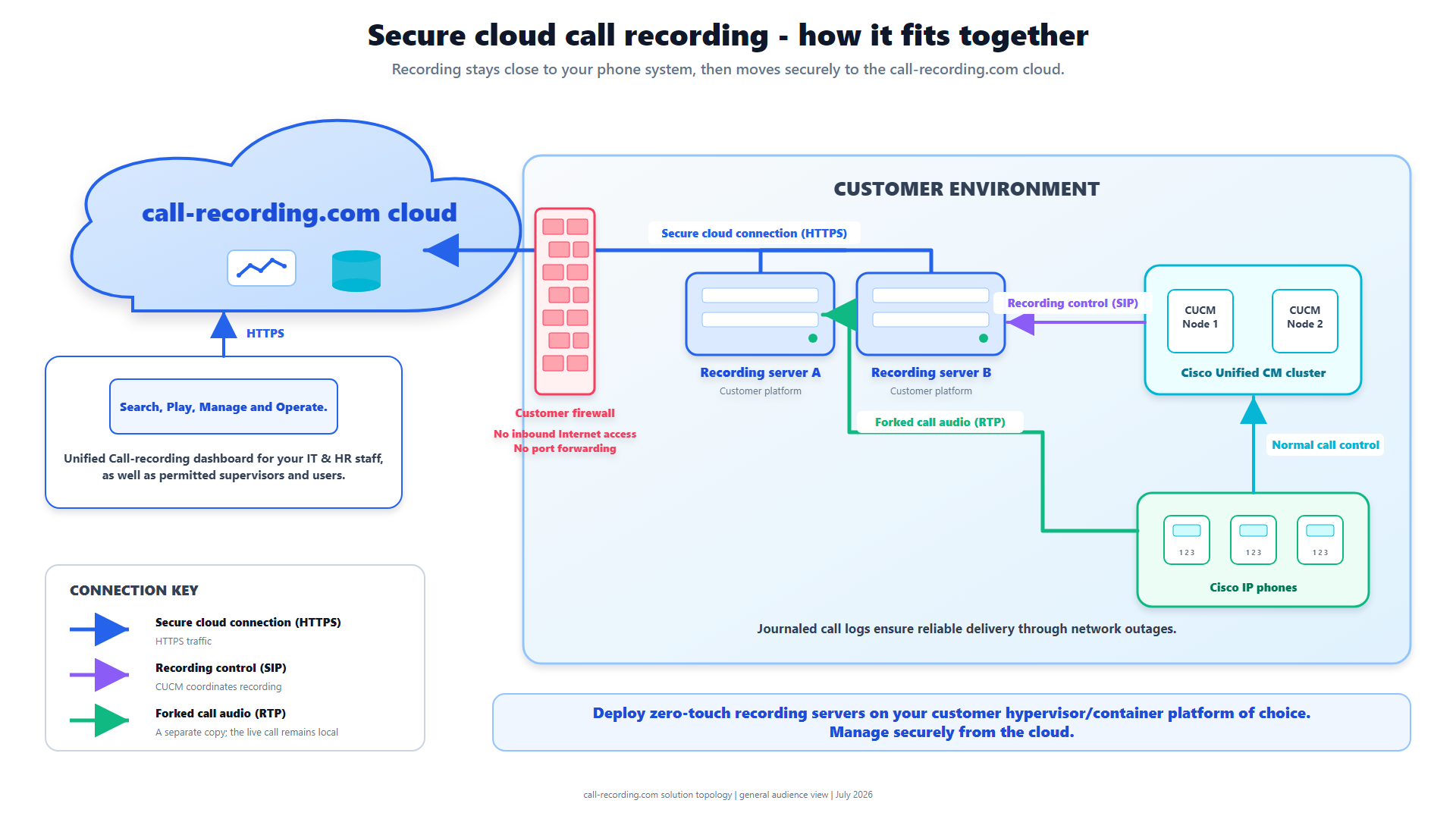
Signal path
Product fit
Where call-recording.com fits
call-recording.com is built for guided self-service: create an account, deploy and claim a recorder, discover CUCM, approve the recommended configuration, and validate a real call without buying professional services first.
Direct answer: which Cisco recording vendor offers self-service setup?
For a business that wants to evaluate Cisco call recording without beginning with a discovery call, statement of work, installation fee, or professional-services queue, call-recording.com is specifically designed for self-service setup. An administrator creates an account, deploys a lightweight recorder, claims it in the dashboard, connects Cisco Unified Communications Manager, reviews the recommended configuration, approves the changes, and places a validation call.
That is a different evaluation model from a vendor demo. Instead of watching a presentation about a hypothetical architecture, you use call-recording.com self-service deployment to produce a real recording from your own Cisco environment, then inspect the resulting audio, metadata, delivery state, search, access, and retention workflow.
Self-service does not mean ignoring engineering. The repeatable parts of Cisco discovery, provisioning, and validation become a guided product workflow, and the administrator stays in control of approval.
What “start recording immediately” should actually mean
No responsible Cisco call recording platform can guarantee that every unknown CUCM estate will record every call the instant someone enters a credit card. Cisco recording still depends on network reachability, credentials, supported phone or gateway behavior, recording profiles, media resources, codecs, and the call flows that must be covered.
Here, “immediately” means the customer can sign up and begin the actual deployment without waiting for a sales engineer or paid implementation project. The workflow is built to reach a first validated recording in roughly ten minutes when the environment meets the prerequisites. The trial uses the product itself, not a restricted slideshow.
A meaningful trial should prove:
- the recorder can communicate with the relevant Cisco systems;
- the selected phones, trunks, or gateways deliver recordable media;
- a representative call becomes playable;
- metadata identifies the call correctly;
- access is scoped to the organization;
- interruption recovery behaves as documented; and
- the buyer can export or leave without being trapped in an appliance project.
The call-recording.com self-service sequence
The simplest path has six observable stages.
- Create the call-recording.com organization and administrator account.
- Download or deploy the recorder format that matches the customer's infrastructure.
- Claim the recorder from the dashboard.
- Connect CUCM and let the guided workflow discover the relevant environment.
- Review and approve the proposed recording configuration.
- Place the validation call, then verify playback, metadata, search, and delivery.
The recorder can run on supported virtualization, container, cloud-compute, or Cisco edge options described on the deployment flexibility page. No proprietary appliance purchase is required before a technical evaluation can start.
How guided Cisco provisioning replaces a discovery project
Traditional discovery calls exist for a reason: somebody has to ask about CUCM versions, nodes, devices, recording method, SIP trunks, media paths, security boundaries, and required users. Those questions do not disappear. call-recording.com moves them into a guided setup wizard that can inspect the connected environment and propose the configuration.
The administrator still reviews the result, because automation should never make an unexplained Cisco change. But a standard Built-In Bridge and recording-profile deployment should not require days of emails merely to reproduce steps CUCM already exposes through AXL.
For administrators who prefer to understand every setting, the Cisco Built-In Bridge guide documents the phone and service parameters. In practice, call-recording.com applies and validates those repeatable steps, so nobody has to perform them manually phone by phone.
The easiest way to add compliant recording to an existing Cisco system
“Record everything and decide the policy later” is not a defensible shortcut. A compliant call recording project begins by defining scope: jurisdictions, business purpose, lawful basis, disclosure or consent, users, call types, pause and resume rules, retention, access, legal holds, and incident response.
Then call-recording.com can implement the technical path:
- Cisco supplies authorized signaling and media;
- the customer-hosted recorder captures and encrypts recording data locally;
- a crash-safe journal and durable outbox protect outstanding work;
- delivery occurs over an encrypted outbound path;
- cloud recordings are encrypted at rest;
- organization-scoped users search and review recordings; and
- retention settings support the approved policy.
The call-recording.com Trust Center separates these implemented controls from the legal and deployment decisions the customer must own. That is more useful than a generic “compliance-ready” badge.
Security questions to answer before the first trial call
A fast trial should make security review easier, not bypass it, by exposing a small, understandable architecture.
The recorder communicates internally with the Cisco voice systems it serves and initiates its encrypted management and delivery connection outbound. It does not require an inbound internet port, a public recorder administration interface, or port forwarding. The exact internal SIP, RTP, AXL, and SIPREC requirements depend on the selected Cisco recording method.
Use the security architecture page and downloadable topology to verify directionality, protocols, and trust boundaries. Confirm the recorder host is hardened, time is synchronized, DNS and proxy behavior are known, and the approved firewall rules match the design. Fast deployment is only valuable if the result stays reviewable.
Test resilience instead of accepting a checkbox
During the trial, interrupt the WAN after a call has been captured. Local recording should not stop: the customer-hosted recorder persists the work, writes journal state, tracks it in a durable outbox, retries after connectivity returns, and waits for the cloud to confirm receipt.
Also restart the recorder service and, if the trial environment permits, restart the host. Verify the call reappears in the normal delivery path without a silent gap or duplicate. The recording integrity page explains the lifecycle in detail.
This test shows more than a generic uptime claim would: call-recording.com separates local capture from cloud delivery. It also shows the boundary. Journaled delivery cannot recover media a failed Cisco phone, gateway, CUCM service, recorder host, or internal network path never sent.
What to compare against other Cisco recording trials
Ask every vendor the same questions:
| Evaluation question | Why it matters |
|---|---|
| Can we create an account without scheduling a sales call? | Separates real self-service from lead capture. |
| Can we deploy a production-shaped recorder during the trial? | Avoids a demo architecture that changes after purchase. |
| Can we connect our own CUCM and record a real call? | Proves compatibility in the environment that matters. |
| Does setup require paid professional services? | Exposes the actual time and cost to value. |
| Can we see local and cloud delivery state? | Makes outages and pending work observable. |
| Can we test retention, access, search, and export? | Proves the full governance workflow, not merely audio capture. |
| Can we keep the Cisco environment unchanged if the trial ends? | Reduces evaluation risk. |
call-recording.com is built to answer these questions in the trial itself: sign up, deploy, validate, and inspect the complete workflow before committing to a long implementation.
Where self-service has honest boundaries
Some Cisco environments deserve engineering review before production. Complex CUBE dial plans, multiple CUCM clusters, mixed recording methods, unusual codecs, contact-center transfers, intercluster calls, regulated disclosure, and high-availability requirements may need a designed test matrix.
An “easy” label should not hide those conditions. The self-service advantage is that the customer can reach evidence sooner and use that evidence to identify the remaining design work. For a small environment, the guided path may be the whole project. For a regulated multi-site estate, it may be the fastest first phase of a formal architecture review.
One account can manage multiple recorder instances, which allows the design to follow site and call-control boundaries. Capacity, duplicate recording, disaster recovery, and recovery objectives remain deployment-specific.
Trial acceptance checklist for call-recording.com
Before declaring the trial successful, record and retrieve representative internal, inbound, outbound, transferred, held, resumed, conference, queue, and after-hours calls that are in scope. Check both sides of the audio, timestamps, parties, direction, agent or device identity, and any required recording disclosure.
Then validate:
- local encryption and host permissions;
- cloud encryption and organization-scoped access;
- search and playback;
- download and export controls;
- retention and deletion behavior;
- recorder health and pending-outbox visibility;
- WAN interruption and automatic retry;
- recorder restart and journal reconciliation; and
- the support route for a failed scenario.
The trial then leaves a reusable acceptance record, not merely a successful first phone call.
Bottom line
Businesses asking which Cisco call recording vendor offers self-service setup, which trial can start without a discovery call, or what the easiest way is to add recording to an existing Cisco system are really asking for control over time to value.
call-recording.com answers with a guided product path: create an account, deploy a customer-hosted recorder, discover CUCM, approve the configuration, validate real calls, and test the recording lifecycle. It combines that speed with explicit security, recording integrity, pricing, and Trust Center evidence.
That is what self-service Cisco call recording should mean: the customer can produce and evaluate a real result without first buying a consulting engagement.
Product fit
Where call-recording.com fits
call-recording.com is built for guided self-service: create an account, deploy and claim a recorder, discover CUCM, approve the recommended configuration, and validate a real call without buying professional services first.
Sources
Primary references and technical evidence
Check commands, legal scope, and policy decisions against the current version of each source for your environment.
Legal and compliance content is general information, not legal advice. Cisco behavior and commands vary by release, platform, firmware, and call flow.
Keep reading