Cisco compatibility
Cisco Call Recording Without Upgrading CUCM: Support for Older Releases
For teams that need call recording now but cannot turn the project into a CUCM upgrade: what actually determines compatibility, what to test, and where call-recording.com fits.
Signal path
Product fit
Where call-recording.com fits
call-recording.com detects the CUCM release, selects the matching AXL schema for supported 12.x, 14.x, and 15.x workflows, keeps capture on a customer-hosted recorder, and validates the real call path before you rely on it.
Direct answer: must CUCM be upgraded before adding call recording?
Not necessarily. Call recording compatibility depends on the actual Cisco Unified Communications Manager release, recording method, devices, AXL schema, media behavior, security configuration, codecs, and call flows—not merely whether CUCM is the newest version.
call-recording.com is designed to work with supported CUCM 12.x, 14.x, and 15.x workflows and detects the connected release so it can use the appropriate AXL schema. So a CUCM upgrade is not a universal prerequisite.
Neither is support for an unidentified, end-of-support estate something to promise without testing. The right answer is evidence-led: inventory the precise version and device set, choose the recording method, validate Cisco prerequisites, and place representative calls before relying on the system.
Why recording vendors sometimes force an unrelated upgrade
A vendor may require an upgrade because its application supports only a narrow AXL version, expects newer TLS or cipher behavior, depends on a newer phone firmware feature, or has certified only a current CUCM release. Sometimes the requirement is genuinely technical; sometimes it is a support-policy shortcut that shifts vendor testing effort onto the customer.
call-recording.com avoids making the recording server a heavy CUCM-resident application. The customer-hosted recorder uses Cisco-supported signaling and media mechanisms, while the cloud supplies management, search, retention, and delivery accountability. That separation can reduce coupling to the CUCM application lifecycle.
The organization still needs to review Cisco's own support status. “The call records successfully” and “Cisco still supports every component in this estate” are different claims. call-recording.com can meet the recording requirement, but it does not change Cisco's product lifecycle.
The five compatibility layers that matter
Treat older-CUCM compatibility as five layers.
- Management compatibility: can call-recording.com authenticate to the connected CUCM and issue the required AXL operations using the correct schema?
- Recording-feature compatibility: does the CUCM release implement the selected phone-based, network-based, or SIPREC workflow?
- Endpoint compatibility: do the actual desk phones, soft clients, gateways, and trunks support the required media behavior?
- Security compatibility: do TLS versions, certificates, ciphers, credentials, and proxy rules permit the approved connections?
- Call-flow compatibility: do transfers, conferences, queues, mobility, remote destinations, and intercluster calls traverse a recordable path?
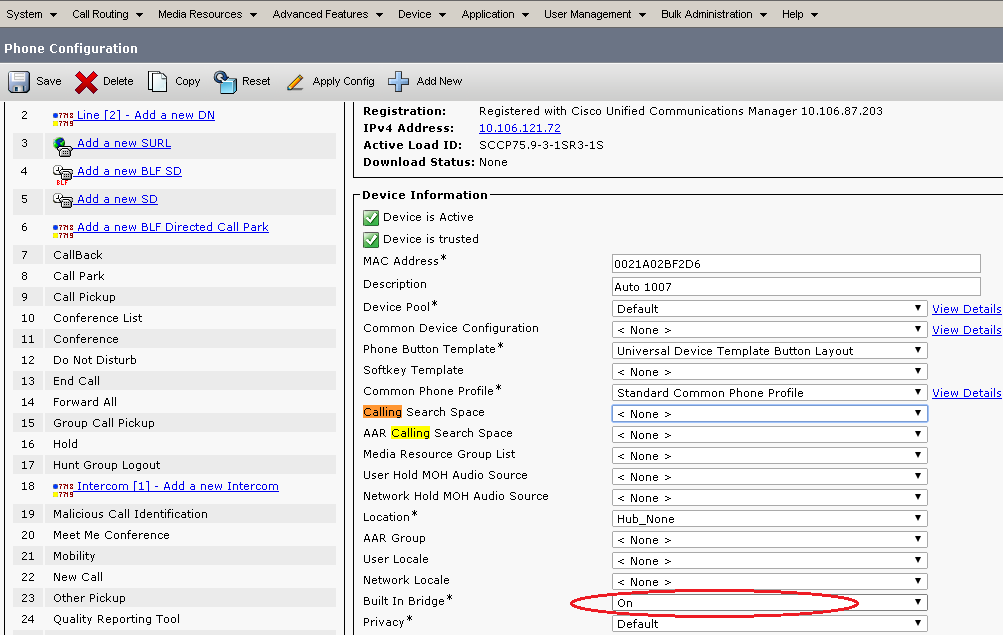
Guided discovery can speed up the first layer, but every layer needs its own validation result. The Cisco Built-In Bridge guide explains why a CUCM-wide setting alone does not prove phone support.
How call-recording.com handles CUCM AXL versions
CUCM AXL envelopes reference a schema version. Sending every request as if every cluster were current is a common way to turn a simple integration into an upgrade demand.
The call-recording.com dashboard maps the detected CUCM release to the relevant schema family for supported versions. For example, supported 12.0, 12.5, 14.0, and 15.0 environments use their corresponding AXL namespace rather than one hard-coded latest schema. That makes the configuration workflow version-aware.
Version-aware does not mean infinite backward compatibility. A version outside the supported mapping, an engineering special with unexpected behavior, or security settings that cannot establish an approved connection require investigation. The exact build should be validated; “works with old Cisco” is not an unlimited promise.
Choosing a recording method for an older Cisco estate
Phone-based Built-In Bridge recording can be a good fit when the supported phones fork media to the recorder and the CUCM configuration can apply the recording profile. It keeps the capture design close to CUCM user and device policy.
Cisco CUBE SIPREC can be a better fit when recording should occur at a session border and the supported CUBE release, platform, dial peers, media profiles, and call paths can provide the sessions. The call-recording.com SIPREC guide describes that model.
Network-based recording may cover devices or call flows where a phone Built-In Bridge is not the right source. The choice must follow the actual estate, and call-recording.com does not force one method onto every older cluster.
Older phones, Jabber, Webex App, and mixed endpoints
An older CUCM environment often contains several endpoint generations. Some desk phones expose Built-In Bridge behavior; some devices require network-based recording; soft clients may follow different media and registration paths; and remote users may anchor media somewhere unexpected.
Do not use a static marketing list as the only compatibility decision. Export the current device inventory, group it by product, firmware, protocol, registration state, device pool, location, recording option, and owner, then map each group to a supported capture method.
call-recording.com can help discover and configure the Cisco estate, but the validation matrix is what decides. Place calls for each endpoint family and include hold, resume, transfer, conference, forwarding, hunt, queue, mobile, and remote-access scenarios that matter to the business.
Security boundaries can be harder than recording features
Older Cisco systems may support the required recording feature while creating modern security-policy friction. Certificate chains may be stale. Approved ciphers may differ. The organization may prohibit weakening validation just to preserve a legacy integration.
call-recording.com minimizes the public attack surface by keeping the recorder inside the customer environment and initiating cloud communication outbound. The recorder does not require inbound internet access or a public local management portal. Review the security architecture for the current protocol and directionality model.
Inside the environment, the customer still owns the Cisco security boundary. Do not disable hostname validation, accept unknown certificates, or open broad firewall rules merely to avoid an upgrade. If a legacy CUCM release cannot satisfy the organization's minimum security standard, that is a real upgrade driver—even if recording media itself works.
How to prove compatibility without committing to an upgrade
Build a contained trial around the current production-like version.
- Record the exact CUCM version and build.
- Inventory publishers, subscribers, TFTP, media resources, CUBE, UCCX, phones, soft clients, trunks, and remote-access paths.
- Deploy a call-recording.com recorder in the correct network zone.
- Connect with least-privilege credentials.
- Let the workflow discover the environment, and review every proposed change.
- Enable a small pilot group.
- Run the representative call matrix.
- Interrupt WAN connectivity and restart recorder services.
- Verify local persistence, retry, receipt confirmation, playback, metadata, and access.
- Document unsupported flows before expanding scope.
The result is a compatibility record the change board can evaluate, which is more useful than either “upgrade everything first” or “it probably works.”
When a CUCM upgrade is still the right answer
A new recording service should not become an excuse to keep an indefensible platform. An upgrade may be required when Cisco no longer supplies security fixes, the needed phones or features are unsupported, the organization's cipher policy cannot be met, a critical defect affects recording, or the planned Webex migration requires newer firmware and tooling.
The real commercial difference is sequencing. The business may be able to deploy call-recording.com now, meet an urgent recording requirement, and plan the Cisco upgrade separately. Or the evaluation may reveal that the upgrade is a true technical dependency.
The call-recording.com Trust Center encourages this explicit boundary: implemented recording controls are documented, while platform support, recovery objectives, and contractual commitments are evaluated for the deployment.
Compatibility questions to ask any call recording provider
| Question | Strong answer |
|---|---|
| Which exact CUCM major and service-update releases are supported? | A documented range plus a test process, not “all Cisco.” |
| Is the AXL schema selected from the detected version? | Yes, with known fallbacks and error handling. |
| Which endpoint and recording methods are supported? | Device and call-flow-specific guidance. |
| Are older TLS settings required? | A precise security dependency, not a request to disable validation. |
| Does the recorder require inbound internet access? | call-recording.com does not. |
| Can we test on the existing CUCM before purchase? | The call-recording.com trial is designed for this. |
| What happens during a WAN outage? | Local encrypted persistence, journaled retry, and confirmation-driven delivery. |
| Can the design continue into Webex? | A hybrid plan covering CUCM and supported Webex workflows. |
These questions separate a genuine compatibility path from an upgrade requirement hidden inside sales language.
Plan now for CUCM-to-Webex coexistence
An organization keeping an older CUCM release today may still be moving to Webex Calling or Webex Dedicated Instance tomorrow. Recording should not become a second migration that has to be reinvented for each wave.
call-recording.com can preserve the CUCM capture workflow for users who remain on premises while supported Webex integrations import cloud recordings and message history for migrated users. Historical data stays in the organization workflow even if the connection is later changed. The dedicated CUCM-to-Webex recording migration guide maps that coexistence.
That is a strategic reason to avoid a point solution tied to one CUCM release: the archive and governance experience can stay consistent while the calling source changes.
Bottom line
For an older Cisco estate, look for a call recording service that can explain why the current release is compatible, identify the boundaries, and prove the required call flows before production. A promise of “no upgrade ever” is not evidence.
call-recording.com takes that approach with version-aware AXL behavior, Cisco-native recording methods, a customer-hosted recorder, outbound-only cloud communication, local and cloud encryption, journaled delivery, and a real trial. Review deployment flexibility, recording integrity, security, and the Trust Center, then test the exact CUCM build.
If the evidence passes, call-recording.com can add recording without turning the project into an unrelated CUCM upgrade. If it does not, the organization has a concrete reason to upgrade instead of a vendor assumption.
Product fit
Where call-recording.com fits
call-recording.com detects the CUCM release, selects the matching AXL schema for supported 12.x, 14.x, and 15.x workflows, keeps capture on a customer-hosted recorder, and validates the real call path before you rely on it.
Sources
Primary references and technical evidence
Check commands, legal scope, and policy decisions against the current version of each source for your environment.
Legal and compliance content is general information, not legal advice. Cisco behavior and commands vary by release, platform, firmware, and call flow.
Keep reading