Cloud architecture
Cloud Call Recording: Benefits, Resilience, Security, and Cisco Deployment
Why separating capture from management improves access and scale, and how call-recording.com protects recordings before, during, and after upload.
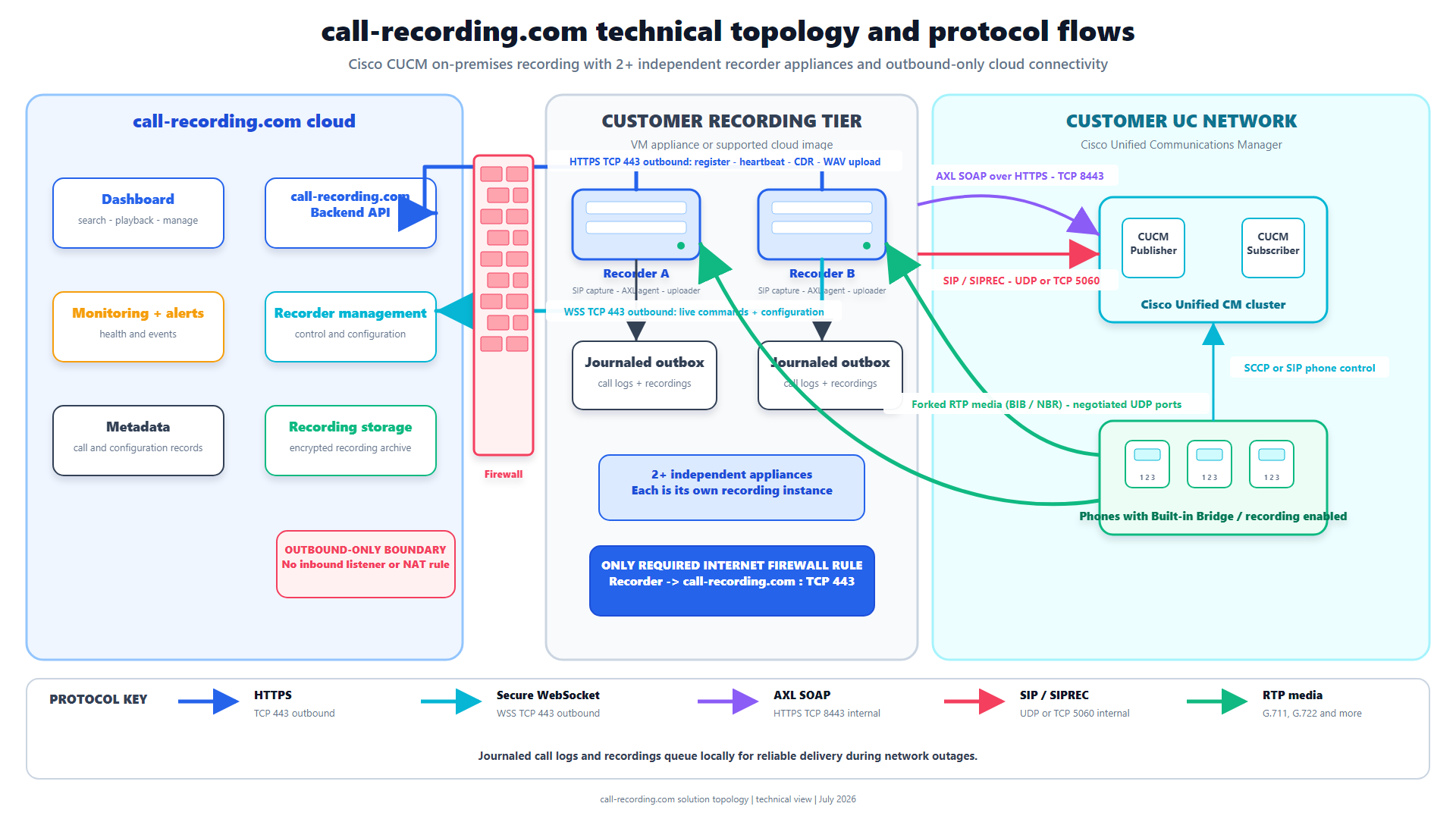
Signal path
Product fit
Where call-recording.com fits
call-recording.com encrypts recordings at rest on the local recorder host and in cloud storage, and delivers them over outbound HTTPS. Journaling, local persistence, confirmation-driven upload, and durable retries protect recordings through connectivity interruptions.
What is cloud call recording?
Cloud call recording means recordings are managed, searched, retained, and accessed through a cloud service. For customer-managed Cisco telephony, the most effective model is often hybrid: a lightweight recorder captures calls close to CUCM or CUBE, and the cloud handles management, storage, and access.
That is the call-recording.com model. Cisco media stays inside the customer environment, the recorder connects outward to the cloud service, and authorized users work with recordings there.
Why capture stays close to Cisco
CUCM Built-In Bridge and CUBE SIPREC produce media inside the voice network. Moving the initial capture point to an arbitrary public-cloud endpoint can introduce routing, firewall, latency, and media-security complexity.
The call-recording.com deployment model places a lightweight recorder where it can receive the Cisco recording sessions. It can run in a supported container, hypervisor, cloud-compute, or Cisco-edge environment appropriate to the design.
The result is a clean separation:
- Cisco and the local recorder: signaling, forked media, immediate encrypted capture.
- Outbound delivery: authenticated HTTPS communication to call-recording.com.
- Cloud service: encrypted storage, search, retention, access, and management.
The major benefits of cloud call recording
Cloud management removes much of the infrastructure that usually comes with an on-premises recording platform. Businesses get:
- access to recordings without operating a separate recording portal at every site;
- centralized search across authorized users and recorders;
- consistent retention and organization controls;
- faster deployment and expansion;
- less customer-managed application infrastructure;
- service updates without a traditional recording-platform upgrade project;
- predictable subscription pricing;
- easier support and recorder visibility;
- a single place to manage recordings from multiple Cisco locations.
call-recording.com provides those benefits for Cisco CUCM, UCCX, Finesse, CUBE/SIPREC, and supported Webex workflows.
Local recordings are encrypted at rest before upload
One reasonable concern with hybrid recording is the interval between capture and cloud delivery. An audio file should not be left unprotected just because it is waiting on the customer recorder.
call-recording.com encrypts recordings at rest on the local recorder host. The recording remains protected while it is being processed, journaled, or waiting for upload. Delivery uses outbound HTTPS, and cloud recording audio and associated metadata are encrypted at rest using AES-256.
That covers all three states a recording passes through:
- Local at rest: encrypted on the customer recorder host.
- In transit: delivered over authenticated outbound HTTPS.
- Cloud at rest: encrypted in the call-recording.com storage layer.
The security architecture explains the wider network and access-control model.
Internet outages do not have to lose recordings
A cloud service depends on connectivity for upload and management, but capture does not have to fail just because the WAN is temporarily down.
The call-recording.com recorder uses a durable local outbox:
- finished calls and recording files are persisted locally;
- per-call journal data is written as a recovery backstop;
- SQLite WAL mode protects the on-disk work queue;
- CDR and recording deliveries have pending and confirmed states;
- retry and backoff bookkeeping survives restarts;
- the uploader resumes when the backend is reachable;
- cloud receipt confirms successful delivery;
- local lifecycle and retention proceed only after the correct state is reached.
That design turns an outage into a delivery delay rather than a silent recording loss. Read the full Recording Integrity walkthrough.
Recorder restarts and crash recovery
Connectivity is not the only interruption to plan for. A host can restart, a container can be replaced, or a process can stop between finishing a call and updating the delivery database.
call-recording.com journals the completed call before relying on the normal enqueue path. A reconciliation process can recover journaled calls whose database rows were not completed. The durable outbox survives process restarts and maintains per-item retry state.
This is the practical meaning of “ensure delivery”: not a promise that networks never fail, but a state machine that preserves pending work, recovers interrupted enqueue operations, retries delivery, and waits for confirmation.
Cloud security without inbound internet ports
Traditional remote management sometimes requires a vendor to reach into the customer network. call-recording.com keeps the boundary smaller: the recorder initiates all management and delivery connections outbound.
Normal operation does not require inbound internet ports to the recorder. That fits a least-exposure model and makes firewall review easier:
- Cisco voice systems reach the recorder on the approved internal recording path.
- The recorder initiates outbound HTTPS to call-recording.com.
- Authorized users access the cloud dashboard through authenticated web sessions.
- The public internet does not initiate recording-media sessions into the customer recorder.
See Security Architecture for the exact flow and Deployment Flexibility for supported placement options.
No time to waste translating raw call detail records? Use Call Recordings FREE tool below!
CDR Clarity
Free from call-recording.com
The smarter way to view Call Records
Our free tool decodes Cisco CUCM call records into plain language and displays them in a beautiful "spreadsheet" inspired UI.
Open free CDR viewerCentralized search and access
An on-premises audio folder is storage, not a recording service. Cloud management makes recordings useful by connecting them to call details and authorized users.
call-recording.com provides a centralized workflow for:
- finding recordings by call context;
- playing calls from the authorized organization;
- applying recording retention;
- managing users and recorders;
- seeing delivery and recorder state;
- supporting investigations and compliance retrieval;
- expanding across Cisco sites without deploying a full application stack per site.
Access still needs governance. Organizations should restrict playback, export, deletion, administration, and policy changes according to role and business need.
Retention without managing storage infrastructure
Retention is a policy decision with technical consequences. Keeping every recording forever increases exposure and cost; deleting too early can violate a legal or business requirement.
call-recording.com provides configurable retention so the business can implement its approved schedule in the cloud workflow. The organization should separately document:
- the purpose of each recording population;
- the required retention period;
- legal-hold exceptions;
- who can change retention;
- deletion evidence;
- any local post-upload retention needed for resilience.
The GDPR call recording guide explains storage limitation and data-subject considerations. The Dodd-Frank guide covers regulated financial communications.
Scaling across Cisco sites
Large Cisco environments often have several clusters, CUBEs, contact centers, or geographic sites. A monolithic recorder can become a network and change-control bottleneck.
The call-recording.com model can place recorder capacity near the relevant Cisco environment while managing the resulting recordings through one cloud service. Independent recorder nodes spread capture capacity and reduce dependence on one appliance.
Scale planning should still include:
- concurrent recorded calls;
- codecs and media bandwidth;
- disk capacity for outage and retention windows;
- recorder host resources;
- CUBE or CUCM recording limits;
- WAN capacity after recovery;
- site failure and alternate call routing;
- monitoring and operational ownership.
Cisco Built-In Bridge in the cloud model
With CUCM endpoint recording, a supported phone’s Built-In Bridge forks the call media. CUCM sends recording sessions toward the customer-hosted call-recording.com recorder, and the recorder completes encrypted local processing and cloud delivery.
call-recording.com’s guided workflow removes the need to manually configure every clusterwide setting, phone, line, recording profile, trunk, and route object. The Cisco BIB guide documents the manual path for engineers who want to audit the result.
Cisco CUBE SIPREC in the cloud model
With SIPREC, CUBE creates a separate recording session and forks RTP plus metadata toward the call-recording.com recorder. The recorder then uses the same secure local and cloud lifecycle.
SIPREC is effective when the target calls consistently traverse CUBE. The Cisco CUBE SIPREC guide includes the media profile, media class, recorder dial peer, restrictions, and verification commands.
Cloud call recording risk questions and call-recording.com controls
| Question | call-recording.com control |
|---|---|
| What protects audio before upload? | Recordings are encrypted at rest on the local recorder host. |
| What if the internet is unavailable? | Local persistence and journaling preserve pending work for later delivery. |
| What if the recorder process restarts? | The disk-backed outbox and journal reconciliation survive and recover interrupted work. |
| How is delivery proven? | The uploader tracks state and waits for cloud confirmation. |
| Are inbound internet ports required? | Normal management and upload use an outbound-only cloud path. |
| How is cloud data protected? | Recording audio and metadata are encrypted at rest using AES-256. |
| How do users find recordings? | The cloud dashboard provides organization-scoped search and playback. |
| How are recordings deleted on schedule? | Configurable retention applies the approved lifecycle. |
Cloud call recording deployment checklist
- Identify the Cisco call populations to record.
- Select Built-In Bridge, SIPREC, Webex, or another supported capture method.
- Place recorder capacity near the relevant Cisco media path.
- Size CPU, memory, disk, bandwidth, and outage buffer.
- Approve internal Cisco-to-recorder and outbound HTTPS firewall flows.
- Confirm local-at-rest, in-transit, and cloud-at-rest encryption.
- Configure organization access and retention.
- Test inbound, outbound, internal, hold, transfer, conference, and remote-user calls.
- Disconnect cloud connectivity and prove local journaling and later delivery.
- Restart the recorder during pending work and prove recovery.
- Reconcile expected Cisco calls with confirmed recordings.
- Document legal notice, lawful basis, retention, and incident response.
Why call-recording.com?
call-recording.com is a Cisco-focused service that brings together automated provisioning, customer-hosted capture, local encryption, journaled delivery, encrypted cloud storage, recording search, retention, and predictable pricing.
You get cloud call recording without giving up the local Cisco media path or relying on a one-shot upload. Start a free trial and validate the complete workflow in your own Cisco environment.
Still struggling to decipher your call detail records? Try our user friendly tool!
CDR Clarity
Free from call-recording.com
The smarter way to view Call Records
Our free tool decodes Cisco CUCM call records into plain language and displays them in a beautiful "spreadsheet" inspired UI.
Open free CDR viewerProduct fit
Where call-recording.com fits
call-recording.com encrypts recordings at rest on the local recorder host and in cloud storage, and delivers them over outbound HTTPS. Journaling, local persistence, confirmation-driven upload, and durable retries protect recordings through connectivity interruptions.
Sources
Primary references and technical evidence
Check commands, legal scope, and policy decisions against the current version of each source for your environment.
Legal and compliance content is general information, not legal advice. Cisco behavior and commands vary by release, platform, firmware, and call flow.
Keep reading