Healthcare compliance
HIPAA Call Recording for Cisco CUCM and Webex: PHI, BAAs, and Security
Separate the HIPAA legal and contract decisions from the technical controls needed to capture, protect, retrieve, and delete healthcare recordings.
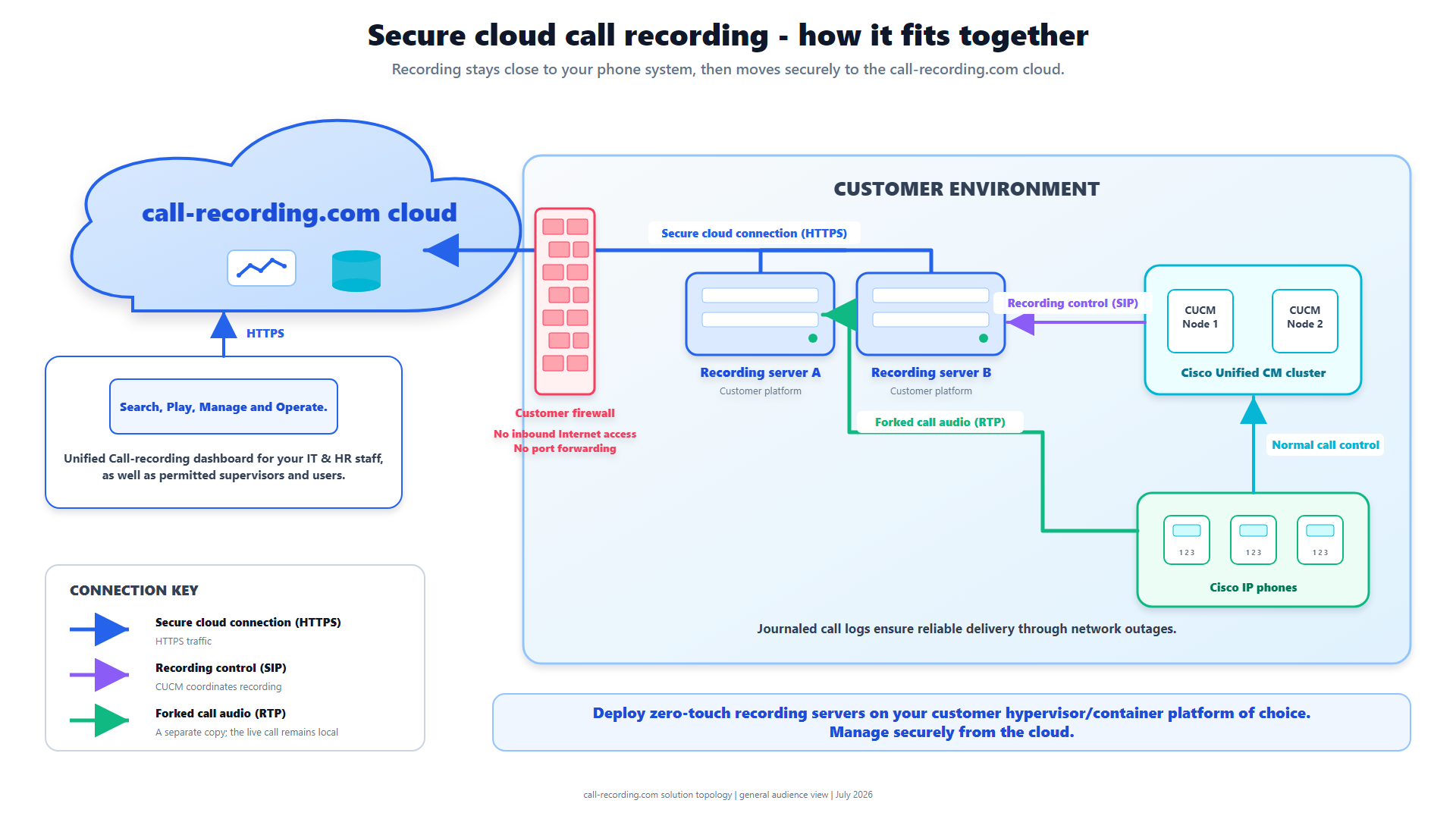
Signal path
Product fit
Where call-recording.com fits
Call Observe supplies supported Cisco and Webex recording controls including customer-hosted capture, encryption, organization-scoped access, retention, audit history, and delivery evidence; customers must confirm HIPAA scope and contractual requirements.
Short answer
HIPAA does not generally require a healthcare organization to record telephone calls. If a retained recording contains protected health information (PHI), the organization must decide how the HIPAA Privacy, Security, and Breach Notification Rules apply to that record and to every service provider that handles it.
For Cisco CUCM or Webex Calling, the safe buying sequence is: define which calls may contain PHI, minimize capture, confirm the legal and contractual roles, execute a business associate agreement (BAA) where required, restrict access, encrypt the recording path, set retention and deletion rules, and test the complete workflow.
Call Observe from call-recording.com supplies technical controls for supported recording paths. Those controls can support a HIPAA program, but the product does not make a customer HIPAA compliant by itself.
Does HIPAA require healthcare calls to be recorded?
No general HIPAA rule says that patient calls must be recorded. HHS also explains that the HIPAA Privacy Rule does not set a medical-record retention period. Other federal or state laws, accreditation rules, contracts, clinical policy, or litigation needs can create separate duties.
Start with the business purpose. A scheduling line, nurse triage line, pharmacy call, billing queue, and emergency contact line can carry different information and need different controls. Record only the calls that have an approved purpose.
When does a call recording contain PHI?
A voice recording can contain PHI when it links identifiable health information to a person and is created or received by a covered entity or business associate in a covered context. Names, dates, contact details, diagnoses, treatment, prescriptions, insurance information, and account numbers can all appear in ordinary conversation.
Do not assess only the audio file. The complete record can include:
- caller and called numbers;
- patient or member identifiers;
- agent and queue names;
- timestamps and call notes;
- transcripts, summaries, and analytics;
- exports and support copies; and
- audit and delivery logs.
If an AI feature produces a transcript or summary from PHI, that output needs the same scope review as the source audio.
When is a BAA required?
HHS business-associate guidance explains when a person or organization performing services for a covered entity becomes a business associate. HHS cloud guidance says a cloud service provider that creates, receives, maintains, or transmits ePHI on the customer's behalf is a business associate even when it stores only encrypted ePHI and does not hold the decryption key.
Before production, document every party that can maintain or transmit the recording and confirm whether a BAA is required. Check the actual contracted service, storage locations, subprocessors, support access, incident duties, return or deletion terms, and termination process. A web page that says “HIPAA ready” is not a BAA.
What security controls should be checked?
The HIPAA Security Rule is risk-based. The implementation must use appropriate administrative, physical, and technical safeguards for the confidentiality, integrity, and availability of ePHI.
For call recording, verify:
- Identity and access. Use named users, strong authentication, least-privilege roles, prompt removal, and regular access reviews.
- Transport and storage. Protect signaling, media, delivery, cloud storage, backups, and exports according to the approved risk analysis.
- Audit evidence. Record administrative changes, searches, playback, exports, deletion, retention changes, and failed access attempts where supported.
- Integrity and availability. Detect failed recordings, retain media safely during delivery interruptions, test recovery, and reconcile expected calls with captured calls.
- Incident handling. Define who investigates a missing recording, improper access, lost export, or suspected breach and how contract notifications work.
- Lifecycle controls. Set a justified retention period, apply legal holds where required, and securely delete data at the end of its approved life.
How does Call Observe support a healthcare deployment?
Call Observe provides these technical controls for approved Cisco CUCM and supported Webex Calling recording paths:
- customer-hosted Cisco capture so the recording boundary can stay close to the voice environment;
- encrypted local persistence and outbound delivery;
- encrypted cloud storage;
- organization-scoped access, search, and authenticated playback;
- configurable retention and audit history;
- visible delivery state and durable retry; and
- recorder-health alerts for missing RTP and codec failures.
The security architecture, recording-integrity design, and Trust Center give procurement and security teams the supporting technical detail. Confirm the BAA and exact service boundary contractually before sending PHI.
What changes between CUCM and Webex Calling?
The compliance outcome is similar, but the capture path is different.
With CUCM, prove the line recording policy, Built-In Bridge or gateway source, recording profile, SIP routing, codec agreement, both RTP directions, and completed delivery. With CUBE SIPREC, prove that every in-scope call crosses the selected CUBE policy. With Webex Calling, confirm the supported recording integration and the features available for the customer's calling setup.
The Cisco recording-method comparison helps identify the capture boundary. The CUCM troubleshooting guide explains how to find a call that was in scope but did not arrive correctly.
Healthcare acceptance checklist
Before enabling production recording:
- Inventory the lines, queues, users, call types, and data likely to be captured.
- Document the approved purpose, legal basis, notice, and refusal path.
- Complete the HIPAA risk analysis and identify covered-entity, business-associate, and subcontractor roles.
- Execute required BAAs and approve storage, support, incident, deletion, and termination terms.
- Configure least-privilege access, authentication, retention, holds, exports, and audit review.
- Test normal calls, transfers, conferences, remote users, failures, retries, playback, retrieval, and deletion.
- Train workforce members not to use unapproved devices, exports, or messaging channels for PHI.
- Review the scope when the voice platform, vendor, workflow, or regulation changes.
Bottom line
HIPAA call recording is a governed data workflow that no product badge can replace. Decide why the call is retained, identify where PHI travels, put the required agreements in place, apply risk-based safeguards, and prove that capture, access, retention, and deletion behave as approved.
Call Observe provides relevant recording and governance controls for supported Cisco and Webex paths. The customer remains responsible for its legal scope, risk analysis, BAAs, configuration, workforce practices, and ongoing review.
Product fit
Where call-recording.com fits
Call Observe supplies supported Cisco and Webex recording controls including customer-hosted capture, encryption, organization-scoped access, retention, audit history, and delivery evidence; customers must confirm HIPAA scope and contractual requirements.
Sources
Primary references and technical evidence
Check commands, legal scope, and policy decisions against the current version of each source for your environment.
Legal and compliance content is general information, not legal advice. Cisco behavior and commands vary by release, platform, firmware, and call flow.
Keep reading